If you’ll be typing longer passages, focus on the writing app, a suitable keyboard with a German layout and how much room the complete set will take up on the table. A tablet with a stylus may suit you if you want to jot down ideas by hand. A paper tablet calls for a workflow geared more towards drafting, while a Windows 2-in-1 is worth considering if you need a particular desktop programme. Before deciding, also check what’s included, how offline editing works and how you can back up your work.
Which tablet is right for you?
For writing longer pieces
If you’ll be writing and editing substantial parts of your short story at a library table, a suitable keyboard, your writing app and a practical drafting workflow are essential. Apple Germany, Samsung Germany and Xiaomi Germany each list keyboard options for specific models.
For capturing ideas with a stylus
If you’d rather sketch out characters or plot ideas by hand before turning them into text, check whether a stylus is included and how you’ll type up or export your draft afterwards. Samsung Germany says the Galaxy Tab S10 FE includes an S Pen; reMarkable describes its own writing and export workflow for the Paper Pro.
For distraction-free writing
If you’d like to work on drafts on a device designed more specifically for writing, check that its editing and export options meet your needs. reMarkable positions the Paper Pro as a device for focused writing.
What matters when writing?
Tablet with a versatile app-based workflow
A good fit if: Your writing app runs on the iPadOS or Android model you’ve chosen and you’ll mainly be typing.
Consider: The keyboard and stylus aren’t included with every model; check the details of the specific offer.
Android tablet with a stylus
A good fit if: You want to capture ideas by hand and add a suitable keyboard for longer passages.
Consider: An included stylus won’t replace a keyboard; check the accessories and layout for the exact model.
Paper tablet
A good fit if: Your drafting workflow is based on handwriting and writing directly on the device.
Consider: Try a sample text to see whether editing and exporting suit the way you normally work.
Windows 2-in-1
A good fit if: You need a particular desktop writing programme and have confirmed it works on the version you’ve chosen.
Consider: The right keyboard may be sold separately; the device name alone doesn’t confirm compatibility with your programme.
Above all, check that your entire writing workflow works at a library table – from typing or sketching to reopening and saving your draft.
| What you need |
What to check before buying |
Who is it important for? |
| Typing longer passages |
Check the exact tablet generation, German keyboard layout and what’s included; open a test document in your writing app. |
If you’ll be writing longer sections of your short story at a table, the keyboard and app working well together are particularly important. Around 29% of consumers put typing comfort first. |
| Writing and saving without Wi-Fi |
Use your own app to open a draft offline, edit it, reopen it and save it once you’re back online. |
If you want to work on your text without reliable Wi-Fi and find it again later, make sure you understand the offline workflow beforehand. Around 23% of consumers prioritise being able to edit and save drafts offline. |
| Handwriting or a focused workflow |
Try writing by hand and test editing and exporting a typical short story. |
If you’d rather jot down ideas by hand or work on a writing-focused device, it’s important to know how you’ll transfer your work into your text afterwards. Around 18% of consumers put a stylus or focused writing first. |
| Table space and portability |
Check the dimensions of the complete set, including the keyboard and stand, and view a sample of your own text in your preferred font size. |
If you regularly take your tablet with you and have limited space at the library table, the device and accessories need to fit your setup. Around 18% of consumers prioritise the handling and portability of their writing set. |
| What’s included in the writing set |
Check the tablet, the keyboard or stylus you need and what’s actually included in the box. |
If you need a complete set for writing, checking all the necessary items before deciding can help. Around 12% of consumers focus above all on the cost of the writing set they need. |
Common buying pitfalls
-
Confusing ‘keyboard compatible’ with ‘keyboard included’
For the iPad (A16), Apple Germany lists the iPad and USB-C cable as included in the stated box contents. Samsung Germany lists an S Pen with the Galaxy Tab S10 FE; the compatible keyboard is sold separately.
Before buying, compare what’s included with the specific tablet against the accessories you actually need. Check the German layout and exact model generation, too.
A separately purchased keyboard or stylus adds to the cost of your set and should be factored in when choosing accessories.
-
Assuming ‘available offline’ means ‘editable offline’
Microsoft Support explains that files marked for offline use in OneDrive on Android may be read-only; editing offline may instead create a new file workflow.
Using your actual app and a test story, check that you can open and edit your draft offline, reopen it and find it again after it syncs.
-
Assuming similar model names mean it’s definitely the same product
Samsung Business Germany lists the model identifier SM-X520NZAREUB for the Galaxy Tab S10 FE. A Joybuy Germany product page describes a device as a Galaxy Tab S10 FE but gives a different model number: SM-X210NDBAEUB.
If the model details don’t match, don’t rely on the title, picture or screen size alone. Check the full model identifier before choosing a device.
Brands to consider
Apple
The iPad (A16) is an option if your writing app suits iPadOS and you want to work on longer passages with a compatible keyboard.
- Apple Germany lists a German Magic Keyboard Folio for the iPad (A16) and specifies iPadOS 18.3 or later as a requirement.
- Apple Germany lists the iPad and USB-C cable as included with the tablet; no keyboard or stylus is listed.
Samsung
The Galaxy Tab S10 FE is worth considering if you want to capture ideas by hand with a stylus and add a keyboard when needed.
- Samsung Germany says the Galaxy Tab S10 FE includes an S Pen and lists a compatible keyboard.
- Check whether the keyboard is sold separately; compare its layout and model identifier with the specific offer.
Xiaomi
The Pad 8 is an Android option with a German keyboard specifically listed for it.
- Xiaomi Germany lists its Pad 8/8 Pro keyboard as compatible with the corresponding models.
- Xiaomi notes that accessories are sold separately. The manufacturer’s claims about typing comfort are not independent measurements.
reMarkable
The Paper Pro with Type Folio is an option if you’re looking for a workflow geared towards drafting and writing directly on the device.
- reMarkable describes the Type Folio as designed specifically for use with the Paper Pro.
- The manufacturer’s claims about focused writing are not independently proven. Test editing and exporting with a text of your own.
Microsoft
The Surface Pro 12-inch, 1st Edition, is worth considering if your writing workflow requires a compatible desktop programme.
- Microsoft describes switching between tablet and laptop use with a suitable keyboard.
- Microsoft says the keyboard is sold separately. Check that the specific programme works as you need it to on the device version you’ve chosen.
Joybuy products for writing and drafting
The Joybuy products below include tablets with keyboards, as well as models with styluses for writing and drafting.
 No image available
MEBERRY M8, 10.1 inches, 128 GB, with keyboard set
If you want to type longer passages, the product name says a keyboard is included in the set.
The product name lists 128 GB ROM and an 8000 mAh battery. According to the product name, the set also includes a case, mouse and OTG.
View at Joybuy
 No image available
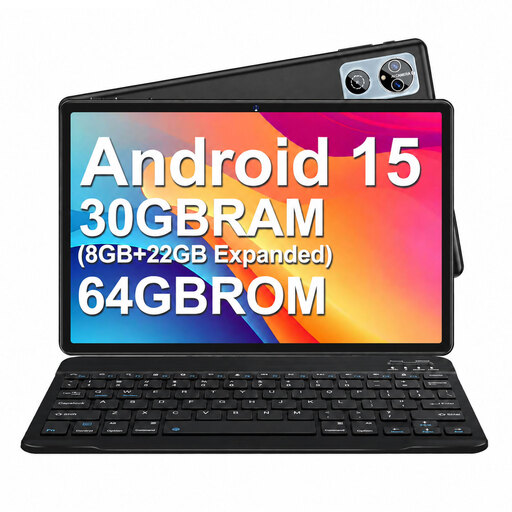
MEBERRY M6, Android 15, 64 GB, with keyboard set
If you want to type at a table, the product name says the set includes a keyboard and case.
The product name lists Android 15, 64 GB ROM and a 6000 mAh battery; a mouse and OTG are also mentioned.
View at Joybuy
 No image available
10.1-inch tablet with keyboard and stylus
If you want to type and capture ideas by hand, the product name lists a keyboard and stylus.
The product name lists Android 16, a quad-core Unisoc T310 processor and 256 GB ROM. It also specifies Wi-Fi 6 and expandable storage of up to 1 TB.
View at Joybuy
 No image available
Xiaomi Pad 7 with keyboard, 8 GB RAM and 128 GB ROM
If you’d rather type longer passages, the product name says a keyboard is included in the offer.
The product name also lists a 3.2K display with a 144 Hz refresh rate and an 8850 mAh battery.
View at Joybuy
 No image available
Teclast ArtPad Pro 2025, 13.4 inches, with T-Pen
If you want to capture ideas by hand, the product name lists a T-Pen.
The product name lists a 13.4-inch 2K display, 256 GB of storage, Android 15 and a 10,000 mAh battery. According to the product name, the 20 GB RAM figure comprises 8 GB plus 12 GB of virtual memory.
View at Joybuy
Frequently asked questions
Do I need a tablet with mobile data for writing in the library?
Not just for writing: what matters is whether you can edit your draft in your specific app without an internet connection. Microsoft Support notes that files available offline in OneDrive on Android may be read-only, and editing them may require a different file workflow. Try working on your draft without an internet connection first.
How do I set up writing and backing up my draft?
First, check that the keyboard intended for your model connects properly and has the right layout, then open a test file in your writing app. Also make a backup you can restore: the Federal Office for Information Security recommends keeping backup copies to protect against data loss. When using public Wi-Fi, it advises against accessing confidential data over unfamiliar networks without protection.
What rights do I have when buying a tablet online in Germany?
For a standard online purchase by a consumer, there is generally a 14-day cancellation period starting from delivery; statutory exceptions apply. The European Union’s consumer portal also explains that you have a legal guarantee of at least two years from receiving the goods. This is separate from any voluntary manufacturer’s warranty.


