Tablets for manuals on the go
This Joybuy selection includes rugged tablets for field work, as well as models for protected locations and reading extensive manuals.
 No image available
Blackview Active 5 Rugged Tablet
The display specification can help you weigh up the size for use on the go. The ‘Waterproof’ description doesn’t replace checking the conditions for your specific use.
8.68-inch display, 24 GB RAM (6 GB + 18 GB virtual RAM), 128 GB ROM, 6,600 mAh, Android 15, NFC and fingerprint sensor. The mAh figure isn’t a measure of battery life.
View at Joybuy
 No image available
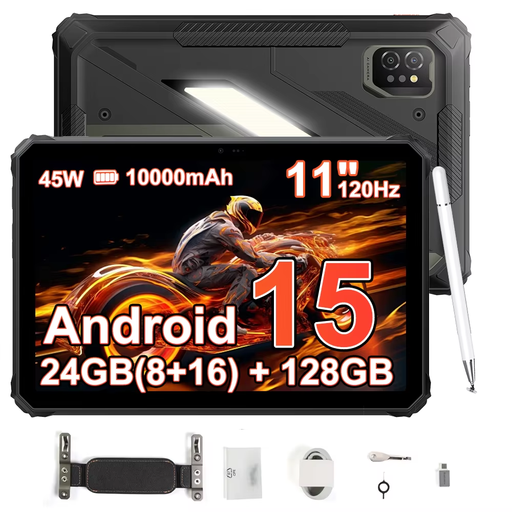
Blackview Active 7 Hardened Tablet
The 11-inch display gives you a specific size to consider if you’re comparing larger manual pages. If you’ll be using gloves, check the operating mode for the exact configuration.
11-inch 120 Hz IPS display, 24 GB RAM (8 GB + 16 GB), 128 GB storage, 10,000 mAh, 45 W and Android 15. The mAh figure isn’t a measure of battery life.
View at Joybuy
 No image available
Blackview Active 8 Pro Tablet
The 10.36-inch display specification can help you weigh up the screen size for manual pages. The product description says the device has a rugged design.
10.36-inch HD display, 16 GB RAM (8 GB + 8 GB), 256 GB storage, 22,000 mAh, dual SIM, 4G and Android 13. The mAh figure isn’t a measure of battery life.
View at Joybuy
 No image available
Teclast ArtPad Pro 2025 Tablet
The large display and T-Pen mentioned in the product title may suit extensive manual pages and annotations. The product description advises against dusty or damp environments and prolonged exposure to direct sunlight.
13.4-inch 2K display, T-Pen with 4096 pressure levels, Helio G99, 20 GB RAM (8 GB + 12 GB virtual), 256 GB storage, dual SIM, 4G LTE, 10,000 mAh and Android 15.
View at Joybuy
 No image available
iFLYTEK AINOTE 2 10.65-inch E Ink Tablet with Protective Case
This E Ink tablet is a reading-focused option for protected locations. According to the product description, it isn’t designed for extreme temperatures.
10.65-inch E Ink display; the product title also mentions ChatGPT-5, speech-to-text, transcription in 16 languages and handwriting-to-text.
View at Joybuy
Frequently asked questions
How do I prepare PDFs for a journey without network coverage?
Make the PDFs you need available offline in the app you use, then test them without a connection. In Google Drive on Android, you can make a file available offline using the three-dot menu; Apple explains how to save PDFs in Books on iPad. The steps may differ in your company’s app.
Does IP68 mean I can use a tablet in any wet conditions?
No. An IP rating doesn’t apply universally to every liquid or type of use. For the Tab Active5, Samsung specifies conditions for fresh water and excludes salt water, among other things. Check the details for the exact model number and intended use.
What extra features should I check before ordering?
Check whether the chosen configuration includes a stylus, protective accessories and replaceable batteries, as well as mobile connectivity options if needed. Lenovo describes the Tab K11 Gen 2 stylus as optional and sold separately; Getac lists some ZX10 features as optional.
What are the rules on statutory rights and guarantees in Germany?
Your statutory rights against the seller are separate from any voluntary guarantee. The Verbraucherzentrale notes that the details also depend on whether you’re buying as a private consumer or for a business. A voluntary guarantee doesn’t replace your statutory rights.
Do EU energy labelling rules apply to every tablet?
No. The rules that apply depend on the type of device. Since 20 June 2025, the European Commission has set ecodesign and energy labelling requirements for covered slate tablets on the EU market, distinguishing these from tablet computers with more desktop-like operating systems. Check which category your specific device falls into.


