First, choose a mouse that feels right in your hand and puts the buttons you need within easy reach. A thumb button panel can be worthwhile if you want to assign lots of shortcuts yourself; for fewer keybinds, an all-rounder may feel less cluttered. Then decide whether you’d rather have a clear desk with wireless connectivity and battery changes, or a cable without that routine.
Who are the different mice suited to?
Players who use lots of keybinds
If you want to trigger frequently used commands directly from your mouse, look beyond the number of buttons and check whether you can reach them comfortably with your thumb. Razer and Corsair both describe the models mentioned here as having a thumb button panel.
Players using a work PC
If you also use the same mouse for long periods of screen-based work, hand shape, posture and enough room for your mouse and forearm all matter. The Federal Institute for Occupational Safety and Health (BAuA) recommends arranging your mouse and keyboard flexibly and leaving room to rest your hand and arm when working at a screen.
People using multiple devices
If you switch between a gaming device and a work device, compare the connection types you need with the ports on your devices. CHERRY lists wired, 2.4 GHz wireless and Bluetooth connections for the XTRFY M50 Wireless.
What should you prioritise when buying?
Start by working out which commands you actually want to trigger with your mouse, and whether your hand can reach the relevant buttons. Then compare the shape and connection options to suit your shared gaming and work setup.
| Buying priority |
What to look for |
Who it matters most to |
| Gaming commands within easy reach |
List the commands you use most often and check button reach, assignment software and which side buttons you can actually use. |
If you want to assign lots of commands to thumb buttons yourself, being able to reach them comfortably matters more than a high total button count; around 33% of consumers put command assignment first. |
| Hand fit for work and gaming |
Check the grip and button reach with your hand, and leave enough room for your mouse and forearm. The BAuA recommends leaving enough space for your mouse and a hand-and-arm rest when working at a screen. |
If you also use the mouse for long periods of screen-based work, look for a shape that suits you and enough room to move; around 27% of consumers prioritise hand fit. |
| Switching between devices |
Compare the ports and connection types you actually need, and check that the software supports your operating system. |
If you switch between a gaming device and a work device, you’ll want the right connections for both; around 20% of consumers prioritise switching between devices. |
| Connection at a permanent desk setup |
Consider whether a cable will get in the way; for wireless models, check the power source and what’s included with the specific version. |
If your mouse stays at a fixed PC workstation, a simple connection and power routine may matter more to you than having several connection modes; around 20% of consumers prioritise this. |
What should you look out for when buying?
-
Confusing the number of programmable controls with the number of thumb buttons
For the Razer Naga V2 HyperSpeed, Razer lists 21 programmable controls in total and a thumb panel with 12 buttons. These figures refer to different things, so what matters is which buttons you can reach comfortably.
Compare the button layout of the specific model rather than relying solely on the highest advertised number.
-
Assuming similarly named G502 versions are identical
The Logitech G502 X is wired, while the G502 X LIGHTSPEED is a wireless version. The model name alone doesn’t reliably tell you how it connects.
Before buying, check the full model name and details for the specific version.
-
Overlooking the power source on a wireless mouse
The Razer Naga V2 HyperSpeed requires battery changes. A wired mouse avoids that routine, but you’ll need to route its cable sensibly across your desk.
Check whether your chosen version uses a battery or a rechargeable battery, and what’s included in the box.
Key brands to consider
Razer
The Naga V2 HyperSpeed is aimed at people who want a thumb button panel with wireless connectivity.
- Razer lists 12 thumb buttons and 21 programmable controls in total for this model.
- The two figures describe different things. Also check whether the buttons suit your thumb reach and whether you’re happy to change the battery.
Corsair
The SCIMITAR ELITE WIRELESS SE is an option if you want to assign lots of commands and adjust the position of the thumb button panel.
- Corsair lists 16 programmable buttons in total and a repositionable Key Slider with 12 side buttons.
- Try it with your hand to see whether the side buttons are easy to reach in your chosen position.
Logitech G
The G502 X range includes wired and wireless versions to suit different desk setups.
- According to Logitech G, the G502 X LIGHTSPEED has 13 configurable controls; the G502 X is wired.
- Check the full model name and connection type so you don’t mix up details from different versions.
CHERRY XTRFY
The M50 Wireless is worth considering if you want to switch between different connection types for gaming and work devices.
- CHERRY lists wired, 2.4 GHz wireless and Bluetooth connections for this model.
- Connection details alone don’t tell you whether the shape and buttons will suit your hand and gaming commands.
Joybuy products for gaming and work
Here you’ll find Joybuy mice for assigning lots of gaming commands, switching between devices and fixed wired desk setups.
 No image available
Razer Naga V2 HyperSpeed
A good fit if you want to assign lots of gaming commands to the side buttons and check that the thumb panel is within easy reach before you buy.
The listing title mentions 2.4 GHz wireless, Bluetooth and 19 programmable buttons in total. Razer lists a thumb panel with 12 buttons for this model. It takes one AA battery.
View at Joybuy
 No image available
AJAZZ AJ200 AI MC gaming mouse with charging dock
An option if you switch between gaming and work devices and want to use several connection types.
The product title lists Bluetooth, 2.4 GHz wireless and USB-C, as well as a charging dock. First check which mode suits the connections on your devices.
View at Joybuy
 No image available
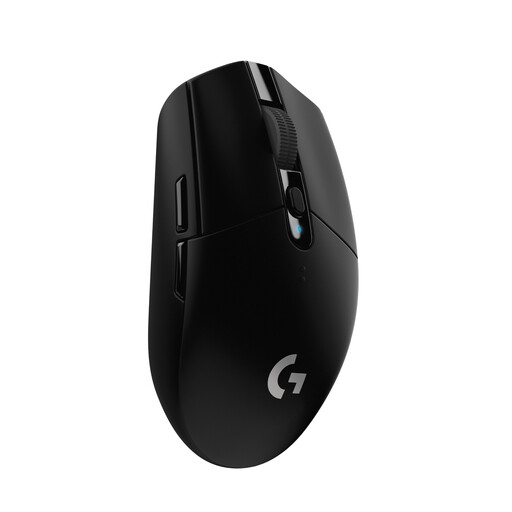
Logitech G305 LIGHTSPEED Wireless Gaming Mouse
A good fit if you want to use a few gaming commands directly from a wireless mouse.
The product title lists six programmable buttons. It takes one AA battery, so remember to factor in battery changes.
View at Joybuy
 No image available
Logitech G G502 Hero High Performance Gaming Mouse
An option for a permanent PC workstation if you prefer a wired setup.
Consider how the cable will run across your desk and check the details for the specific version.
View at Joybuy
 No image available
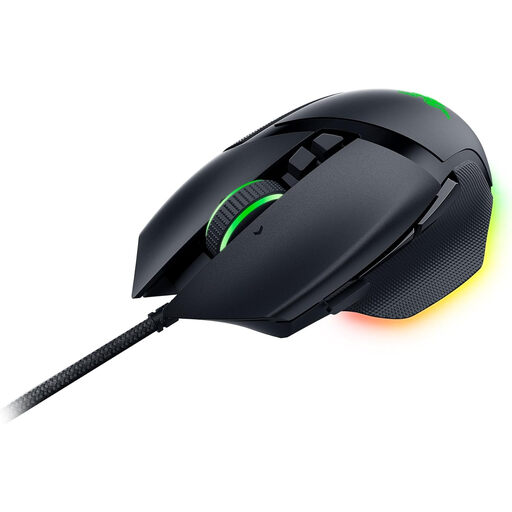
Razer Basilisk V3 Wired RGB Gaming Mouse
A good fit if you’re looking for a wired mouse with programmable buttons for a permanent desk setup.
The product title lists 11 programmable buttons and a wired design. Check that the right-handed shape with thumb rest suits your hand and that the cable won’t get in the way at your desk.
View at Joybuy
Frequently asked questions
How do I set up extra buttons for a tactical RPG?
Start by deciding which commands you use most often, then check which assignments work in the game and the mouse software. Details of programmable controls don’t guarantee that a particular macro will work with every game.
What should I check if I use my mouse for long periods at my home-office desk?
Check your hand size, the mouse shape and the room you have to move. The Federal Institute for Occupational Safety and Health recommends, among other things, leaving enough space for your mouse and a hand-and-arm rest when working at a screen; this doesn’t mean that any particular gaming model has a general medical benefit.
What ongoing costs and rights should I know about?
If your mouse uses replaceable batteries, remember to factor in battery changes; for a rechargeable model, check how it charges. The consumer advice centre explains that new goods come with a two-year statutory guarantee against the seller for faults caused by issues that already existed when the goods were handed over. This statutory guarantee is separate from a voluntary manufacturer’s warranty.
Can an old mouse go in household waste?
No. The Federal Environment Agency says that old electrical equipment should be collected separately and can be taken to a recycling centre free of charge. Removable used batteries must also be kept out of general waste and taken to an appropriate collection point.


