For a large archive of teaching materials kept at a fixed workstation, an external HDD may be the better choice. If you often take your drive with you or regularly copy large files, a portable SSD may fit your routine better. The drive itself isn’t the only thing that matters: plan for a second local copy, stored separately, and test that you can restore your files. If you’re handling personal data about pupils, you’ll also need to check your school’s and local authority’s requirements.
Who is this comparison for?
Teachers with an archive of teaching materials
If you mainly back up lots of teaching files at one workstation, consider how much storage they use and how many backup versions you want to keep. Germany’s Federal Office for Information Security also stresses that backed-up data must be restorable.
Teachers travelling between school and home
If you regularly take a backup drive with you, check that its ports and cables suit your needs, and consider whether you need extra protection for carrying it around. Product information from Samsung, Crucial and Seagate describes different portable drives, including their connection and protection features.
Teachers handling sensitive school data
If you need to back up personal data, check your school’s requirements and which security measures are approved before choosing a drive. Article 32 of the General Data Protection Regulation requires appropriate technical and organisational measures. Germany’s Federal Office for Information Security also outlines ways to encrypt files.
What should you consider when choosing?
| What you need |
What to check before buying |
Who should pay particular attention? |
| Restoring files |
Plan for a second, separate copy and test whether you can restore selected files. |
If I want to be able to rely on my backup when something goes wrong, I need a clear recovery process as well as a drive. Around 33% of consumers put restoring files at the top of their list. |
| Space for an archive of teaching materials |
Check how much storage your files use and whether you want space for multiple backup versions. |
If I want to keep large teaching files and older backup versions, I’ll choose a capacity that reflects what I actually need. Around 27% of consumers prioritise archive capacity. |
| Taking it with you and copying files |
Check the USB ports and cables on your computer, and confirm the protection claims for the exact model variant. |
If I take the drive between school and home or copy large files, I’ll look for a suitable connection and a design that works for the way I carry it. Around 20% of consumers prioritise transferring files on the go. |
| Protecting sensitive data |
Check with your school whether the data in question may be stored externally and which encryption methods are approved. |
If I need to back up personal data about pupils, I’ll want to check the approved security solution and recovery process in advance. Around 20% of consumers prioritise protecting sensitive data. |
Common backup mistakes
-
Assuming one external drive is a complete backup strategy
A backup drive can fail without you noticing. And a saved copy is of little use if you can’t restore the files.
Plan for separate local copies and regularly test whether you can open or restore selected files.
An additional copy requires another storage device and time for regular restore tests.
-
Treating interface speeds or maximum figures as actual backup times
USB interface speeds and advertised SSD maximums alone don’t tell you how long a particular backup will take.
Check your computer’s connection, and bear in mind that quoted speeds depend on the model variant and test conditions.
-
Assuming encryption or data recovery is enabled automatically
Password protection needs to be set up. The availability of an advertised data recovery service may also depend on the exact version sold and the country.
Check which security measures your school approves, and review the terms for the specific version sold in Germany.
Setting up the drive and keeping access details secure can take extra time. You should also agree on a recovery process in advance.
Brands to consider
Toshiba
The Canvio Basics range is a USB-powered portable HDD for local file storage, suited to those who prioritise capacity and a straightforward connection.
- Toshiba lists a 2 TB variant among the options in this range.
- According to the manufacturer, it comes formatted as NTFS for Windows and needs reformatting for macOS. An interface speed isn’t the same as a measured backup speed.
Samsung
The 2 TB portable SSD T7 Shield MU-PE2T0S/EU is an option if you regularly carry your drive around or copy large files.
- For this model, Samsung lists an IP65 rating, two USB cables, optional password protection with AES-256 hardware encryption, and sequential transfer speeds of up to 1,050 and 1,000 MB/s.
- These are manufacturer figures, not independently measured backup times. Password protection needs to be set up.
Crucial
The X9 is a compact portable SSD with USB-C for frequent file transfers, provided your devices have compatible connections.
- Crucial quotes read speeds of up to 1,050 MB/s.
- According to Crucial’s footnote, this maximum was measured on a high-performance desktop PC and may vary on your device. You should also consider the format and host device.
Western Digital
The WD Elements Portable range includes USB-powered HDDs for local backups. The manufacturer information considered here relates to the 2 TB variant WDBU6Y0020BBK-WESN.
- For this variant, Western Digital lists USB 3.2 Gen 1 (also known as USB 3.0) and a limited two-year warranty.
- This information doesn’t provide an independent comparison of reliability with other drives.
Seagate
Expansion Portable is a range of portable HDDs for local backups.
- According to Seagate’s data sheet, you don’t need a separate power supply to use the drive.
- The data sheet lists a two-year limited warranty for EMEA. The Rescue service mentioned isn’t available in every country, so check the terms for the specific version sold in Germany.
Joybuy products for local backups
This selection includes portable HDDs for local backups, desktop HDDs for larger archives and a portable SSD.
 Image unavailable
WD Elements Portable 5 TB USB-C
For local backups if you’re looking for a portable drive with 5 TB and USB-C.
View at Joybuy
 Image unavailable
WD Elements Portable 2 TB USB-C
For local teaching files if 2 TB and a portable drive suit your needs.
The product name specifies USB-C, USB 3.2 Gen 1, 2.5-inch and exFAT.
View at Joybuy
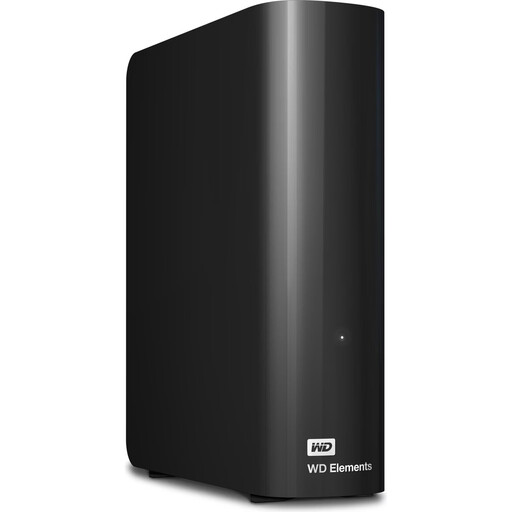 Image unavailable
WD Elements Desktop 10 TB
For a large archive of teaching materials at a fixed workstation, if a desktop HDD suits your backup routine.
Specifications list 10 TB, USB 3.2 Gen 1 and NTFS. According to the product description, an external power adapter is required.
View at Joybuy
 Image unavailable
WD Elements Desktop 8 TB USB 3.0
For backing up a larger archive at a fixed workstation, if 8 TB meets your storage needs.
Product specifications list USB 3.0 and NTFS. An external power adapter is required.
View at Joybuy
 Image unavailable
Kexin M.2 SATA Portable External SSD, 256 GB
For local files if you’re looking for a portable 256 GB SSD with USB-C and USB-A cables.
The product name specifies USB 3.1 and speeds of up to 500 MB/s.
View at Joybuy
Frequently asked questions
Is one external hard drive enough for a backup without the cloud?
Don’t rely on a single drive for your local backup routine. The Baden-Württemberg teacher training server recommends using at least two backup drives as one way to protect against possible drive failures. You should also test that you can actually restore your files.
Do I need to set up a new external HDD before using it with a Mac?
That depends on the model and the backup method you want to use. Toshiba lists NTFS as the Windows format for Canvio Basics and says it needs reformatting for macOS. Back up any existing data before reformatting a drive.
Is an encryptable SSD automatically approved for personal data about pupils?
No. A product feature doesn’t automatically mean your school will approve that particular drive. Article 32 of the General Data Protection Regulation requires appropriate technical and organisational measures when processing personal data. Check that the specific device and process meet your school’s requirements. This doesn’t mean that teaching materials without personal data must always be encrypted.
Is a data recovery service included in Germany?
Don’t assume so based on the model name alone. Seagate’s data sheet for Expansion Portable notes that the Rescue Data Recovery Service mentioned isn’t available in every country. Check the terms for the specific version sold in Germany.


