
Same-day & Next-day Delivery

Quality Guaranteed

Unlock Your Welcome Offers: FREE Delivery | Up to 80% OFF | Free 30-day JoyPlus trial
Download the APP
The Teclast ArtPad Pro Tablet is aimed at users looking for a large Android device for note-taking, streaming, mobile working and drawing. However, the product variants differ in what is included: some offers contain only the tablet, stylus and protective case, while others also include a Bluetooth keyboard.
Before buying, you should therefore consider more than just storage capacity and display resolution. The key question is whether the technical specification suits your everyday needs, and whether important details such as LTE bands, actual RAM and stylus compatibility have been checked.
With the Teclast ArtPad Pro Tablet, the advertised 20 GB consists of 8 GB of physical RAM and 12 GB of virtual RAM. The virtual portion is provided by the internal storage. It can help keep apps open, but it does not replace genuine RAM with comparable access speeds.
For studying, office work, browsing and streaming, 8 GB of physical RAM is sufficient for many everyday situations. If you regularly work on large drawing or multitasking projects, you should interpret the specification accordingly.
The product description specifies dual-SIM 4G LTE. Before ordering, you should check whether the supported frequency bands are compatible with your German mobile network provider. Network coverage, your tariff, SIM format and any provider settings can also affect how the tablet works.
An LTE tablet is particularly useful for commuters, working away from home or homes without reliable Wi-Fi. For occasional use on the go, however, a smartphone hotspot is often sufficient.
The device is advertised with support for 4096 pressure levels and T-Pen. This specification describes the system’s technical pressure sensitivity. How precisely lines respond in a particular app also depends on the application, the stylus connection and the device configuration.
If you want to use the tablet as a tablet for drawing, check in advance whether your preferred Android app supports pressure levels, palm rejection and layer functions as required.
A 12.7-inch tablet offers more workspace than compact models. This is useful for PDF documents, split-screen views, spreadsheets and digital sketches. At the same time, a larger device takes up more room in your bag or rucksack.
The 2K display shows content at a higher resolution than traditional Full HD panels. Text, lines and user interfaces can therefore appear more detailed. When assessing the display, buyers should also consider brightness, viewing angles, colour reproduction and reflections, as resolution alone does not provide a complete picture of image quality.
The Android 15 tablet provides a current software platform at the time of each offer. Nevertheless, it is worth checking the apps you need in the Google Play Store. Special business applications, professional drawing programmes or accessory apps may have different system requirements.
The Widevine L1 specification is particularly relevant for streaming. It can provide the necessary conditions for certain high-resolution playback options. The actual resolution also depends on the streaming service, account, content and app.
With 256 GB of storage, there is comparatively plenty of room for apps, documents, photos and offline content. The amount of storage actually available will be lower because of system files and pre-installed applications. If you store lots of videos or large project files, you should also check whether storage expansion is supported.
The integrated 10000 mAh battery is a relevant capacity specification for a tablet of this size. Battery life depends on factors including display brightness, LTE use, video playback, gaming and background processes. According to the product information, it charges at up to 18 W input power. Use a compatible USB-C cable and power adapter, and do not charge the device in a damp environment or when it is noticeably overheating.

Why this product suits the profile: The combination of a large display, 256 GB of storage, Android 15 and stylus support covers typical requirements for studying, streaming and taking digital notes.
The product information distinguishes between 8 GB of physical RAM and 12 GB of virtual RAM. This makes it easier to assess the advertised memory realistically.
12.7-inch 2K display, 256 GB of storage, T-Pen support and 10000 mAh battery according to the product information.

Why this product suits the profile: This variant is aimed at users looking for a tablet with a keyboard for emails, documents and notes, while also wanting to draw or work by hand.
The included accessories explicitly list a Bluetooth keyboard, stylus and protective case. Nevertheless, you should check the specific offer page before buying.
Dual-SIM 4G LTE, 5G Wi-Fi, 256 GB of storage and 4096 pressure levels according to the product description.
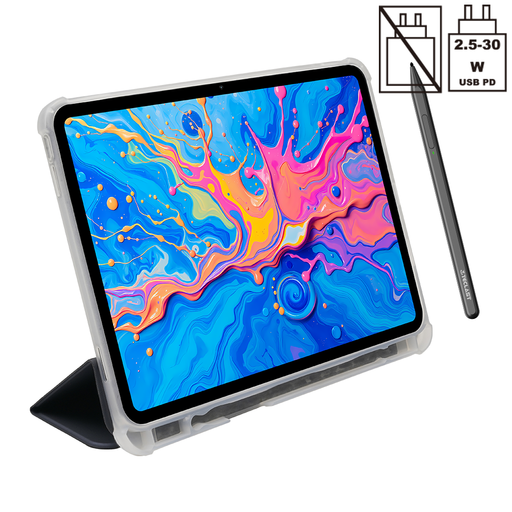
Why this product suits the profile: For mobile use, digital sketches, navigation and media on the go, this version offers LTE support, GPS, OTG and an included stylus.
The LTE and GPS specifications are listed separately. Even so, you should check the mobile network bands, tariff conditions and SIM compatibility before buying.
10000 mAh battery, dual-SIM 4G LTE, T-Pen support, GPS and Widevine L1 according to the product information.
A tablet with stylus is not automatically suitable for every creative application. Check exactly which T-Pen accessories are included, the connection method and the functions supported by the app you use. An additional universal stylus may be suitable for navigation and simple note-taking, but it may not support the same pressure levels as the intended T-Pen.
For longer texts, a tablet with keyboard is more practical than an on-screen keyboard. Check the layout, language, connection and included accessories. A keyboard described as a “Bluetooth Keyboard” may differ from a German QWERTZ layout. For professional use, you should also establish whether specific special characters are easy to access.
Follow the manufacturer’s safety instructions: the tablet should be used between 0 and 35 °C, and not in damp, dusty or strongly magnetic environments. Keep the charger, cable and small parts out of the reach of young children.
We have put together a complete, regularly updated list of products that fully meet these strict selection criteria and the safety regulations applicable in the EU.
Yes, the product information specifies T-Pen support and 4096 pressure levels. This is fundamentally relevant for handwritten notes and sketches. Whether an app supports palm rejection or handwriting-to-text conversion depends on the application itself.
It is not possible to determine a fixed battery life from the capacity alone. Display brightness, LTE, Wi-Fi, video playback and background apps all affect power consumption. The 10000 mAh figure should therefore be understood as a technical capacity specification, not a guaranteed usage time.
The product description specifies dual-SIM 4G LTE. Before buying, you should compare the supported LTE frequencies with those used by your provider. You will also need a suitable data tariff and a compatible SIM card.