
Same-day & Next-day Delivery

Quality Guaranteed

Unlock Your Welcome Offers: FREE Delivery | Up to 80% OFF | Free 30-day JoyPlus trial
Download the APP
A large Android tablet with a stylus can combine drawing, studying, office work and streaming in a single device. When buying the TECLAST ArtPad Pro Tablet, however, you shouldn't just focus on high storage figures or a large screen diagonal. What really matters is whether the technical specifications match your daily workflow and which accessories are actually included in the box.
Figures like "20 GB RAM" sound impressive. With the TECLAST ArtPad Pro Tablet, the 20 GB is made up of 8 GB of physical RAM plus 12 GB of virtual memory, according to the product specs. The virtual portion is drawn from the internal storage and can support multitasking, but it doesn't replace additional physical RAM.
For note-taking, multiple browser tabs, video calls and drawing apps, this combination is generally relevant. However, if you regularly work with very large files or run demanding applications simultaneously, you should take this figure with a pinch of salt.
According to the product description, the ArtPad Pro supports Dual-SIM 4G LTE as well as 5G Wi-Fi. "5G Wi-Fi" refers to the 5 GHz Wi-Fi band and doesn't automatically mean a mobile 5G connection. For use on the go without a Wi-Fi router, the LTE compatibility is therefore the key feature.
Before buying, you should check:
With a tablet that includes a stylus, the contents of the box are especially important. Some product variants include the T-Pen, while others also come with a protective case or a Bluetooth keyboard. You should therefore read the full product titles carefully. A keyboard can make the device more suitable for emails and longer texts, while a protective case makes it easier to carry in a rucksack.
The TECLAST ArtPad Pro Tablet features a 12.7-inch display with 2K resolution. A 12.7-inch tablet offers more drawing space than compact 10-inch models, but it's also less portable. For sketches, PDF annotations and split-screen views, the larger screen is practical.
The 2K resolution can render contours and small text in greater detail. However, on its own it doesn't tell you anything about colour gamut coverage, maximum brightness or anti-glare performance. If you often work by a window, on the train or outdoors, you should check these values separately in the product specs.
According to the product data, the device supports 4096 pressure levels and T-Pen drawing. A drawing tablet with 4096 pressure levels can produce different line thicknesses depending on how hard you press. For the actual drawing feel, the compatible apps, palm rejection, stylus latency and accuracy at the edges of the screen are also important.
The 4096 pressure level figure is therefore a technical benchmark, but not a guarantee of identical behaviour in every app. Before buying, it's worth checking the drawing and note-taking applications you use.
The ArtPad Pro uses the Helio G99 (MT8781) Octa-Core processor. This platform is designed for everyday applications, multimedia and mobile work. The 256 GB of internal storage provides room for apps, documents and media files. Depending on your actual usage, large video files or extensive drawing projects may still create additional storage demands.
The stated 10,000 mAh battery and 18 W charging input are objective specifications. Real-world battery life depends on factors including screen brightness, LTE usage, volume level, active apps and ambient temperature. When charging, only use compatible USB-C cables and power adapters. The device should not be charged in a damp environment or when it is noticeably overheating.
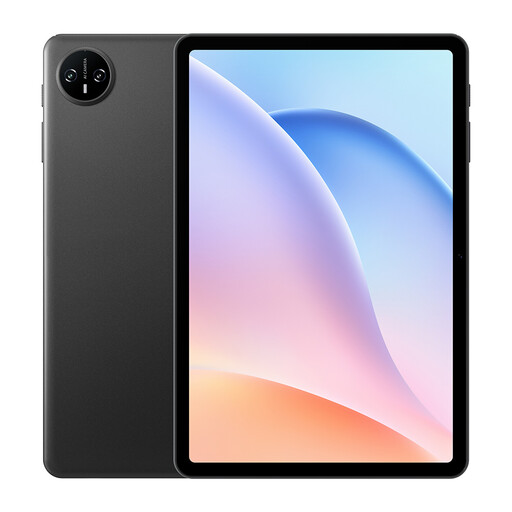
Why this product fits the profile: This 10.1-inch model is aimed at users looking for a compact Android 15 tablet for studying, streaming, internet browsing and simple note-taking.
The storage specs clearly state 4 GB of base memory plus 16 GB of expanded memory. This makes the RAM figure easier to assess realistically.
Android 15, 128 GB internal storage, Micro-SD expansion up to 2 TB according to the product specs, and a 3.5 mm headphone jack.

Why this product fits the profile: The combination of a large 2K display, Helio G99, 256 GB storage and T-Pen support is designed for creative and multimedia use.
The product data separates physical and virtual RAM capacity and lists 4G LTE separately from 5G Wi-Fi.
12.7-inch 2K display, 4096 pressure levels according to the product specs, 256 GB storage and a 10,000 mAh battery.
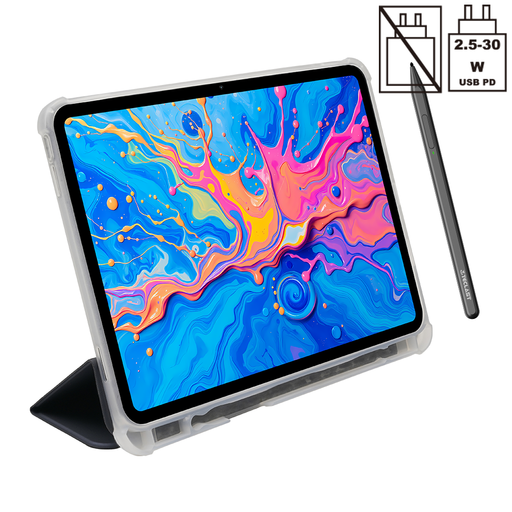
Why this product fits the profile: This version is ideal for people who frequently transport their tablet and want to combine drawing with protected storage.
The product name explicitly mentions the stylus and tablet protective case. However, you should still check the box contents before ordering.
Dual-SIM 4G LTE, T-Pen support, 12.7-inch 2K display and a stated 10,000 mAh battery.

Why this product fits the profile: For students and professionals, a tablet with a keyboard and protective case can make writing longer texts and transporting the device much easier.
This variant lists the keyboard, protective case and stylus in the product name. This makes it easier to match the accessories you want before buying.
4096 pressure levels according to the specs, 256 GB storage, 4G LTE, plus accessories for writing, drawing and transport.
We've put together a complete, regularly updated list of products that fully meet these strict selection criteria and the safety regulations in force in the EU.
According to the product specs, the device supports the T-Pen and 4096 pressure levels. For actual suitability, you also need to consider the drawing app you use, stylus compatibility and features like palm rejection. Before buying, you should check these points against your own software.
The capacity is stated as 10,000 mAh. It's not possible to give a fixed battery life from this figure, as screen brightness, LTE, video playback and app usage all affect consumption. If you use the tablet on the move frequently, a compatible USB-C charging adapter can be handy in daily life.
For note-taking, research, video calls, streaming and short texts, an Android tablet with a keyboard can be sufficient. However, for professional desktop software, extensive file management or specialised creative programmes, you should check in advance whether the applications you need are available for Android.