Choose your controller based on the tennis game and platform. Nintendo Switch Sports is designed for swing movements using compatible Joy-Con, while a conventional gamepad is suitable for a PC game with compatible controller support. At a desk with limited room to move, button controls are the more practical choice. Check the game's controller support, how the controller connects to your device and any accessories you may need beforehand.
Which controls suit different players
Switch fans who want to play tennis with motion controls
If you want to swing your racket in Nintendo Switch Sports, check that you have the right type of Joy-Con, wrist straps and enough clear space around you. Nintendo Germany describes this control method for the game.
PC players with limited desk space
If you prefer playing with buttons, first check whether your tennis game supports gamepad inputs, then make sure the controller can connect to your PC. Microsoft and Sony describe different ways to connect their controllers to a PC; support in the game itself is a separate consideration.
Households that occasionally play as a pair
If another player joins in, check which controls the specific game requires for each player and which compatible controllers you already have. Nintendo describes Joy-Con that can be used individually; multiplayer modes and controller requirements can vary from one PC game to another.
What to consider when buying
Motion controls with Joy-Con
A good fit if: You want to play Nintendo Switch Sports on a compatible console using swing movements and can safely make enough room to move.
Things to consider: The controller generation, compatible wrist straps and charging option need to match your console.
Button-based gamepad for PC
A good fit if: Your specific PC tennis game supports gamepad inputs and you want to play without swinging your arms.
Things to consider: Being able to connect a controller to your PC doesn’t guarantee that the game supports every button or extra feature.
| What matters when buying |
What to check |
Who it matters most to |
| Game and platform compatibility |
Check the game title, platform, supported controller type and preferred control method in the game information. |
If you want to make sure your controller works with a specific tennis game first, compatibility is your main concern. This accounts for roughly 36% of consumers in this guide. |
| Safe space to move |
Clear obstacles from your swing area and, if using Joy-Con individually, attach the correct wrist strap. |
If you want to swing at home without risking damage to furniture or other objects, having enough space comes first. This concern applies to around 29% of consumers here. |
| Local two-player gaming |
Check the local play mode and controller requirements for each player, and count any devices you already own. |
If someone else will occasionally join you, make sure you have the right controls for both players. Around 21% of consumers consider playing together their top buying priority. |
| PC connection and accessories |
Check the operating system, connection type or wireless receiver, and the cable and power requirements for the exact model. |
If you want to set up a suitable connection at your desk and keep charging or accessory requirements manageable, this may be your main consideration. Around 14% of consumers here list it as their top priority. |
Common buying pitfalls
-
Confusing motion sensors with game compatibility
A controller can detect movement and still be unsuitable for the game you want to play. Nintendo lists both Switch Pro Controllers as incompatible with Nintendo Switch Sports.
Check the information for the specific game to see which controller types it supports.
An unsuitable controller could mean you need to buy another device to play the game you want.
-
Treating Joy-Con and Joy-Con 2 and their accessories as interchangeable
Joy-Con 2 are designed for Switch 2. Original Joy-Con can be used wirelessly with Switch 2, but cannot be attached to the console; wrist straps from the two generations are not interchangeable either.
Before choosing a set, check the controller generation, compatible wrist straps and charging options separately.
Depending on what you already own, you may need a compatible wrist strap or a separate charging option.
-
Assuming PC compatibility means every game feature is supported
A PC controller won’t automatically work with every tennis game or support all its extra features. 2K Games lists partial controller support for TopSpin 2K25; Sony says certain DualSense features depend on support from the game.
Before buying, check the game’s input information and, if necessary, its button mapping for the game you actually want to play.
-
Overlooking how a wireless PC controller connects
Depending on the model, you may be able to connect via USB, Bluetooth or a wireless receiver. Microsoft lists Xbox Wireless as a possible way to connect to a PC, although an adapter may be required; 8BitDo lists 2.4 GHz or a cable for the Ultimate 2C on Windows.
Check the connection method for the exact model against your PC’s ports and the items included in the box.
If your PC doesn’t support the required wireless connection, you may need an additional accessory.
Brands to consider
Nintendo
A good option for motion controls with Joy-Con in Nintendo Switch Sports.
- Nintendo Germany lists compatible Joy-Con types for the game.
- Switch Pro Controllers are not compatible with this game. Joy-Con 2 are designed for Switch 2; original Joy-Con need a separate compatible charging option with that console.
Xbox/Microsoft
Xbox Wireless Controllers are an option as button-based gamepads for supported PC tennis games.
- Microsoft describes USB, Bluetooth and Xbox Wireless as ways to connect to a PC.
- You may need an adapter for Xbox Wireless; check support in the specific game separately.
PlayStation/Sony
DualSense may be suitable as a PC gamepad, particularly if you already own one.
- Sony describes Bluetooth and USB connections with supported versions of Windows.
- Haptic feedback and adaptive triggers require support from the game in question.
8BitDo
The Ultimate 2C Wireless Controller is one option for button-based controls on Windows.
- 8BitDo lists a 2.4 GHz receiver or cable as connection options for Windows.
- According to the manufacturer, Bluetooth mode is for Android; check game support and the compatible connection method.
Joybuy products
This selection includes button-based gamepads for PC tennis games and Joy-Con 2 for Nintendo Switch Sports on Switch 2. Before buying, check that the game supports the controller and that you have the right connection.
 No image available
EasySMX D10 PC controller
Designed as a PC gamepad for tennis games with controller input support; check game compatibility separately.
The product title lists Bluetooth, TMR sticks, dual-mode triggers and mechanical buttons.
The product title lists PC, Switch, Android and iOS as compatible platforms.
Joybuy
 No image available
Microsoft Xbox Series X/S Wireless Controller, Deep Pink
A conventional gamepad for PC tennis games, provided the specific game supports controller input.
The product information lists Bluetooth, Xbox Wireless and two AA batteries.
The product title lists Xbox One, Xbox Series X/S and PC as platforms.
Joybuy
 No image available
PlayStation DualSense Wireless Controller, Midnight Black, with USB cable
For PC tennis games with gamepad input support; check compatibility with the specific game.
The product information lists Bluetooth and USB-C; a USB cable is included in the product title.
According to Sony, haptic feedback and adaptive triggers depend on support from the game.
Joybuy
 No image available
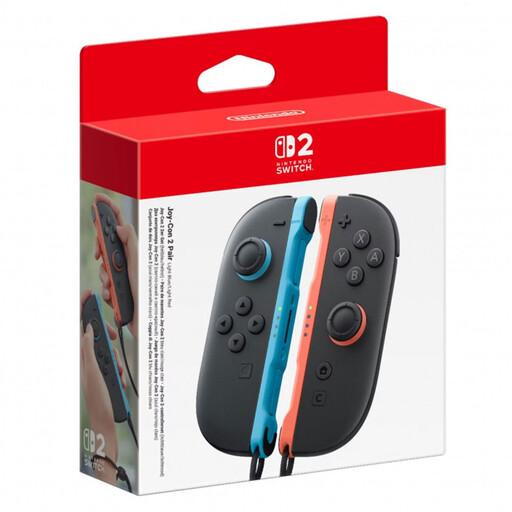
Nintendo Switch 2 Joy-Con 2-pack, Light Blue/Light Red
Designed for swing movements in Nintendo Switch Sports on Switch 2; make sure you have plenty of clear space before playing.
According to the product information, the set contains two Joy-Con 2 and two compatible wrist straps.
This version is designed for Nintendo Switch 2.
Joybuy
 No image available
GameSir G7 HE wired controller, Black
Designed as a gamepad for PC tennis games with controller input support; check compatibility with the specific game separately.
The product information lists a USB-C cable, Hall Effect sticks and two vibration motors.
Windows 10, Windows 11 and PC are listed as compatible platforms; the cable is listed as 3 m long.
Joybuy
Frequently asked questions
Can I play tennis in Nintendo Switch Sports with a Switch Pro Controller?
No. Nintendo Germany lists both the Nintendo Switch Pro Controller and the Nintendo Switch 2 Pro Controller as incompatible with Nintendo Switch Sports. Instead, check which type of Joy-Con is right for your console.
What should I bear in mind when swinging Joy-Con beside my desk?
Make sure you have plenty of clear space before playing, and be aware of your surroundings. Nintendo also recommends attaching the compatible wrist straps when using Joy-Con or Joy-Con 2 individually as wireless controllers.
Can I charge original Joy-Con on a Switch 2?
Original Joy-Con can be used wirelessly with Switch 2, but cannot be attached to the console. Nintendo lists an original Switch console or compatible charging accessories as charging options.
Will a PC controller work with any tennis game?
No. Connecting a controller to your PC doesn’t guarantee that a tennis game supports every controller input or extra feature. Check the game information and compare it with the exact controller model and connection method you plan to use.
Do I need an online membership for Nintendo Switch Sports?
Nintendo requires an active Nintendo Switch Online membership for online play. This online requirement doesn’t apply to local play.


