For motion-controlled tennis on Nintendo Switch, you’ll need the Joy-Con supported by the game. On Switch 2, Joy-Con 2 may be suitable, depending on the game, but the Nintendo Switch Pro Controller won’t work with Nintendo Switch Sports. For games that support button controls, choose a compatible gamepad. Then check separately whether your headphones work with the controller, console or PC. Sony requires a wired controller connection to use the DualSense headset socket on PC and Mac.
Which controller is right for you?
For motion-controlled tennis
If you want to play Nintendo Switch Sports or another explicitly motion-controlled sports game on Switch 2, first check which Joy-Con version the game supports and whether the right wrist straps are included. Nintendo describes this motion control for Joy-Con and Joy-Con 2.
For using headphones with your controller
If you want to plug your headset directly into the controller, check that the socket and headphone plug are compatible, and confirm how the controller connects to your console or PC. Sony notes that you need a wired controller connection to use the DualSense headset socket on PC and Mac.
For games with button controls
For a tennis game that supports gamepad controls, choose a controller that works with the specific game and your platform. Information from manufacturers on Xbox, PlayStation and PC controllers covers different platform and audio connections.
What should you check before buying?
First, check whether the game uses motion controls or button inputs. Then choose the right way to connect your headphones.
| What you’re looking for |
What to check before buying |
Who it matters most to |
| Motion controls |
Check the game, console generation, supported Joy-Con version and compatible wrist straps. |
If you want to play tennis with a swinging motion, the controls need to suit the game. Around 29% of consumers put motion controls first. |
| Headphone connection |
Check the headphone plug, whether you need a microphone, and how audio connects to your console or PC. |
If you want to plug your headphones directly into the controller, check how the audio actually connects; on PC, this may require a wired connection. Around 29% of consumers prioritise a headphone connection. |
| Button controls |
Check that the specific game and platform you’re using support the controller. |
If you’re looking for a tennis gamepad for your console or PC, it needs to work with both the game and your device. Around 24% of consumers prioritise button controls. |
| Playing together |
Consider the game mode, how many controllers each person needs and the audio connection you plan to use. |
If other people are joining in, you’ll want to know which controllers the mode requires and whether Bluetooth audio works at the same time. Around 18% of consumers prioritise playing with others. |
Avoid common buying mistakes
-
Buying a Switch 2 Pro Controller for Nintendo Switch Sports because it has a headphone socket
Nintendo explicitly states that the Switch 2 Pro Controller isn’t compatible with Nintendo Switch Sports. Having a headset socket doesn’t make up for the controls required by the game.
First check what controls the specific tennis game requires, then choose your audio connection separately.
You may also need a compatible Joy-Con or Joy-Con 2 for this game.
-
Assuming Joy-Con, Joy-Con 2 and their wrist straps are interchangeable
Joy-Con 2 are designed for Switch 2. Nintendo also notes that wrist straps from the two generations aren’t compatible with each other. Original Joy-Con can’t be connected to Switch 2 for charging.
Check the console generation, what’s included, which wrist straps are compatible and how the controllers can be charged separately.
-
Assuming a Bluetooth connection to a PC means the DualSense headset socket will work
Sony requires a wired controller connection to use the DualSense headset socket on PC and Mac.
Decide in advance whether you want to connect your headphones to the controller or directly to your PC.
To use the controller for audio, you may also need a suitable wired connection to your PC.
-
Combining Bluetooth headphones with wireless multiplayer on the original Switch without planning ahead
When Bluetooth audio is enabled, Nintendo limits the number of wireless controllers that can be connected at the same time to two. Bluetooth audio is disabled on this console during local wireless multiplayer.
Decide how many people will be playing and which audio connection you’ll use before buying extra controllers or starting the game mode.
Key brands at a glance
Nintendo
A good fit for motion-controlled sports games using Joy-Con on Switch and Joy-Con 2 on Switch 2, as well as compatible Switch 2 games with gamepad controls.
- Nintendo lists motion controls and wrist straps for Joy-Con 2; the Switch 2 Pro Controller has a CTIA headphone socket.
- Joy-Con 2 are designed for Switch 2. Nintendo explicitly states that neither Pro Controller is compatible with Nintendo Switch Sports.
Sony PlayStation
The DualSense is an option for PS5 and supported PC games with gamepad controls, when you want to connect a wired headset to the controller.
- Sony lists a 3.5 mm headset socket on the DualSense.
- Sony requires a wired controller connection to use this socket on PC and Mac; some additional features depend on the game and connection.
Microsoft Xbox
The Xbox Wireless Controller is an option for Xbox consoles and supported Windows games with button controls.
- Microsoft lists Xbox Wireless, Bluetooth and a 3.5 mm stereo headset socket for compatible headsets.
- The connection and game support need to suit your device; support for motion-controlled tennis in Nintendo Switch Sports hasn’t been confirmed.
8BitDo
The Ultimate Wired Controller for Xbox is a wired option for supported games on Xbox and Windows.
- For this model, 8BitDo lists a CTIA audio connection, a USB cable connection and a 2.5 m cable.
- The cable needs to reach your gaming setup; the connection details don’t confirm support for every tennis game or headset.
Joybuy controllers for different ways to play
This selection includes Joy-Con for motion-controlled tennis, as well as gamepads for compatible games with button controls on the platforms listed for each product.
 No image available
Nintendo Switch 2 Joy-Con 2 2-Piece Set, Blue/Light Yellow
For motion-controlled tennis on Switch 2, if the game supports Joy-Con 2. The set includes one left and one right controller, along with compatible Joy-Con 2 wrist straps.
Joybuy
 No image available
Razer Wolverine V3 Tournament Edition White
For tennis games with button controls on Xbox or a Windows PC, provided the specific game supports this controller. Check compatibility with your device and game before buying.
Joybuy
 No image available
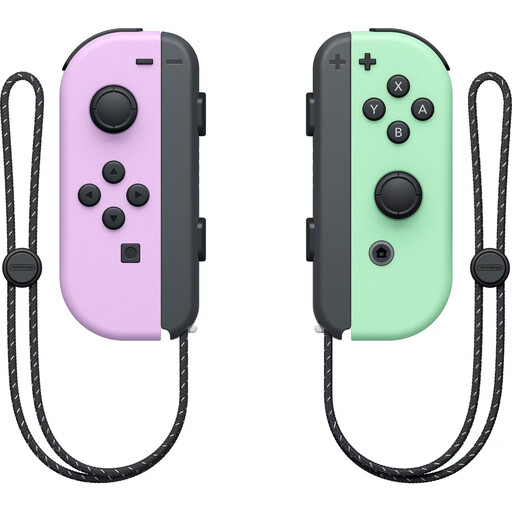
Nintendo Switch Joy-Con Controller Pair, Pastel Purple/Pastel Green
For motion-controlled tennis on Nintendo Switch, if the game supports Joy-Con. This set is designed for Nintendo Switch and includes one left and one right Joy-Con.
Joybuy
 No image available
Nintendo Switch Pro Controller, Black
For tennis games on Nintendo Switch that support this controller with button controls. Not compatible with Nintendo Switch Sports.
Joybuy
 No image available
Nintendo Switch 2 Pro Controller
For tennis games with button controls on Switch 2, provided the specific game supports the Pro Controller. The four-pole 3.5 mm headphone socket follows the CTIA standard; it isn’t compatible with Nintendo Switch Sports.
Joybuy
Frequently asked questions
Can I play Nintendo Switch Sports with a Pro Controller because it has a headphone socket?
No. Nintendo states that neither the Switch Pro Controller nor the Switch 2 Pro Controller is compatible with Nintendo Switch Sports. Check the headphone connection separately from the Joy-Con controls required for the game.
Does the DualSense headset socket work on PC when connected via Bluetooth?
No, not with this type of connection: Sony says the DualSense must be connected to a PC or Mac with a cable to use the headset socket.
What should I set up before a game of motion-controlled tennis?
Check which Joy-Con version the game supports and, if you’re using the controllers separately and wirelessly, attach the matching wrist straps. Nintendo lists separate straps for Joy-Con and Joy-Con 2; they aren’t interchangeable.
Can I use Bluetooth headphones and as many wireless controllers as I like with the original Nintendo Switch?
No. Nintendo specifies a maximum of two wireless controllers connected at the same time when Bluetooth audio is enabled. Bluetooth audio is disabled on this console during local wireless multiplayer.
What consumer rights apply when buying a new controller online in Germany?
When you buy online from a business, you generally have a 14-day right to cancel. Exceptions and when the period starts depend on the contract, as explained by the Verbraucherzentrale. If an item is faulty, you have a statutory right to claim against the seller for at least two years from the date you receive it. This is separate from any voluntary guarantee.


