For motion-controlled tennis in Nintendo Switch Sports, you’ll need supported Joy-Con; Pro Controllers won’t work, and Nintendo Switch Sports Resort requires a Switch 2. For button-based matches on PlayStation, Xbox or PC, choose a gamepad that’s compatible with your specific platform and game version. Also take stock of the controllers and players you already have: original Joy-Con can connect wirelessly to Switch 2, but Nintendo says they can’t be attached to it or charged through the console.
Which controller is right for you?
Motion players on the TV
If you want to hit tennis balls with an arm swing, first check the specific Switch game and which controller modes it supports. Nintendo describes motion-controlled tennis with Joy-Con; compatible wrist straps and enough space in front of the screen are also important when getting set up.
Tennis players with a console already
If you already own a Switch, Switch 2, PlayStation or Xbox, check that your exact game version is compatible with your controller. Nintendo lists restrictions on Pro Controllers for Switch Sports and Sports Resort, so check the support details for your platform.
Couch co-op and PC players
If several people are playing on the same screen, or you prefer a button-based match on PC, check the supported player count and how the controller connects to your platform. Nintendo lists Joy-Con for most sports in Sports Resort; Sony notes that DualSense features on PC depend on the connection and support from the game.
What should you consider when buying?
First check the control style and the specific game. Then consider your platform, player count and the equipment you already own.
| Buying priority |
What to check before buying |
Who is it important to? |
| Motion controls |
Check the game, console, supported controllers and compatible wrist straps. |
If I want to swing the racket with an arm movement, the supported motion mode matters more than a motion sensor alone. Around 33% of consumers have this as their main priority. |
| Game and device compatibility |
Check the exact game version and platform against the controller list; if using original Joy-Con with Switch 2, also check how they can be charged. |
Anyone looking for a gamepad for a console or PC they already own wants to avoid buying the wrong one. Around 27% of consumers prioritise compatibility above all else. |
| Playing together |
Check the game mode and player count, along with the controllers, straps and charging options you already have. |
If I want to play with others on the same screen, I need enough compatible controllers and don’t want to overlook pairs I already own. Around 20% of consumers have local multiplayer as their main priority. |
| Button controls |
Check the supported platform, connection type and whether the game supports any extra features you want. |
Anyone who prefers buttons to racket swings is looking for a gamepad for their platform. Around 20% of consumers prioritise button-based tennis above all else. |
Avoid common buying mistakes
-
A motion sensor doesn’t automatically mean Switch Sports compatibility
Nintendo doesn’t support Pro Controllers with Nintendo Switch Sports or Sports Resort. So a controller with a motion sensor won’t automatically replace the Joy-Con required for each game.
Before buying, check the controller list and the game mode you want to play.
An incompatible controller could mean you need to buy compatible Joy-Con as well.
-
You may not need another pair of Joy-Con 2
A Switch 2 console bundle already includes a pair of Joy-Con 2. Nintendo also notes that the Joy-Con 2 Charging Grip isn’t included in any of the available Switch 2 bundles.
Count the controllers you already have and the player spaces you need before choosing another set.
Factor in charging if you want to charge extra Joy-Con 2 regularly between games.
-
Don’t assume Joy-Con and Joy-Con 2 use the same straps
Nintendo says original Joy-Con can connect wirelessly to Switch 2, but can’t be attached to it or charged through the console. Nintendo also explains that Joy-Con 2 wrist straps aren’t compatible with original Joy-Con.
Check the controller and strap models separately, and make sure you know how you’ll charge your controllers.
Depending on how you use older Joy-Con, you may need a separate charger or straps made for that model.
Key controller brands to consider
Nintendo
Joy-Con are a good fit for supported motion modes on Switch and Switch 2; the specific game is what matters.
- Nintendo lists Joy-Con for motion-controlled tennis in Switch Sports, and Joy-Con 2 and original Joy-Con for most sports in Sports Resort.
- Pro Controllers aren’t supported in either of the Sports games mentioned. Joy-Con 2 aren’t designed for the original Switch.
PlayStation
DualSense is an option for PS5 tennis games and compatible PC games.
- Sony lists USB and Bluetooth as connection options for PC.
- Sony says haptic feedback on PC requires a USB connection and support from the game. This doesn’t confirm an advantage in any particular tennis game.
Xbox
The Xbox Wireless Controller is relevant for supported Xbox and Windows PC games.
- Microsoft lists Xbox consoles and Windows PC as supported platforms, as well as Bluetooth.
- These platform details don’t confirm compatibility with Nintendo Switch Sports or Sports Resort.
8BitDo
The Ultimate 2C Wireless is one button-based controller option for Windows PC and Android; make sure you check the exact version.
- 8BitDo lists 2.4 GHz wireless or wired connections for the Wireless version on Windows, and Bluetooth on Android.
- The similarly named Bluetooth version has different platform details. The model name alone doesn’t confirm compatibility with Nintendo Switch Sports.
Joybuy product selection
This selection includes Joy-Con for supported motion modes on Nintendo Switch, as well as gamepads for button-based matches on PC, PS4 and Xbox. Check compatibility with your specific game version.
 No image available
Nintendo Switch 2 Joy-Con 2 pair, blue/light yellow
For supported motion modes on Switch 2; Nintendo lists Joy-Con 2 for most sports in Sports Resort.
2-piece set in blue/light yellow.
View at Joybuy
 No image available
EasySMX D10 PC controller
An option for button-based matches on PC, as long as the tennis game supports the controller.
The product name identifies it as a PC controller.
View at Joybuy
 No image available
Wireless Dualshock-compatible controller for PS4 and PC, black
The product title lists PS4 and PC as compatible platforms; check support for your tennis game.
Wireless model in black.
View at Joybuy
 No image available
Microsoft Xbox Wireless Controller, Pulse Red
For button-based matches on Xbox or Windows PC, provided your specific game version supports the controller.
The product title lists Xbox One, Xbox Series X/S and PC.
View at Joybuy
 No image available
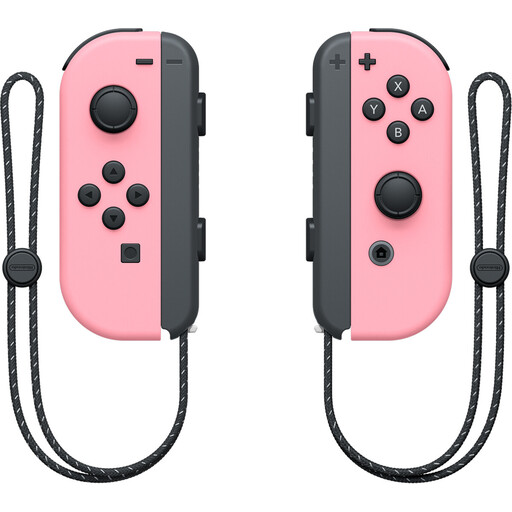
Nintendo Switch Joy-Con pair, pastel pink
For supported motion-controlled tennis on Nintendo Switch; check the controller details for your specific game.
Joy-Con pair in pastel pink.
View at Joybuy
Frequently asked questions
Can I play Nintendo Switch Sports on the TV with a Pro Controller?
No. Nintendo lists both the Switch Pro Controller and Switch 2 Pro Controller as incompatible. Depending on the sport, the game uses supported Joy-Con configurations and doesn’t have a handheld mode.
Do I have to buy new Joy-Con 2 for Nintendo Switch Sports Resort?
Not necessarily: Nintendo lists both Joy-Con 2 and original Joy-Con for most sports. Original Joy-Con connect wirelessly to Switch 2, but can’t be attached to it or charged through the console. Also check which sport you want to play and the player count; Pro Controllers aren’t supported.
How do I get ready to play motion-controlled tennis in front of the TV?
When playing with the Joy-Con detached, attach the wrist strap designed for your Joy-Con model and wear it as instructed by Nintendo. Make sure you have plenty of clear space before you swing; Joy-Con and Joy-Con 2 straps aren’t interchangeable.
Do I need a charging grip to charge extra Joy-Con 2?
Not necessarily. Nintendo lists charging Joy-Con 2 while attached to Switch 2, or using a Joy-Con 2 Charging Grip, sold separately. Think about how many controllers you’ll want to charge between games with friends.


