Choose your controller based on the tennis game and platform you’re using. Nintendo Switch Sports uses compatible Joy-Con for swing controls and doesn’t support Pro Controllers. If you’re playing a tennis game with gamepad support on PC, Xbox or PlayStation, button controls are a better fit if you’d rather not swing. In a bright room, the main concern is how easy the screen is to see, so check its position and display settings before switching controllers.
Which control style is right for you?
For players who like swing controls
If you want to control the racket with movement in Nintendo Switch Sports, compatible Joy-Con are the right choice. Make sure you have enough clear space to swing. Nintendo describes tennis in Switch Sports as a swing-based game.
For playing on a screen in a bright room
If it’s hard to see the ball in a bright room, check your screen and its position first. Changing controllers won’t automatically make the picture easier to see.
For players who prefer button controls
If you’d rather play without swinging, look for a gamepad that supports both your device and the specific version of your tennis game. Compatibility depends on the game and platform.
What should you consider when choosing?
| What matters to you |
What to check before buying |
Who is this important to? |
| Motion controls |
Check that the game, console and Joy-Con generation are compatible, and make sure you have the right wrist strap. Nintendo Switch Sports doesn’t support Pro Controllers. |
If I want to play tennis with swing controls, I need a controller that works with my game and console, as well as enough clear space. Around 36% of consumers put swing-control compatibility first. |
| Screen visibility in a bright room |
Check the screen where you’ll actually be playing. According to Nintendo, the Switch 2 brightness setting applies to handheld and tabletop modes, not TV mode. |
If I struggle to see the ball or on-screen information in a bright room, I want to check the screen and its position before changing controllers. Around 29% of consumers put in-game visibility first. |
| Button controls |
Check compatibility with the exact game version and platform, and confirm whether your model connects via USB, Bluetooth or a receiver. |
If I want to play without swinging, my gamepad needs to work with my tennis game and device. Around 21% of consumers prioritise button controls. |
| Extra players and accessories |
Take into account the controllers you already have, what’s included in the set, compatible wrist straps and charging options. |
If several people will be playing, I want to know whether there are enough compatible controllers and whether wrist straps and a suitable charging option are included. Around 14% of consumers prioritise playing together and accessories. |
Avoid common buying mistakes
-
Buying a Pro Controller for Nintendo Switch Sports
Nintendo says that neither the Nintendo Switch Pro Controller nor the Nintendo Switch 2 Pro Controller is compatible with this game.
Check the control requirements for the specific game before you buy. For swing-based tennis in Nintendo Switch Sports, compatible Joy-Con are the relevant controllers.
-
Trying to fix poor screen visibility by changing controllers
A different controller won’t automatically make a hard-to-see picture clearer. According to Nintendo, the Switch 2 brightness setting applies to handheld and tabletop modes; Nintendo Switch Sports doesn’t support handheld mode.
Check the screen position and display where you’ll actually be playing, separately from your choice of controller.
-
Assuming different Joy-Con generations and wrist straps are interchangeable
Joy-Con 2 are designed for Switch 2. Their wrist straps aren’t interchangeable with those for the original Joy-Con. Original Joy-Con can be used wirelessly with Switch 2, but can’t be attached to or charged by the console.
Check the console generation, what’s included in the set, the compatible wrist strap and the charging options. Nintendo lists a Switch console or suitable charging accessory as a way to charge original Joy-Con.
-
Assuming “wireless” means Bluetooth on PC
For the 8BitDo Ultimate 2C Wireless, the manufacturer lists 2.4 GHz via a USB-A receiver or a wired connection for Windows, and Bluetooth for Android. Connection options vary by model.
Check the connection table for the exact model and the available ports on your gaming device.
Key brands to consider
Nintendo
Joy-Con are an option for swing-based tennis in Nintendo Switch Sports; make sure your console and Joy-Con generation are compatible.
- Nintendo describes tennis in Switch Sports as a swing-based game played with compatible Joy-Con.
- Pro Controllers aren’t compatible with Switch Sports. Joy-Con 2 are designed for Switch 2; if you’re using them separately, check that you have the right wrist strap.
Xbox / Microsoft
Xbox Wireless Controllers are a gamepad option for tennis games that support your Xbox or Windows device.
- Microsoft lists support for Xbox and Windows, as well as Bluetooth and USB connection options for PC.
- Controller support doesn’t automatically mean a particular tennis game will accept its inputs. It isn’t an alternative for Nintendo Switch Sports.
PlayStation / Sony
DualSense is a gamepad option for PS5 tennis games and, depending on the game, PC too.
- Sony describes USB and Bluetooth connections with supported computers.
- According to Sony, haptic feedback on PC requires a supported game and a USB connection; that doesn’t give you any particular advantage in a tennis game.
8BitDo
The Ultimate 2C Wireless is another gamepad option for supported Windows tennis games.
- For this model on Windows, 8BitDo lists a connection via 2.4 GHz receiver or cable.
- According to the manufacturer, Bluetooth is listed for Android. Make sure you don’t confuse the Ultimate 2C Wireless with a differently equipped version.
Joy-Con and gamepads at Joybuy
This selection includes Joy-Con 2 for swing-based tennis on Switch 2, as well as an Xbox controller for supported tennis games with button controls.
 No image available
Nintendo Switch 2 Joy-Con 2 Set (Blue/Light Yellow)
Compatible Joy-Con are the recommended controls for swing-based tennis in Nintendo Switch Sports.
The set includes one left and one right Joy-Con 2, plus two wrist straps. The product title specifies that it’s for Nintendo Switch 2.
Joybuy
 No image available
Microsoft Xbox Wireless Controller – Deep Pink (Xbox One/Xbox Series X/S/PC)
For supported tennis games if you’d rather use buttons than swing controls.
The product title lists Xbox One, Xbox Series X/S and PC; Microsoft describes it as supporting Bluetooth. Also check whether your specific game version supports the controller.
Joybuy
 No image available
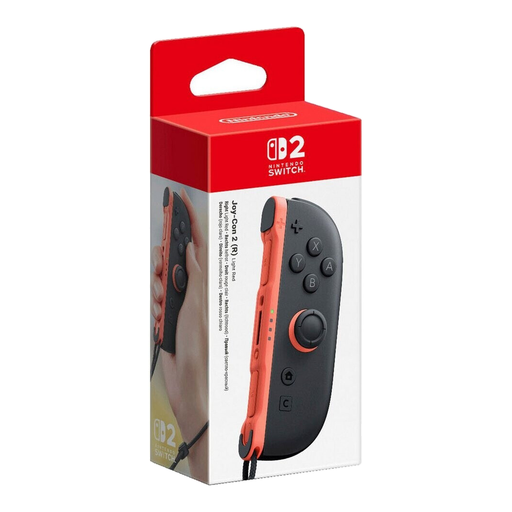
Nintendo Switch 2 Joy-Con 2 (Right) – Light Red
For swing-based tennis on Switch 2 if you’re looking for a single right Joy-Con 2.
The product title identifies it as a right Joy-Con 2 for Nintendo Switch 2. According to the product description, a compatible wrist strap is included.
Joybuy
 No image available
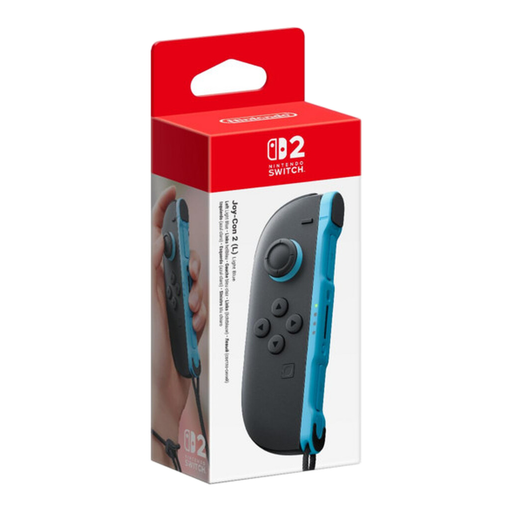
Nintendo Switch 2 Joy-Con 2 (Left) – Light Blue
For swing-based tennis on Switch 2 if you’re looking for a single left Joy-Con 2.
The product title identifies it as a left Joy-Con 2 for Nintendo Switch 2. According to the product description, a compatible wrist strap is included.
Joybuy
Frequently asked questions
Does Nintendo Switch Sports work with a Pro Controller or in handheld mode?
No. Nintendo lists both generations of Pro Controller as incompatible and doesn’t support handheld mode; Nintendo recommends playing in TV mode.
Do I need a special motion controller because my room is bright?
Not for that reason alone. First, check whether the screen is easy to see where you plan to play. The Switch 2 brightness setting described by Nintendo applies to handheld and tabletop modes, not TV mode.
How do I keep Joy-Con secure when swinging?
When using Joy-Con wirelessly and separately, Nintendo recommends attaching the wrist strap made for that Joy-Con generation and securing it around your wrist. Make sure the area around you is clear before swinging, too.
Can I charge original Joy-Con on Switch 2?
No, you can’t attach them to Switch 2 to charge them. Nintendo lists a Switch console or suitable charging accessory as a charging option; you can use original Joy-Con wirelessly with Switch 2.
What should I look for in a gamepad for tennis games on PC?
Check that the exact game version supports the controller, and confirm how it connects. For some models, Bluetooth, USB and receiver connections vary depending on the platform and version.


