Players with limited room to swing
If you share a room, button controls can save space – provided your game and console support the gamepad you choose.


To play tennis in Nintendo Switch Sports, you need a compatible Joy-Con or Joy-Con 2; Nintendo doesn’t support Pro Controllers for this game. If space to swing is limited, a conventional gamepad could be a suitable alternative, provided the tennis game you’re playing supports that controller and button controls. For motion-controlled tennis, you’ll need the right strap and plenty of clear space.
If you share a room, button controls can save space – provided your game and console support the gamepad you choose.
If you want to swing the controller like a racket, check that you have enough clear space to move and use the right wrist strap. Nintendo describes this control method for tennis in Nintendo Switch Sports.
If you want to play together on one console, check the local multiplayer mode, how many controllers you’ll need and what accessories you already have.
First decide whether you can swing safely and which controllers your game actually supports. Then check whether the controllers you already own are enough to play together.
| What matters | What to check before buying | Who should pay particular attention |
|---|---|---|
| Safe space to move | Clear space to swing in the room; whether the game supports button controls. | If I’m playing next to housemates or furniture, I need either enough space or a supported control method that doesn’t involve swinging a racket. Around 34% of consumers put having a safe area to move at the top of their list. |
| Game and console compatibility | Check the exact game, mode, console generation and explicitly supported controllers. | If you don’t want to buy a controller for a mode it doesn’t support, check the game and console first. Around 33% of consumers prioritise compatibility with their tennis game and console. |
| Playing together | Check the number of players supported in local mode, and which controllers and straps you already have. | If we want to play together on one console, what matters to me is whether our existing controllers are enough for local multiplayer. Around 20% of consumers prioritise playing together. |
| Accessories you already own | Check which straps and controller generation are included; if you’re using original Joy-Con with Switch 2, find out how to charge them. | If you want to avoid unnecessary extra purchases, take stock of your existing controllers and compatible accessories first. Around 13% of consumers pay particular attention to the accessories they already own and any additional purchases. |
For tennis in Nintendo Switch Sports, Nintendo specifies Joy-Con or Joy-Con 2, not Pro Controllers. According to Nintendo, Mario Tennis Aces offers classic game modes as well as the motion-controlled Real mode; Mario Tennis Fever is listed for Nintendo Switch 2. Even so, check the specific mode and controller support for each game.
A controller with motion sensors won’t necessarily work with every tennis mode. Nintendo doesn’t support Pro Controllers for Nintendo Switch Sports.
If you want to play Nintendo Switch Sports, choose a supported Joy-Con or Joy-Con 2. For other games, check the specific mode and which controllers are supported.
The wrist straps aren’t interchangeable between generations. Original Joy-Con can be used wirelessly with Switch 2, but can’t be attached to the console.
Check that the controller and strap are from the same generation. If you’re using original Joy-Con with Switch 2, find out how you’ll charge them before you buy. Nintendo recommends attaching the correct strap when playing separately with a wireless controller.
Nintendo describes tennis in Nintendo Switch Sports as using the Joy-Con itself as a racket. So the first things to consider are whether the game supports your controller and whether you have enough space to move.
Before buying extra accessories, check how the specific game is controlled and whether you can swing safely in your room.
Joy-Con and Joy-Con 2 are the most directly relevant controllers for motion-controlled tennis in Nintendo Switch Sports.
According to 8BitDo, the Ultimate 2C Bluetooth is a gamepad option for supported tennis games with button controls.
According to HORI, the Wireless HORIPAD Turbo is a gamepad option for supported games on Switch and Switch 2.
This selection includes gamepads for tennis games with supported button controls, as well as a pair of Joy-Con 2 for motion-controlled tennis on Switch 2. Check compatibility with the specific game and mode before buying.
 No image available
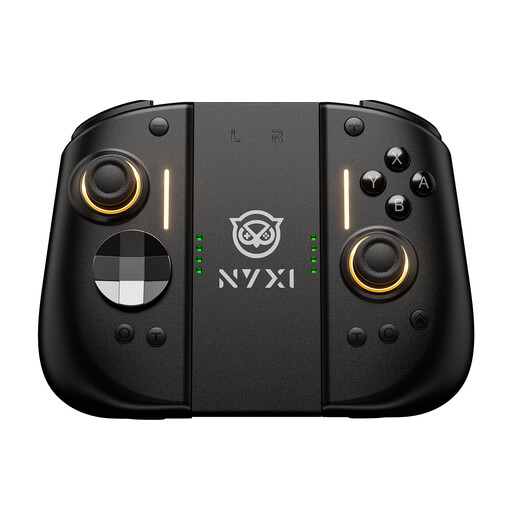
For tennis games with supported button controls; the product name lists Switch 2, Switch, PC, iOS and Android.
All-button hitbox controller with Bluetooth, 2.4G and wired connectivity, plus hot-swappable fast-trigger switches.
 No image available
Suitable for tennis games with button controls only if the specific game supports this controller.
The product name lists a 9-axis gyroscope, Hall Effect joysticks, mechanical buttons and two rear buttons.
 No image available
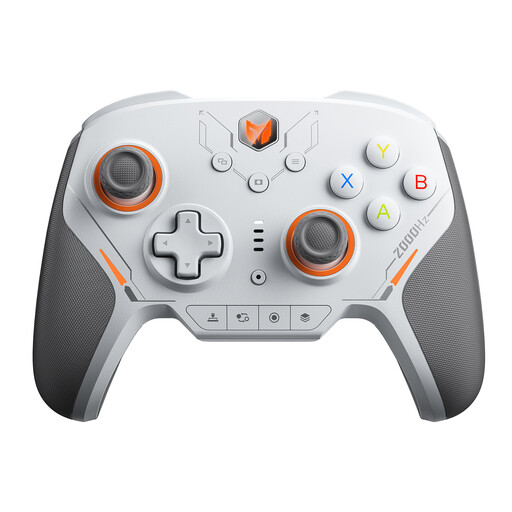
For a supported button-control mode; the product name lists Switch as a platform. Check compatibility with your specific tennis game.
The product name lists 16 mechanical micro-switches, a 2000Hz polling rate and TMR joysticks.
 No image available
For a tennis game with a supported gamepad mode; the product name lists Switch 2 as a platform. Check support in the specific game.
The product name lists a 6-axis gyroscope, mechanical buttons and a 2000Hz polling rate.
 No image available
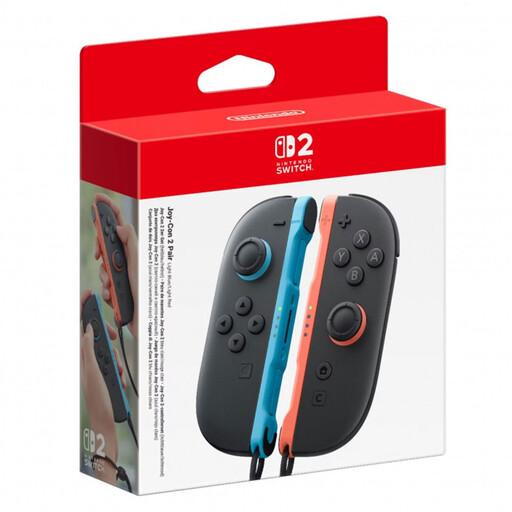
For motion-controlled tennis on Switch 2: Nintendo specifies Joy-Con 2 for tennis in Nintendo Switch Sports. Make sure you have enough clear space to swing.
According to the product details, the set includes two Joy-Con 2 controllers with motion controls and two matching Joy-Con 2 wrist straps.
Use the correct strap when playing separately; Joy-Con 2 straps don’t fit original Joy-Con.
No. Nintendo lists Joy-Con or Joy-Con 2 as supported controllers and doesn’t support Pro Controllers on Switch or Switch 2. Handheld mode isn’t supported either.
Nintendo recommends attaching the correct wrist strap and fastening it around your wrist when playing separately with a wireless controller. Joy-Con 2 straps don’t fit original Joy-Con. Also check that you can swing without hitting other people or objects.
Not necessarily. Original Joy-Con can be used individually in supported two-player modes; the Switch 2 console bundle includes one left and one right Joy-Con 2, along with straps. It depends on the specific game mode and the accessories you already have.
Nintendo requires an active Nintendo Switch Online membership to play Nintendo Switch Sports online. It isn’t a general requirement for a local tennis match.
The Bundesnetzagentur checks electrical and wireless products for things including CE marking and product and manufacturer details. If a product is faulty, your statutory consumer rights against the seller are separate from any voluntary guarantee, as explained by the Verbraucherzentrale.