Tennis fans in a bright shared living room
If you want to watch with some ambient light, consider brightness, screen size and room lighting together.


When choosing a projector for tennis in a shared flat, start by considering the room lighting and where you can put it. If there’s some ambient light, a home cinema projector with brightness suited to your planned screen size may be a good option; if space is tight, consider an ultra-short-throw model. A portable smart or battery-powered projector is better suited to rooms where you’ll often put the device away and can darken the room. Before you buy any model, make sure you know how you’ll stream the match you want to watch, including its audio.
If you want to watch with some ambient light, consider brightness, screen size and room lighting together.
A large shared screen shouldn’t block walkways or seating. The key is whether the projection distance and screen width work in your room.
If you’ll put the projector away after the match, look for a practical set-up, a suitable way to stream content and audio that works in your room.
A good fit if: you watch with some ambient light and have room behind the seating for the specific model. BenQ quotes 3,800 lumens and Full HD for the TH575i; Epson quotes 3,000 lumens for both white and colour brightness on the EH-TW7000. These are manufacturer specifications, not measurements taken in a shared living room.
Bear in mind: the projection distance, a clear line of sight and streaming content with audio all need to work in your shared flat. The quoted brightness alone doesn’t guarantee a clear picture at every screen size or in all lighting conditions.
A good fit if: you’ll often put the device away and can darken the room when needed. XGIMI quotes automatic image adjustment for the HORIZON Pro; Anker gives the Capsule 3 Laser a battery life of 2.5 hours in Eco mode.
Bear in mind: ISO and ANSI lumens are not identical measurement specifications. Check the brightness for your room and, for longer matches, consider whether you’ll need to plug the projector in.
A good fit if: there’s no suitable space for a projector behind the sofa, but you can leave room right in front of the screen. Epson describes the EH-LS970W as an ultra-short-throw projector.
Bear in mind: the device needs space right next to the screen. Check beforehand that it won’t get in the way of furniture or walkways.
| Priority | What to check before buying | Who it matters most to |
|---|---|---|
| Picture clarity with ambient light | Start by considering the room lighting and screen size. BenQ Germany suggests around 2,000 ANSI lumens for 100–120 inches with no ambient light, and around 3,000 ANSI lumens when there’s additional room lighting. These are guidelines, not universal buying thresholds. | If you want to follow the ball and see the lines at your planned screen size with the lights on, picture clarity is your priority. Around 33% of consumers would put this first. |
| Screen size and where to put the projector | Measure the screen width and available distance. BenQ Germany describes the throw ratio as the projection distance divided by the screen width. Also check the set-up requirements for the specific model. | If you need to keep walkways and seating clear in a shared room, you’ll need a screen size that suits the space available. Around 27% of consumers would prioritise where to put the projector. |
| Tennis streaming and audio | Check which service is showing the match you want and whether it has a suitable app or external streaming device. Make sure the projector’s connections and audio set-up are compatible. | If you want to watch a specific live match, that exact streaming set-up needs to work with your device. Around 20% of consumers would put reliable streaming first. |
| Flexible, considerate use | Check how easy the projector is to carry and set up, how it sounds at a reasonable room volume, and how long it runs in your preferred mode. For longer matches, make sure you can plug it in where you plan to use it. | If you’ll put the projector away after the match and your flatmates won’t always be watching too, easy set-up and flexible use matter. Around 20% of consumers would prioritise this. |
Room lighting and screen size affect how easy it is to see the ball and lines. The resolution specification alone doesn’t tell you how bright the picture will be.
Consider the lighting you’ll typically have and the screen size you want. Then check the brightness specification and how it was measured for the exact model.
Screen width and distance are still linked, even if the projector automatically aligns the image.
Measure your room and decide on your preferred screen width before choosing a model. Then consider automatic set-up as a useful extra.
An integrated smart system doesn’t mean the streaming service or app you need will be available on the device.
Check how you’ll watch the specific match on the projector or a compatible external streaming device, and make sure you’ve considered the audio set-up too.
Anker gives the Capsule 3 Laser a battery life of 2.5 hours in Eco mode. This figure applies to that mode, and a broadcast may run longer when you include breaks.
Check the battery life and operating mode against how you plan to use the projector, and see whether there’s a power socket where you’ll set it up.
The TH575i is an example of a Full HD home projector to consider if there’ll be some ambient light while you watch tennis together.
The EH-TW7000 is a home cinema model with optical set-up features; the EH-LS970W is a separate ultra-short-throw model.
The HORIZON Pro is an example of a smart projector that may suit shared flats where the set-up changes from time to time.
The Capsule 3 Laser is a compact battery-powered model for situations where portability and easy storage are important.
The following Joybuy models include portable or flexible set-up projectors, as well as an option described as ultra-short-throw. For each model, check that the screen size, room lighting and streaming set-up will work for your tennis night.
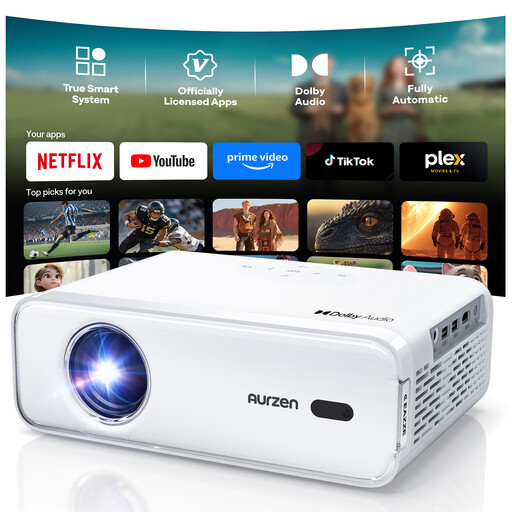 No image available
Could be an option if you stream the tennis through an external HDMI device. First, check that you have a suitable audio set-up and access to the specific broadcast.
The product specifications list 4K support, Full HD 1080P, Netflix, Dolby Audio, autofocus and keystone correction.
According to the product information, you can’t install additional streaming apps on this version.
 No image available
The product name describes this as an ultra-short-throw projector for smaller rooms. Check the required distance and make sure there’s clear space right in front of the screen.
Specifications include 4K support, 1080P, Wi-Fi 6 and Bluetooth 5.4.
 No image available
This portable model has an integrated stand and may suit set-ups that change from time to time. Check how the picture looks in your usual room lighting.
Specifications include 1080p, 250 ISO lumens and an integrated stand with 160° adjustment.
 No image available
This foldable model is an option if you want to put the projector away after watching together. Check how the picture looks in the lighting you plan to use.
Specifications include 1080P Full HD, 1,600 ISO lumens and a foldable design.
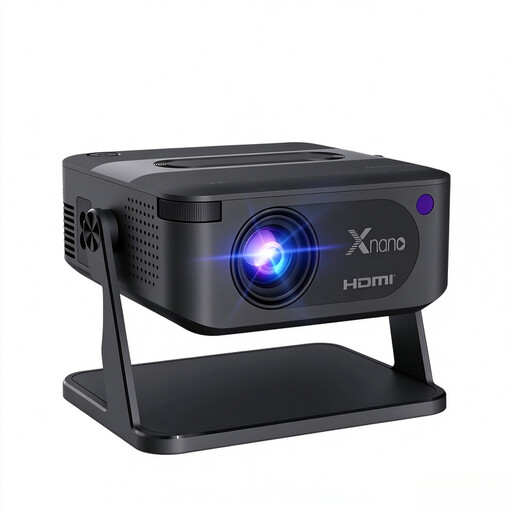 No image available
This compact model may be worth considering if you need a flexible set-up. Before buying, check that its stated resolution and your preferred screen size suit the way you plan to use it.
Specifications include a native resolution of 720P, 4K compatibility, voice activation and automatic keystone correction.
Measure the clear screen width and the usable distance between the projector and the screen. BenQ Germany describes the throw ratio as the projection distance divided by the screen width. Then compare this figure with the zoom and set-up requirements for the specific model.
There’s no general answer without knowing the specific match and streaming service. Check whether the service’s app is available on the projector or whether you’ll need a compatible HDMI streaming device, and make sure you’ve considered the audio set-up too.
The Verbraucherzentrale distinguishes between your statutory rights against the seller and an additional voluntary guarantee with its own terms and conditions. If a product is faulty, you can ask the seller to put it right. Any guarantee should be checked separately against its terms.
It depends on whether the use genuinely counts as private. GEMA distinguishes private use among a close circle of friends from public performance. Its guidance on public use of music doesn’t provide a blanket answer on all the broadcast rights for a particular tennis match.
The Bundesnetzagentur lists checks including a correctly displayed CE mark, identifiable manufacturer details and German instructions with safety warnings. This guidance doesn’t prove that a particular listing has already been checked. Follow the instructions for the specific projector when setting it up.