Who is this setup suitable for?

Tennis fans sitting to the side

If several people are sitting towards the side of the sofa, it’s not just the projector that matters: you also need to consider how the screen distributes light across the viewing area. Stewart Filmscreen explains that image brightness can decrease as the viewing angle becomes wider.

Tennis fans in a bright living room

If you can’t darken the room enough during a match, the projector brightness, screen material and seating position all need to work together. Elite Screens distinguishes between standard materials and screens designed for particular ambient light and projection conditions.

Households with an off-centre projector

If the projector can’t be placed in the centre, check the horizontal adjustment options of the specific model. Vertical keystone correction alone doesn’t confirm that the image can be corrected when the projector is positioned to the side.

What should you look for when buying?

Buying consideration What to look for Who is it especially important to?
Viewing from the side Check the stated viewing angle of the specific screen and the view from the furthest seat. When I’m sitting to the side of the screen with other people, I want to be able to follow the match clearly from the outer seats too. Around 33% of consumers put side-on viewing first.
Off-centre projector position Check the throw distance and image width against the horizontal adjustment range of the exact model; don’t confuse vertical correction with horizontal correction. If the only space for the projector is beside the screen, I need image positioning that suits that location. Around 20% of consumers prioritise placing the projector to the side.
Ambient light in the room Consider the room’s ability to block out light, the projector’s stated brightness, the image size and the screen material’s suitability together. If the living room needs to stay lit during a match, I want to choose a screen and projector that suit those conditions. Around 27% of consumers put visibility in ambient light first.
Fast-paced rallies Check whether the specific model offers frame interpolation, and make sure it can connect to your TV receiver or streaming device. For fast-moving action, motion handling matters more to me than the other setup considerations. Around 20% of consumers give this their top priority.

Common projector setup misconceptions

  • Confusing automatic keystone correction with a good view from the side

    Keystone correction changes the shape of the image when the projector is set up at an angle. It doesn’t change how the screen distributes light to viewers sitting to the side.

    Check the screen’s viewing angle and the projector’s image correction separately.

  • Assuming vertical correction will solve every off-centre setup

    The BenQ TH685P and TK710 models discussed here have vertical correction features or vertical lens shift; neither is specified as offering horizontal optical shift.

    Compare your planned projector position with the horizontal adjustment options of the complete model. If it won’t work, you may need a different mount or model.

  • Considering the projector alone instead of the whole setup

    The projector, screen, mount and signal source each have a different role. Epson also lists a compatible replacement lamp for the EH-TW7000.

    Plan for the screen, mounting, signal path and, if needed, a replacement part compatible with your model.

Relevant brands and product ranges

Epson

The EH-TW7000 is an option for a permanent living-room setup, while the EH-LS11000W has explicitly stated horizontal lens shift.

  • Epson Germany lists 3,000 lumens of white and colour brightness, as well as frame interpolation, for the EH-TW7000.
  • The horizontal adjustment range of ±47,1 % is specified for the EH-LS11000W and shouldn’t be assumed to apply to the EH-TW7000.

BenQ

The TH685P is a Full HD model, while the TK710 is a 4K laser projector. Check whether each specific model is suitable for an off-centre position.

  • BenQ lists 3,500 lumens for the TH685P and 3,200 ANSI lumens for the TK710.
  • These are manufacturer specifications. Automatic vertical keystone correction or vertical lens shift doesn’t confirm horizontal optical lens shift.

Elite Screens

As a screen manufacturer, Elite Screens is relevant when choosing a screen and checking its suitability for side-on seating.

  • Elite Screens Europe describes CineWhite as a material with wide light dispersion and distinguishes it from CLR material for certain ultra-short-throw projectors.
  • A screen’s suitability also depends on the projection type, room light and seating position; this doesn’t mean one screen is suitable for every bright environment.

Joybuy projectors at a glance

The Joybuy options below include portable projectors, as well as models with image correction features or a screen set. For watching tennis from side-on seats, the screen angle, room light and projector position still need to suit your room.

Aurzen Tri-Fold DLP Mini Projector with 5000mAh battery

Aurzen Tri-Fold DLP Mini Projector, 5000mAh

The portable design may suit a flexible setup; for side-on seating, check the screen angle and image brightness separately.

The product title lists a built-in 5000mAh battery with up to 1.5 hours of use, ToF autofocus, USB-C and 4K support.

Google Cast isn’t supported, according to the product information. Screen mirroring with Google Pixel and Motorola phones, as well as Chromebooks, is also listed as unavailable.

View at Joybuy
XGODY Gimbal A6 Pro with 100-inch screen

XGODY Gimbal A6 Pro with 100-inch screen

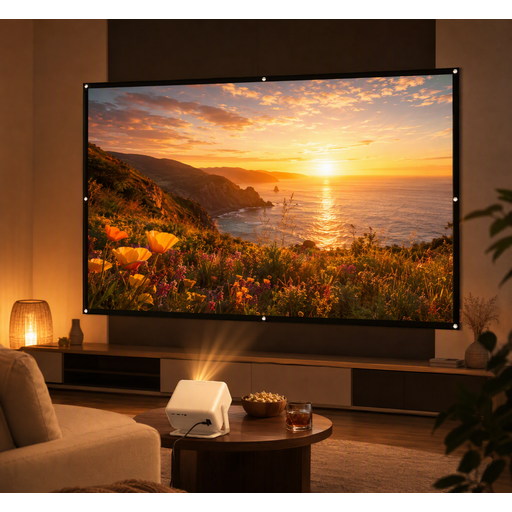
This set could be a good choice if you’re looking for a projector and screen together; for side-on seating, check the viewing angle of the included screen.

The product title describes a portable projector and 100-inch screen set.

View at Joybuy
XBJ A5Pro Outdoor Smart Projector, native 1080P

XBJ A5Pro Outdoor Smart Projector, native 1080P

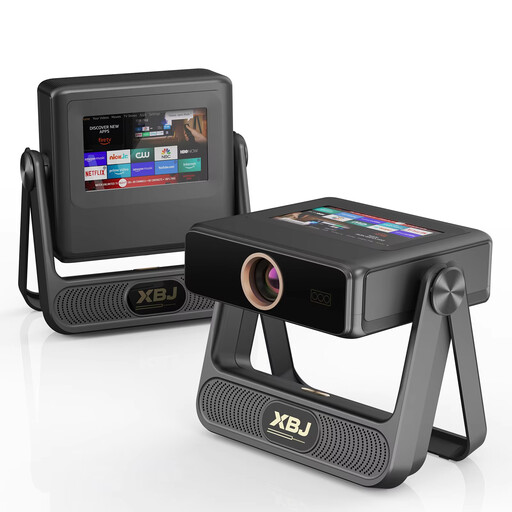
If you’re looking for native Full HD resolution, the product title lists 1080P. For your tennis setup, also check the image size, room light and view from the outer seats.

Other details in the product title include 900 ANSI lumens, autofocus and automatic keystone correction. Horizontal correction isn’t specified.

View at Joybuy

Projector with built-in apps and 180° rotation

Projector with built-in apps and 180° rotation

If you’re looking for an adjustable orientation, the product title lists 180° rotation. Check whether this lets you position the image correctly from where you plan to place it.

The title lists built-in apps, Wi-Fi 6, Bluetooth, automatic image correction, a 50–200-inch image size and 50–100 % digital zoom.

View at Joybuy

XGIMI Vibe One Portable Mini Projector, 1080p

XGIMI Vibe One Portable Mini Projector, 1080p

The built-in stand may be useful for a portable setup; for side-on seating, the screen’s viewing angle still needs to be considered separately.

The product title lists a built-in 160° stand, autofocus, keystone correction and 250 ISO lumens.

View at Joybuy

Frequently asked questions

Do I need lens shift if only the viewers are sitting to the side?

No, not for that reason alone. Lens shift affects the position of the projected image when setting up the projector. For viewers sitting to the side, the screen’s viewing angle is the main thing to check.

Can I use any ALR screen for side-on seating?

No. Check the viewing angle and whether it’s suitable for your type of projector. Elite Screens Europe explicitly describes its CLR screen as a material for table-mounted ultra-short-throw projectors.

How can I check that the image size and distance will work before installation?

Measure the available distance between the lens and screen, along with your preferred image width. Then compare both with the throw ratio and zoom of the exact model. Finally, check that you can position the image correctly from your planned mounting location.

What should I know about replacing the lamp or dealing with a fault?

Check the replacement part number for your specific model: Epson lists ELPLP85 as compatible with the EH-TW7000. If there’s a fault, remember that your statutory rights against the seller are separate from any voluntary guarantee, as explained by the Verbraucherzentrale consumer advice centre.

What are the German requirements for product information and projector disposal?

For market surveillance, the Bundesnetzagentur lists CE marking, product identification, and German-language usage and warning information among the points it checks. A projector that’s reached the end of its life shouldn’t go in household waste: the German Federal Ministry for the Environment explains that it must be returned separately through authorised collection points, and that retailers have take-back obligations in certain circumstances.