What to look for when buying
First, measure the available distance and the clear projection area. Then check that the brightness and options for darkening the room suit the lighting, and find out how the specific match will be streamed and how the sound will be played.
| What you need |
What to check before buying |
Who it matters most to |
| Image size at a short throw distance |
Compare the projector’s distance from the wall, available wall width and image height with the specific model’s throw ratio. |
If my living room only allows a short distance between the projector and the wall, I still want to achieve the image width I’m after. Around 36% of shoppers say throw distance is their top priority. |
| Picture with ambient light |
Consider the brightness rating and its measurement standard, the planned image size and ways to darken the room together. |
If I can’t make the room completely dark, I want a match picture that suits the lighting and the image size I have in mind. Around 29% of shoppers rank ambient light as their top buying concern. |
| Fast rallies |
Check the sports or motion settings available on the specific model and with your intended signal source. |
If fast rallies are particularly important to me, I want to check the motion settings rather than focus only on a large screen size. Around 21% of shoppers say motion handling is their main concern. |
| Match reception and sound |
Check the specific broadcaster or service, the relevant app or HDMI connection, and the speakers and audio connections. |
If I want to use the projector easily for a particular match, I need to know how I’ll receive the signal and have a suitable audio setup. Around 14% of shoppers say reception and easy setup are their top buying priorities. |
Projectors on Joybuy
These Joybuy products showcase different ways to set up a projector in a small living room, from ultra-short-throw models to compact projectors that are easy to position flexibly. Before buying, pay particular attention to image size, lighting conditions and how you’ll receive the match.
 No image available
Philoent Ultra-Short-Throw Projector, 4K/1080P
Described as an ultra-short-throw projector for small rooms. Check that its required distance suits your specific setup.
The title lists 4K/1080P support, Wi-Fi 6 and Bluetooth 5.4. The description mentions autofocus and automatic keystone correction.
View on Joybuy
 No image available
XGIMI Elfin Flip Laser, 1080P
The foldable design and portable build make it a good fit if you want to put the projector away after the match.
The title lists 1080P, 1,600 ISO lumens and Harman Kardon audio. Autofocus is also specified; ISO lumens aren’t directly comparable with ANSI lumens.
View on Joybuy
 No image available
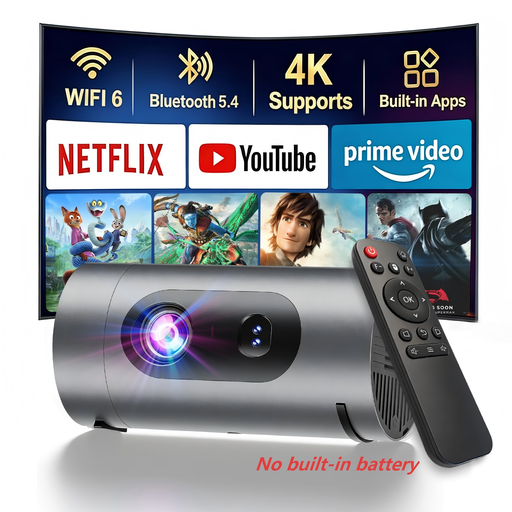
XBJ 1080P Smart Ultra-Light Mini Projector
The compact, portable design is made for flexible use. Check that the stated brightness suits your planned image size and lighting.
The title lists 1080P, 800 lumens and 8 W Dolby Digital audio. The description includes autofocus, automatic keystone correction, Wi-Fi casting and a built-in Android system. For use away from a mains socket, you’ll need your own power bank; the description says no battery is included.
View on Joybuy
 No image available
XBJ Portable Projector, Native 1080P
The 280° rotating stand lets you position the projector flexibly. Check that your preferred position works with the available projection area.
The title lists native 1080P and 700 ANSI lumens. The description includes built-in video apps, autofocus and automatic keystone correction; check separately whether an app can show the match you want to watch.
View on Joybuy
 No image available
XGIMI AURA 2, 4K Ultra-Short-Throw Laser Projector
The ultra-short-throw design is intended for use close to the wall. Check your furniture dimensions, available projection area and the distance specified for your installation.
The title lists 2,300 ISO lumens, Dolby Vision and built-in 60 W Harman Kardon speakers. XGIMI Germany gives the AURA 2 a throw ratio of 0.177:1; ISO lumens aren’t directly comparable with ANSI lumens.
View on Joybuy
Frequently asked questions
How can I check whether the image will fit in my living room?
Measure the usable distance between the projector’s position and the projection surface, as well as the available wall width. Compare both with the specific model’s throw ratio and setup guidance. For ultra-short-throw models, also check how the stated distance from the wall is measured.
Will a streaming app on the projector automatically let me watch a tennis match?
No. First, find out which broadcaster or service is showing the match, then check whether its app is available on your chosen model or whether you’ll need a compatible streaming device. Netflix support listed for the Nebula Capsule 3 doesn’t guarantee access to a tennis broadcast.
What should I check about picture and sound when setting it up?
Make sure you have a clear projection area and allow for the setup distance required by your model. Also check that the speakers, audio output and, if needed, HDMI connection work with your streaming device and preferred sound system.
Who should I contact if my projector is faulty?
For consumer purchases in Germany, the seller’s statutory liability for faults is separate from any voluntary guarantee. If a product is faulty, the first step may be to ask for a repair or replacement; the details depend on the contract and the circumstances. The Verbraucherzentrale explains the difference between statutory rights and a guarantee.
What should I look for to check that a product is safe in Germany?
Check the information and documentation for the specific device. The Bundesnetzagentur lists CE marking, manufacturer details and product traceability among the points it checks during market surveillance.


