What should you look for when buying?
First, choose based on the tasks you do most often and the space you need for your mouse. Then consider noise, hand position and switching between devices in the context of your own workspace.
| What matters to you |
What to check |
Who is this important for? |
| Quiet typing |
Where possible, compare how the keys feel and sound on a similar surface. Check that the version described as quiet has all the keys you need; CHERRY and Trust describe certain models as quiet. |
If I work alongside other people, I want to keep typing noise to a minimum without missing any keys I need. Around 28% of consumers prioritise quiet. |
| Number pad |
Think about how often you enter figures and whether a wider keyboard will still fit alongside your mouse and documents. The DGUV notes that a full-size keyboard may be a suitable choice if you regularly enter numbers. |
If I enter figures regularly, I want to input them comfortably and am prepared to use more desk space if needed. Around 22% of consumers say number entry is their most important buying consideration. |
| Space for the mouse |
Measure the space available and check whether you can manage without a dedicated number pad. The DGUV notes that compact keyboards may be an option if you enter few numbers or mainly use the mouse. |
If I mainly navigate the map with a mouse, I want enough room to move it around beside my keyboard. Around 22% of consumers prioritise saving space. |
| Hand position |
Check the weight, wrist rest and key layout. Perixx notes that you may need time to get used to the split layout of the PERIBOARD-512 B. |
When typing for long periods, I want to choose a key and hand position that suits me, even if the layout takes up more desk space. Around 17% of consumers say finding a comfortable hand position is their most important consideration. |
| Switching between devices |
Check the connections actually included and whether wireless connections are permitted in your workplace. CHERRY says the STREAM KEYBOARD ULTIMATE offers four connection channels, including wired use. |
If I regularly switch between several devices, I want the connection options to suit the way I work. Around 11% of consumers prioritise switching between devices. |
Keyboards at Joybuy
The Joybuy products listed here include compact keyboards and keyboard-and-mouse sets for smaller workspaces and for switching between devices. Pay particular attention to the key layout of each specific variant: the layouts listed are not all DE-QWERTZ.
 No image available
NAXSIR foldable Bluetooth keyboard with magnetic stand, black
The foldable design and Bluetooth connection may suit you if you’re looking for a compact keyboard for use with several devices.
The title specifies a magnetic stand, an aluminium casing and a rechargeable battery. The description mentions quiet scissor keys and support for Windows, iOS and Android.
View at Joybuy
 No image available
Foldable Bluetooth keyboard with wireless mouse, silver white
This set may suit a compact workspace if you want to use a keyboard and mouse together.
The product title mentions quiet scissor keys, three connection modes and the ability to switch between up to three devices. The keyboard charges via USB-C and is listed as compatible with Windows, Android and iOS.
View at Joybuy
 No image available
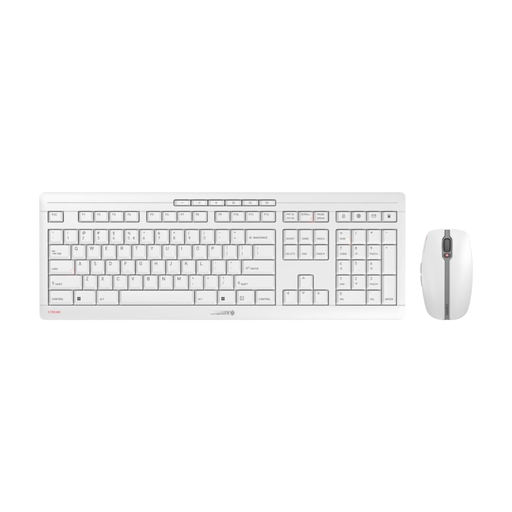
CHERRY Stream Desktop Recharge, EU-QWERTY
This wireless keyboard-and-mouse set may suit you if you want to choose both input devices together.
The specifications list an EU-QWERTY layout, a 2.4 GHz wireless connection and quiet scissor keys. The keyboard is rechargeable via USB-C. Check the exact key layout if you need DE-QWERTZ.
View at Joybuy
 No image available
CHERRY STREAM KEYBOARD TKL, US layout
The TKL layout without a number pad may suit you if mouse space is more important and you enter only a few figures.
This wired version has CHERRY SX scissor keys and six multimedia keys. It has a US layout with a Euro symbol; check the key layout before buying if you need DE-QWERTZ.
View at Joybuy
 No image available
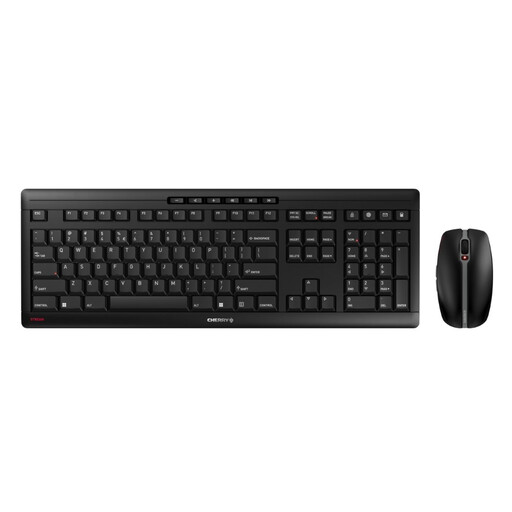
CHERRY STREAM DESKTOP RECHARGE, US layout
This set may suit you if you want to choose a keyboard and mouse with a 2.4 GHz wireless connection together.
The specifications list CHERRY SX scissor keys, USB-C charging, ten hotkeys and a mouse with six buttons and a DPI switch. This version has a US layout; check the key layout if you need DE-QWERTZ.
View at Joybuy
Frequently asked questions
Do I need a number pad for terrain mapping?
No. It depends on how often you actually enter figures. The DGUV notes that a full-size keyboard may be a suitable choice if you need to enter lots of numbers, while a compact keyboard may work better if you enter few figures or mainly use the mouse.
Can I set up custom keyboard shortcuts for mapping?
You can configure keyboard shortcuts in QGIS. According to the QGIS documentation, project-specific settings can override them during a session, so check the settings in the software you actually use.
What should I look for in a split keyboard for a shared desk?
Check that the size and key layout suit your workspace and hand position. Perixx notes that the split layout of the PERIBOARD-512 B takes time to get used to. If possible, try it out before making your final decision.
How can I make sure the keyboard layout is right for my computer?
Check the name of the exact variant and compare its layout with the one you need, such as DE-QWERTZ. The CHERRY STREAM KEYBOARD TKL described here is labelled as a US layout with a Euro symbol; the model name alone does not tell you how the keys are laid out.
What should I check when choosing a wireless keyboard for work?
Check whether the wireless connection you plan to use is permitted in your workplace, and review the details for the specific product. For market surveillance of electronic products, the Bundesnetzagentur lists points to check, including CE marking, identifiable manufacturer details and a declaration of conformity. This does not mean that any specific model mentioned here has been tested.


