When choosing a keyboard for terrain mapping by a bright window, focus on the issue that slows you down most: glare, repetitive commands, long typing sessions or number entry. In daylight, the surface, key legends and workstation layout all matter; backlighting alone doesn’t guarantee better visibility. Extra keys are only useful if you can configure them for your specific software, while a split layout and number pad address different needs around hand position and desk space.
Which keyboard is right for you?
Mapping by a bright window
When daylight changes across your workspace, consider the key legends, surface and position of your keyboard and screen together. The Federal Institute for Occupational Safety and Health (BAuA) describes glare and reflected glare as potential visual impairments.
Frequent shortcut users in mapping and 3D
If you use the same commands repeatedly, first check whether your specific application supports the shortcuts you need and whether the keyboard software lets you assign them. For example, QGIS allows you to customise keyboard shortcuts.
Heavy typists who enter numbers
For long typing sessions or frequent number entry, you’ll need to weigh up hand position, a number pad and the space left for a mouse or stylus. An integrated number pad and one you can position separately offer different layouts.
What should you look for when buying?
First, decide whether glare, frequent commands, hand position or number entry has the biggest impact on your work. Then compare the features that address that need, rather than treating backlighting, layout and extra keys as interchangeable solutions.
| Priority |
What to check |
Who should consider it? |
| Visibility by a window |
Check the key legends and surface finish in your actual setup; consider backlighting separately. |
If I want to identify keys reliably in changing daylight, I’ll also check for potential glare at my workstation. About 33% of consumers prioritise visibility. |
| Repetitive commands |
Find out which actions you use frequently in your software and whether they can be assigned to shortcuts; then consider the keyboard software. |
If you often use the same mapping commands, you’ll want to access them in a way that suits your application. About 27% of consumers prioritise shortcuts. |
| Hand position |
Check the split layout, wrist rest, space required and how easily you can reach your key combinations. |
For longer work sessions, I want a key layout that suits my hand position and workstation. About 20% of consumers say hand position is their main priority. |
| Number pad and desk space |
Consider how often you enter numbers and the space between your keyboard, mouse and stylus; check for a German layout. |
If I enter numbers frequently, I want to position the number pad so there’s still room for a mouse or stylus. About 20% of consumers have this as their main priority. |
Which buying mistakes can you avoid?
-
Assuming backlighting means good visibility in direct daylight
Adjustable backlighting doesn’t automatically mean the key legends or surface will be easy to see by a bright window.
Assess the key legends and surface finish at your intended workstation, separately from the backlighting feature.
-
Buying macro keys without checking your software
Programmable hardware keys are only suitable if you can assign them the commands you repeatedly use in your specific application.
Make a note of the actions you use frequently, then check whether you can assign them in the application and the accompanying keyboard software.
Setting up commands and device profiles can take extra time.
-
Assuming similar model names and variants are identical
A similar name may refer to a different layout or bundle. For example, the Logitech MX Keys S is also listed as a keyboard and mouse set, while Keychron offers different layout variants.
Check the full model name, German layout and contents of the specific listing.
A bundle may include accessories you don’t need, so check what’s included.
Brands worth considering
Logitech
The MX Keys S is designed for anyone looking for a low-profile keyboard with adjustable backlighting and customisable key functions. The ERGO K860 has a split layout and an integrated number pad.
- Logitech says the MX Keys S has backlighting that adapts to its surroundings.
- An independent review notes that the ERGO K860 lacks backlighting and wired connectivity. These features don’t necessarily apply to other product ranges.
3Dconnexion
The Keyboard Pro with Numpad combines extra programmable keys with a number pad you can position separately.
- The manufacturer lists twelve extra programmable keys.
- Check whether suitable commands or profiles are available for your specific mapping or 3D software.
CHERRY
The MX 10.0N RGB is a low-profile, wired mechanical keyboard with adjustable backlighting.
- CHERRY lists a height of 22 mm, a detachable USB cable and adjustable backlighting.
- According to the manufacturer, advanced macro settings require CHERRY UTILITY software. Adjustable backlighting doesn’t guarantee better visibility in direct daylight.
Keychron
If you’re looking for a German ISO-DE layout and configurable mechanical keys, compare the available model variants.
- Keychron offers a K10 Max ISO variant; the manufacturer describes QMK configuration for the K10 Max range.
- Specifications for a US ANSI version aren’t necessarily the full specifications for a specific ISO-DE variant.
Joybuy products for mapping by a bright window
This selection includes keyboards with a German layout, customisable keys or features for repetitive commands. Check that the specific variant and its features suit your workstation.
 No image available
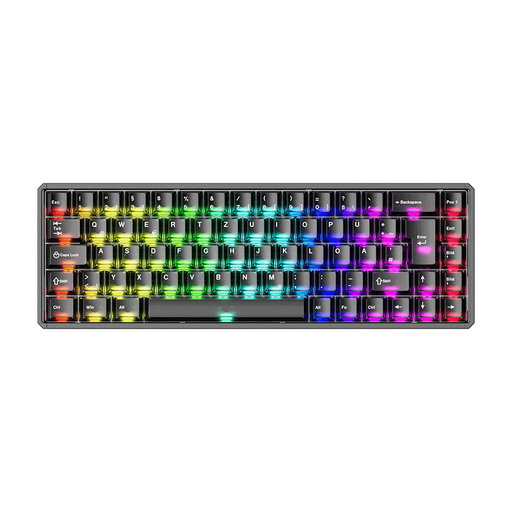
Akko MOD68-HE Tri-Mode, ISO-DE, black transparent
A suitable option if you’re looking for an ISO-DE version and customisable keys for repetitive commands.
Tri-mode connectivity and magnetic switches. According to the description, mechanical switches aren’t supported; check whether this type of switch meets your expectations.
View at Joybuy
 No image available
Akko 3084B Plus, 75%, ISO-DE, black and gold
A good fit if a German layout and customisable functions for repetitive input are important to you.
Tri-mode connectivity via Bluetooth, 2.4 GHz and USB-C; hot-swap support and RGB backlighting. The title lists V3 Pro Cream Blue switches.
View at Joybuy
 No image available
Akko 5087S V1 TKL, ISO-DE-QWERTZ, black and gold
A wired option if you’re looking for a German layout and high-contrast key legends.
USB-C connection, customisable RGB backlighting and macro function. The product description lists yellow legends on a dark base; check how visible they are at your window-side workstation.
View at Joybuy
 No image available
Ticktype EVO75 Custom, ISO-DE, Spray-Coated Nebula
A compact option if you’re looking for an ISO-DE layout and keys you can customise for repetitive commands.
75% layout, tri-mode connectivity, RGB backlighting and, according to the product title, VIA compatibility. The description lists software for customising key assignments and macros.
View at Joybuy
 No image available
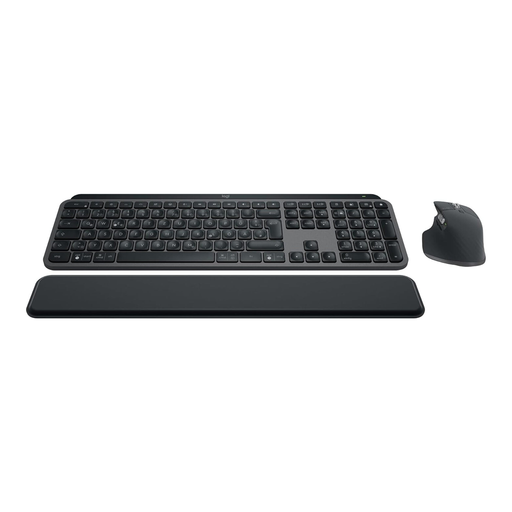
Logitech MX Keys S Combo, German QWERTZ keyboard and mouse
An option if you’re looking for a low-profile keyboard with a German layout and adjustable backlighting, and you’d like a mouse included.
According to the product name, the set includes the MX Keys S and MX Master 3S. The description lists Bluetooth, Logi Bolt, connection to up to three devices and backlighting that adjusts automatically.
View at Joybuy
Frequently asked questions
Does a backlit keyboard automatically help by a sunny window?
No, a backlighting claim doesn’t guarantee that. Glare and reflected glare also depend on the surface and setup, so check the key legends and positioning in the daylight at your actual workstation.
Do I need a special keyboard for terrain mapping?
Not necessarily. What matters is whether the application you use supports the shortcuts you need. QGIS lets you customise keyboard shortcuts; extra hardware keys are only useful if you can assign them the commands you use repeatedly.
How do I set up programmable keys?
First, list the commands you use repeatedly and check their shortcuts in your application. Then assign keys using the relevant device software and check that it supports the configuration you want.
What should I compare when choosing a layout and number pad?
Check whether you need a German layout and whether an integrated or separately positioned number pad better suits your workstation. Also compare the full model name and what’s included, as variants with similar names can differ.
What rights do I have if I buy a faulty keyboard?
For consumer purchases in the EU, you’re generally entitled to a minimum two-year legal guarantee from the date you receive the goods; the seller is responsible. Your Europe explains this EU-wide minimum requirement. An additional manufacturer’s promise doesn’t replace your statutory rights.


