What should you look for when buying?
First decide which views you want to see at the same time. Then check the colour workflow and screen position for your workspace.
| What you need |
What to check before buying |
Who should pay particular attention |
| Spotting fine texture transitions |
Native resolution, screen size and readability at your usual scaling; zoom in on details and check UV edges as well. |
If I’m comparing small transitions alongside the UV layout, I need a clear view of details at my chosen scaling. Around 33% of consumers shopping for this use prioritise fine details. |
| Assessing colour differences |
Set your output colour space and the mode you’ll use; check measurements for the specific model and preset, as well as profiling or calibration options. |
If I’m assessing colour differences for a defined output target, the colour mode needs to suit that workflow. Around 27% of consumers shopping for this use put colour control first. |
| Changing the screen position |
Work out the height you need when sitting and standing; check the adjustment range, stand or VESA mount, and desk fixing. |
If I switch between sitting and standing, I want to be able to position the screen comfortably in both. Around 27% of consumers shopping for this use prioritise positioning at a sit-stand workstation. |
| Space and connections |
Measure the footprint, including the stand; check video output, cables and the laptop’s required charging power separately. |
If my workspace is short on space or my laptop needs specific video and charging connections, I check the dimensions and ports in advance. Around 13% of consumers shopping for this use prioritise space and cable management. |
Connection and adjustment specifications vary by model. BenQ, for example, lists 110 mm of height adjustment and USB-C with 90 W Power Delivery for the PD2706U; ASUS specifies 0–130 mm of height adjustment and 96 W USB-C Power Delivery for the PA279CRV. Compare these details with your desk, laptop and cables.
Joybuy monitors for this use
The Joybuy options below include 4K and QHD monitors for viewing details, checking colour and working at a sit-stand desk. Compare the specifications for each model with your colour workflow, the screen position you need and your computer’s connections.
 No image available
CRUA CR320QB 32-inch curved 4K monitor
The 32-inch screen and 4K resolution may appeal if you want to work with several views on screen at once.
3840 × 2160 pixels; VA display; 3000R curvature; HDR10; 100% sRGB according to the product listing.
Joybuy
 No image available
MSI MPG 322URXDE QD-OLED 32-inch 4K monitor
If you’re looking for a large 4K workspace with colour gamut specifications, compare the listed modes with your specific output target.
3840 × 2160 pixels; 240 Hz; USB-C with 98 W Power Delivery. The product description lists 98% Adobe RGB and 99% DCI-P3; these are product specifications, not independent measurements.
Joybuy
 No image available
ASUS ROG Swift OLED PG32UCDMR 32-inch 4K monitor
The 32-inch 4K format may suit detailed viewing and multiple open windows. Also check that you can position the screen comfortably at both desk heights.
3840 × 2160 pixels; QD-OLED; 240 Hz; USB-C with 90 W. The product description lists 99% DCI-P3 and 80 mm of height adjustment.
Joybuy
 No image available
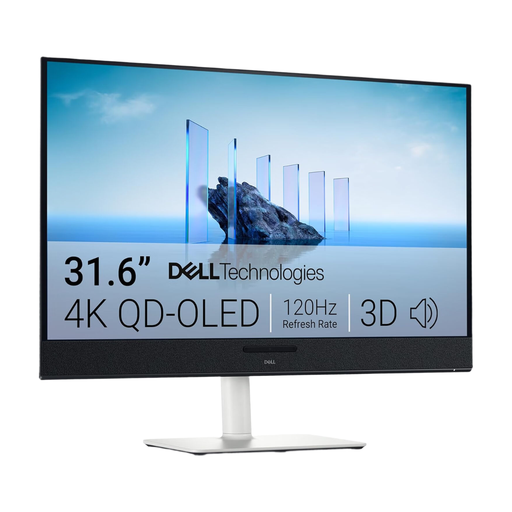
Dell Plus S3225QC 31.6-inch 4K QD-OLED monitor
If you’re after a large 4K screen for viewing several things at once, check the footprint and the available screen positions against your workspace.
3840 × 2160 pixels; QD-OLED. The product description lists 99% DCI-P3 and a height-adjustable stand.
Joybuy
 No image available
GIGABYTE G27Q20 27-inch QHD monitor
If desk space is a consideration and QHD is enough for your views, this format could be an alternative to 4K. It offers fewer pixels than 4K for displaying several views at once.
2560 × 1440 pixels; 200 Hz, overclocked to 210 Hz. The product description lists 130 mm of height adjustment and 94% DCI-P3.
Joybuy
Frequently asked questions
Will a 4K monitor get rid of visible UV or texture seams?
No. A higher display resolution can help you see details, but a UV seam remains a break in the UV map. The Blender Foundation also notes that aligning the edges of different UV islands can be tricky when painting textures in 2D.
How should I adjust my monitor when switching between sitting and standing?
Check the screen position you want at both desk heights, then compare it with the adjustment range of the stand or a suitable mount. The BAuA emphasises the importance of setting up your workstation to suit you and changing your posture; whether a particular adjustment range works depends on your setup.
What should I check about calibration and USB-C before buying?
If you want to use hardware calibration, check which software and, where necessary, which measuring device your workflow requires. If you use a laptop, check video output, cables and charging requirements separately. For example, EIZO specifies a maximum USB-C power delivery of 60 W for the CS2740.
Is a particular monitor resolution or stand required in Germany?
The official information referenced here doesn’t establish a general requirement for 4K or a particular type of stand for all private buyers. ASR A6 sets out requirements for screen-based workstations within its scope, including workplaces in business premises and teleworking workstations. These requirements shouldn’t automatically be applied to every private purchase.
How can I compare energy consumption and my rights when buying a monitor?
The European Commission describes an energy efficiency scale from A to G for electronic displays; the energy label helps you compare specific models. If a product is faulty, statutory consumer rights against the seller are distinct from a voluntary manufacturer’s guarantee. The Verbraucherzentrale explains that new goods are generally covered by a two-year statutory warranty period.


