Anyone checking texture seams
When comparing UV islands with the 3D view, look for clearly visible details and scaling that keeps your tools and views easy to read. Adobe describes UV islands in Substance 3D Painter as content in the 2D view.


For checking the UV view and 3D preview, choose a resolution that remains easy to read at your preferred scaling. If you also want the monitor to power your laptop, its USB-C video output and your laptop’s power requirements must be compatible with the monitor’s video and Power Delivery features. For reliable colour decisions, you’ll also need suitable colour modes and a proper calibration process.
When comparing UV islands with the 3D view, look for clearly visible details and scaling that keeps your tools and views easy to read. Adobe describes UV islands in Substance 3D Painter as content in the 2D view.
If you’d like to connect your monitor and laptop through a single monitor connection, check both your computer’s USB-C video output and its charging requirements. A USB-C port alone doesn’t guarantee that the two will be compatible.
If you’re assessing colours for a defined output workflow as well as checking seams, consider suitable colour modes and the calibration process required. Adobe highlights the importance of calibration for consistent appearance across applications.
First check that the resolution and scaling suit your workspace, then make sure your laptop’s connection and charging requirements are covered.
| What you need | What to check before buying | Who should pay particular attention |
|---|---|---|
| Texture seams and UV details | Native resolution, screen size, supported computer output and readable scaling for arranging the 2D and 3D views. | When I check UV islands alongside the 3D preview, I want to see the details without the interface becoming difficult to read at my chosen scaling. Around 34% of consumers put checking details first. |
| Making the most of limited power sockets | Check your laptop’s USB-C video output and charging requirements against the monitor’s Power Delivery output, and make sure you have a suitable cable. | When there are only a few spare sockets at my workstation, I’d like to power a compatible laptop through the monitor if possible. Around 33% of consumers prioritise powering their laptop. |
| Assessing colours in your workflow | Check the output colour space you need, the available colour modes and the calibration process for the specific model. | When I assess colours for a defined output process, I need a display mode to match and a clear calibration process. Around 20% of consumers put their colour workflow first. |
| Purchase and running costs | Compare the features you need and the EU energy label for the specific model. | If extra resolution or colour features don’t serve a clear purpose in my workflow, I don’t want to pay for them unnecessarily. Around 13% of consumers prioritise weighing up the costs. |
The monitor’s maximum Power Delivery output alone doesn’t tell you whether a particular laptop will output a video signal or receive enough power to charge.
Compare your laptop’s port and power requirements with the monitor’s input and the cable you’ll use. If video output or charging power isn’t compatible, you may still need to use your laptop’s separate power adapter.
More pixels won’t automatically change your UV layout, texture or preview settings. Adobe explains that preview settings can affect how an image looks without making the same changes to the exported texture.
Check seams in the UV and 3D views and, if it matters for your workflow, in the exported result too.
A stated colour space doesn’t replace the need to align your software, display mode and output colour space. A planned calibration process may also take extra time and require additional equipment.
Set your intended output colour space and software settings, then check that the monitor mode and calibration process are suitable.
The PA279CRV and PA27JCV offer different resolution options for a USB-C-focused creative workstation.
The PD2706U is a 27-inch 4K monitor with USB-C, designed for creative workstations.
The CS2740 is a 4K option for workflows where colour assessment and hardware calibration are important.
A 27-inch 4K IPS option with USB-C, for when detailed images are a priority.
The U2725QE is a 27-inch 4K option with a Thunderbolt hub and integrated USB hub connectivity.
These monitors combine a screen resolution suited to detailed work with stated USB-C Power Delivery capabilities. Check your laptop’s actual power requirements and your preferred screen size against each specific model.
 No image available
A good fit if you want to arrange the UV and 3D views across a large screen. Check that everything remains easy to read at your preferred scaling.
Listed in the product title: 40 inches, 5120 × 2160 pixels, IPS and USB-C with 65 W Power Delivery. Whether that’s enough power for your laptop depends on its requirements.
 No image available
A 27-inch 4K option if you want to check texture seams on a more compact screen and connect a compatible laptop via USB-C.
Listed in the product title: 3840 × 2160 pixels, IPS, 120 Hz and USB-C with 90 W Power Delivery. Check your laptop’s video output and charging requirements.
 No image available
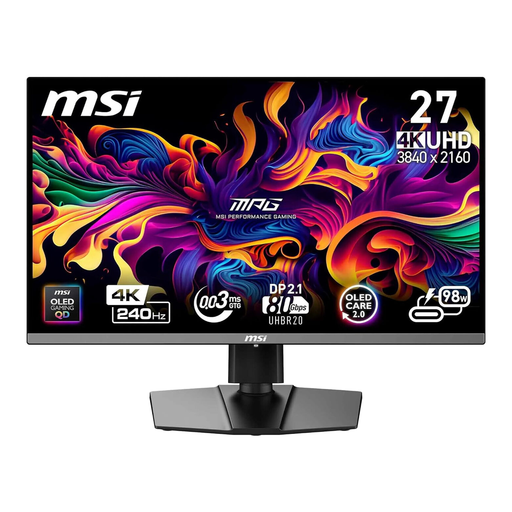
Worth considering if you’re looking for 4K resolution and a stated USB-C charging output of 98 W in a 26.5-inch model.
Listed in the product title: 3840 × 2160 pixels, QD-OLED and USB-C with 98 W Power Delivery. This power rating isn’t a guarantee of compatibility with every laptop.
 No image available
A larger 4K screen could suit you if you want more room to arrange your work views. Check that the size and scaling work for your workspace.
Listed in the product title: 3840 × 2160 pixels and USB-C with 98 W Power Delivery. Your laptop’s video output and power requirements must be compatible.
 No image available
A good fit if you’re looking for a large 4K workspace with USB-C charging listed in the product title.
Listed in the product title: 3840 × 2160 pixels, 32 inches and USB-C with 90 W Power Delivery. Check this against your laptop’s actual power requirements.
No. Check whether your laptop can output a video signal through the USB-C port in question and how much charging power it needs. Compare both with the monitor’s video and Power Delivery capabilities, as well as the cable you’re using.
No. Resolution affects what you see on screen, not whether textures are corrected. In Substance 3D Painter, you can check UV islands in the 2D view. Preview settings can affect how they look without making the same changes to the exported texture.
First, set the intended output colour space and display transform in your software. Then check that you have a suitable monitor mode and the calibration process you need. Adobe notes that calibration is important for consistent appearance across applications.
Compare the EU energy labels for the specific models. The European Commission rates electronic displays on an efficiency scale from A to G. The German Environment Agency advises against disposing of old electrical appliances in household waste.