
Lieferung heute & morgen

Qualitätsgarantie

Willkommens-Angebote freischalten: KOSTENLOSE Lieferung | Bis zu 80 % RABATT | Kostenlose 30-Tage-JoyPlus-Testphase
App herunterladen
As a Joybuy Product Recommendation Officer, I analyse market data daily to provide you with objective, practical buying advice. When searching for a new mechanical keyboard, the sheer volume of technical jargon and marketing promises can be overwhelming. Many buyers invest in models advertised with a "Gaming" label that lack fundamental performance features, or discover that the promised "customisation" is limited to just the backlighting.
This guide will help you navigate these pitfalls. We'll focus on the critical technical features that define a high-quality mechanical keyboard, enabling you to make an informed decision that meets your actual needs—whether for competitive gaming, productive work, or the joy of customisation.
Before we dive into the technical details, let's highlight two common marketing traps that often lead to disappointment:
To find a keyboard that will satisfy you in the long run, you should carefully examine three technical aspects. These are the primary determinants of performance, comfort, and durability.
The mechanical switches define the typing feel and response time. The three basic types are:
For competitive gamers, there are also more advanced technologies like the Rapid Trigger keyboard. It uses magnetic (Hall effect) switches, whose actuation and reset points can be set dynamically with extremely high precision (often to 0.1 mm). This allows for significantly faster responsiveness in games.
The way the PCB (Printed Circuit Board) is mounted inside the case has a significant impact on the typing feel and sound.
The keyboard's size should match your workspace and usage habits. Furthermore, selecting the correct regional layout (e.g., QWERTY for the US/UK) is essential to ensure all characters and symbols are where you expect them to be.
Here are some recommendations tailored to specific user profiles that take the quality features mentioned above into account.
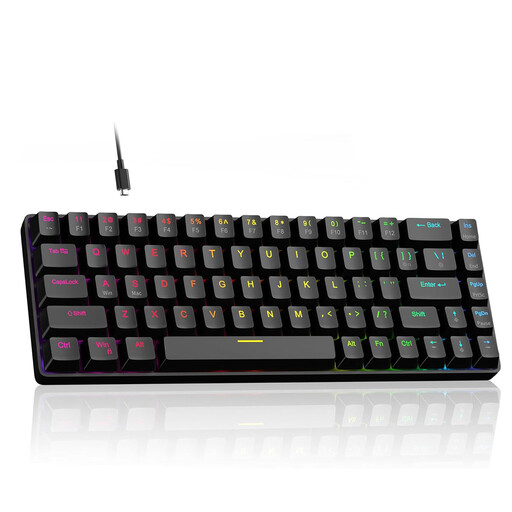
Why This Fits Their Persona: This model is designed for esports athletes where every millisecond counts. The magnetic switches with Rapid Trigger technology enable instantaneous key response, providing a tangible advantage in fast-paced FPS games.
Instead of just flaunting RGB lighting, this keyboard delivers real performance advantages through its Hall effect switches and 8000 Hz polling rate, which minimise input latency.
The actuation point is digitally adjustable from 0.1 mm to 4.0 mm. The Rapid Trigger function ensures an immediate key reset.
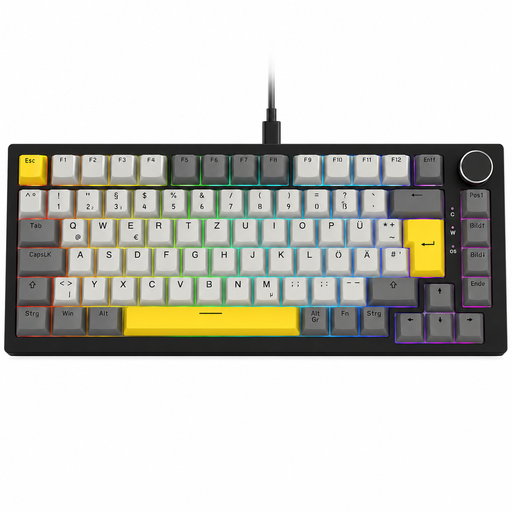
Why This Fits Their Persona: This model combines many sought-after features: a compact 75% format, a Gasket Mount structure for a superior typing experience, and a hot-swap PCB for easy modifications. The practical volume knob completes the package.
It offers true customisability through hot-swap sockets instead of relying on software gimmicks. The gasket structure is a clear quality feature that elevates it above standard models.
The combination of Gasket Mount, hot-swap capability, and a compact form factor with a full feature set is rare and offers an excellent overall package.

Why This Fits Their Persona: This wireless mechanical keyboard is designed for professional use. It combines a subtle design with quiet, tactile switches and high-productivity features, such as seamless switching between up to three devices.
It deliberately avoids the loud "gaming" aesthetic and instead focuses on functional excellence: quiet switches suitable for the office, long battery life, and reliable wireless connectivity.
The low-profile switches allow for fast and fatigue-free typing. The smart backlighting and multi-device capability streamline any workflow.
We have compiled a complete, up-to-date list of products that fully meet these strict selection criteria and all relevant safety standards.
In a gasket-mount keyboard, the plate and PCB assembly is mounted on flexible gaskets, which dampens vibrations and provides a softer, quieter typing feel. With the conventional tray-mount design, the PCB is screwed directly into the case, which can lead to a harsher bottom-out and more case resonance.
Yes, absolutely. A hot-swap keyboard allows you to change the mechanical switches without any technical expertise or soldering tools. This is ideal for experimenting with different switch types (linear, tactile, clicky) to find the perfect typing feel for you. Additionally, you can easily replace faulty switches yourself, which extends the keyboard's lifespan.
The regional layout determines the physical and logical arrangement of keys. The most common physical layouts are ANSI (prevalent in the US) and ISO (common in Europe), which differ in the shape of the Enter key and the size of the left Shift key. Furthermore, logical layouts like US-QWERTY, UK-QWERTY, or others place symbols like @, #, ?, and $ in different locations. Choosing the layout you're used to is crucial for an efficient and error-free typing workflow.