
Lieferung heute & morgen

Qualitätsgarantie

Willkommens-Angebote freischalten: KOSTENLOSE Lieferung | Bis zu 80 % RABATT | Kostenlose 30-Tage-JoyPlus-Testphase
App herunterladen
The search for the right wireless gaming mouse can quickly become overwhelming. Manufacturers advertise ever-higher DPI counts, extremely low weights, and new sensor technologies. But not every innovation is a real advantage for competitive players. Often, exaggerated marketing claims lead to purchasing decisions that later turn out to be impractical or detrimental to performance.
This guide will help you understand the crucial technical features and avoid common buying traps. As a Joybuy Product Recommendation Officer, I'll analyse the facts for you, so you can make an informed decision that actually improves your in-game performance.
Before we dive into the technical details, let's look at two common marketing traps that often lead to disappointment:
ultra-lightweight gaming mouse is undeniable, but the execution is critical. Models with a perforated or hole-punched shell are light, but they are susceptible to dust and dirt ingress, which can compromise the longevity of internal components. Structural integrity can also suffer. A solid, thoughtfully engineered mouse can achieve a similar weight without these disadvantages.To make the right choice, you should focus on three core parameters that have a direct impact on your performance.
The heart of any gaming mouse is its sensor. Modern optical sensors, like those in the Pixart PAW series, offer flawless tracking without unwanted acceleration.
high-DPI gaming mouse offers flexibility, but most esports pros play with values between 400 and 1600 DPI to ensure maximum precision. More important than the maximum value is a high-quality sensor that operates flawlessly at these common settings.8K polling rate mouse (8000 Hz) reduces latency to as low as 0.125 ms. This can provide a noticeable advantage on monitors with very high refresh rates (240 Hz and above), but it also requires more CPU power.These two factors determine how the mouse feels in your hand and how long you can play without fatigue.
ultra-lightweight gaming mouse (typically under 70 grams) allows for faster reactions and changes in direction, which is particularly advantageous in fast-paced FPS games. A low weight also reduces strain on the wrist.ergonomic gaming mouse is adapted to the natural posture of the hand. Whether you prefer a symmetrical design for various grip styles (Palm, Claw, Fingertip) or an asymmetrical shape for right-handers depends on your personal preference. The shape is crucial for comfort and control during long gaming sessions.For a wireless mouse, a stable connection and a reliable power supply are essential.
gaming mouse with long battery life (over 70 hours) ensures you can get through extended gaming weekends without interruption. Look for models that can also be used via cable while charging.Here are some recommendations tailored to different needs and playstyles.
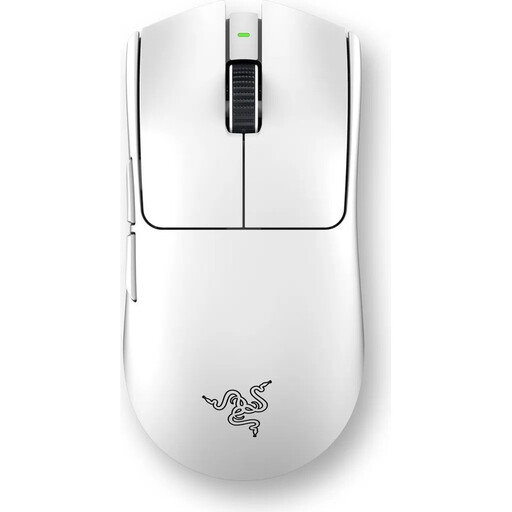
Why This Fits Their Persona: For players where every millisecond counts. This model was developed in collaboration with esports pros and is designed for maximum speed and responsiveness. The extremely low weight and high polling rate are optimised for competitive FPS titles.
The mouse focuses on measurable performance advantages (8000 Hz polling rate, 54g weight) rather than just a high DPI number. The solid, symmetrical shape offers proven ergonomics without the drawbacks of a perforated shell.
Ultra-lightweight 54g design for maximum agility and Razer 8000Hz HyperPolling technology for extremely low latency.
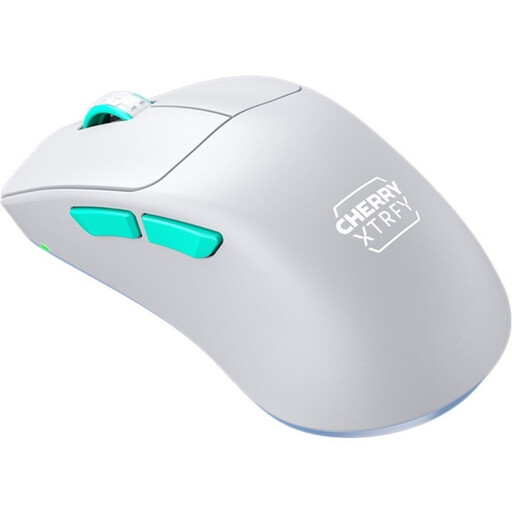
Why This Fits Their Persona: Ideal for right-handed players who game for hours and value comfort and control. The combination of low weight, long battery life, and an ergonomic shape specifically designed for precision makes it a reliable tool for long sessions.
This mouse achieves its low weight of 53g through a thoughtful, solid construction without holes. The focus is on functional ergonomics (ultra-low front) rather than pure aesthetics.
Unique ergonomic design for right-handers with a low front for more control and a battery life of up to 75 hours.
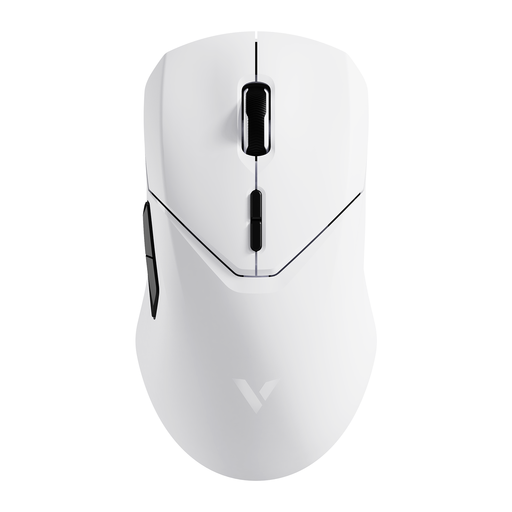
Why This Fits Their Persona: For gamers who want advanced features like a high polling rate and a top-tier sensor but don't want to pay the premium price for absolute top-of-the-line models. The extremely long battery life is an additional practical advantage for daily use.
This model offers a 4000 Hz polling rate, which is noticeably higher than the 1000 Hz standard, without the extreme CPU demands of 8K mice. It balances a low weight (68g) with a solid build and an exceptionally long battery life.
Offers a 4K polling rate for improved response time and an outstanding battery life of up to 180 hours according to the manufacturer.
We've compiled a complete, up-to-date list of products that meet these strict selection criteria. Discover more models that fit your playstyle.
Is an 8K polling rate mouse worth the extra cost? A polling rate of 8000 Hz can reduce latency to a minimum, which can be beneficial for professional players with monitors that have a refresh rate of 240 Hz or higher. For most gamers, however, a mouse with 1000 Hz or 4000 Hz is perfectly sufficient and places less strain on the computer's CPU. The benefit strongly depends on the rest of your hardware and your individual perception.
How important is weight in a wireless gaming mouse? Weight is a crucial factor for agility and fatigue. An ultra-lightweight gaming mouse (under 70g) allows for faster movements and relieves wrist strain during long gaming sessions, which is especially advantageous in fast-paced shooters. Ultimately, however, the ideal weight is a matter of personal preference. It's important to find a balance between low weight and a stable, comfortable build.
How do I maintain my gaming mouse for maximum lifespan? Clean the housing regularly with a dry microfibre cloth. You can use compressed air to gently remove dust from the crevices around buttons and the sensor. Avoid liquid cleaning agents. Check the mouse feet (skates) for wear and replace them if necessary to ensure a consistent glide. Turn off the mouse when not in use for extended periods to preserve the battery.