If you’ll mainly be editing text, choose a laptop that supports the software you need, with a comfortable keyboard and enough screen space to work. For more demanding page layouts and print preparation, the display, memory and monitor connections become more important. Adobe lists 8 GB RAM as the minimum and 16 GB as the recommended amount for InDesign on Windows; your printer will also specify the PDF settings needed for print.
Who works on a theatre programme?
Programme design for print
If you’re laying out pages with images and sending a PDF to the printer, let your software requirements and the agreed export settings guide your choice. Adobe outlines settings for InDesign such as printer’s marks and bleed.
Editing and proofreading
If you mainly work on names, copy and corrections, look for a suitable keyboard, easy-to-read documents and support for the file formats you need to share. Notebookcheck lists input devices and, where possible, anti-glare displays among the factors to consider when choosing an office laptop.
Between home and the rehearsal venue
If you edit on the move and want to connect a monitor at home, check both the laptop’s size and the video ports on the specific model. Apple lists Thunderbolt 4 ports with DisplayPort on the MacBook Air M5; according to Lenovo, compatible ThinkPad E16 Gen 3 configurations can connect to displays via HDMI, USB-C and Thunderbolt.
What should you look for when buying?
First, decide which programmes and file formats you actually need, and whether you’ll mainly be proofreading or designing pages. Then you can choose a display, storage and ports to suit your workspace.
| Consideration |
What to check when buying |
Who is it most relevant to? |
| Page layout and software |
The programme and operating system you need; for InDesign on Windows, check the RAM and display requirements for the version you use. |
If you work with pages, images and toolbars, choosing the right layout software is key; around 33% of consumers put layout and software first. |
| Images and print output |
Check the display on the specific model, and agree the PDF format, bleed and colour profile with your printer. |
If you need to assess images and the print file, you’ll need a screen that suits the way you work, along with agreed export settings; around 25% of consumers put print output and image checking first. |
| Proofreading |
Check the keyboard layout, display finish and compatibility with the files you use. |
For lengthy rounds of corrections, readable text and a comfortable typing experience matter; around 25% of consumers prioritise copy editing and input devices. |
| Monitor and portability |
Compare the exact model’s video output with the monitor’s input, and check whether you’ll need any adapters. |
If you take your laptop between home and the rehearsal venue and use a monitor at your desk, its portability and connections need to work for you; around 17% of consumers put desk connectivity first. |
Common buying mistakes
-
Assuming every model in a laptop range is the same
Operating systems, displays and ports can vary within the same range. For example, one specific HP ProBook 460 G11 model is listed with FreeDOS rather than Windows pre-installed.
Before ordering, check the full model number, operating system, display and ports for the version on offer.
-
Assuming a good display means your file is print-ready
What you see on screen doesn’t determine the bleed, PDF/X format or output profiles. For print, follow your printer’s specifications and use the appropriate export settings.
Get the printer’s specifications before exporting, then check the finished PDF against them. If the file doesn’t meet the requirements, you may need to make further rounds of corrections.
-
Choosing a Windows ARM laptop based on office use alone
At the time of research, Adobe described native support for InDesign on Windows ARM from version 22.0 as a beta; according to Adobe, earlier beta versions ran in emulation mode.
If you need InDesign, check that your specific version and the other programmes your team uses are supported before buying.
Key brands at a glance
Lenovo
ThinkPad E16 models are worth considering if you want a larger Windows laptop and plan to use external displays.
- Lenovo’s PSREF lists display output via HDMI, USB-C and Thunderbolt for compatible E16 Gen 3 configurations.
- The processor and specifications vary by model. Check the configuration you’re planning to buy.
Apple
The MacBook Air M5 is a macOS option for a compact workspace, with the option to connect an external display.
- For the 13-inch model in the standard configuration described, Apple lists 16 GB of unified memory and a 512 GB SSD. The Thunderbolt 4 ports support DisplayPort.
- Before switching, check that the software your team needs, its fonts and your peripherals are compatible with macOS.
ASUS
The Vivobook S 16 OLED (S5606) is part of a Windows range with a large OLED display, suited to visual layout work.
- ASUS describes a 16-inch OLED display for this range.
- The display, ports and specifications can vary by model. Check the product number, and bear in mind the conditions behind any quoted battery life or performance figures.
HP
Some ProBook models could suit a 16-inch home-working setup.
- The HP ProBook 460 G11 model A23HLEA#ABD is listed with 16 GB RAM and a resolution of 1920 × 1200 pixels.
- This particular model comes with FreeDOS rather than Windows pre-installed; this doesn’t necessarily apply to other ProBook configurations.
Acer
Swift Go 16 OLED models combine a larger display with a laptop that’s still portable.
- For model NX.JDDEG.00C, Acer lists Windows 11 Home, 32 GB RAM, HDMI and a 16-inch OLED display with a resolution of 2048 × 1280 pixels, among other features.
- These specifications apply to the product number listed and aren’t automatically shared by other models in the range.
Joybuy laptops for writing and layout work
These models cover Windows laptops with a range of display sizes for proofreading and page layout.
 No image available
Lenovo Yoga Slim 7i Aura Edition, 14-inch
The 14-inch size is a good option if you edit on the move and want a compact device.
2.8K OLED display, Core Ultra 7 355, 16 GB RAM, 1 TB SSD and Windows 11.
View at Joybuy
 No image available
Acer TravelMate TMP216-41-TCO
The 16-inch display gives you more room to work on the laptop itself when editing pages.
WUXGA display, AMD Ryzen 3 PRO 7335U, 16 GB DDR5, 512 GB SSD and Windows 11 Pro Education.
View at Joybuy
 No image available
Lenovo ThinkPad E16 Gen 3 21ST
The 16-inch size is a good choice if you work on layouts and text directly on your laptop and want more screen space.
AMD Ryzen 7 250, 32 GB RAM, 1 TB SSD and Windows 11 Pro.
View at Joybuy
 No image available
HP OMEN 16-ap1071ng
The 16-inch screen gives you more room to check pages and comments on the laptop itself.
QHD display, AMD Ryzen 7 8745HX, 16 GB RAM, 1 TB SSD and Windows 11 Home.
View at Joybuy
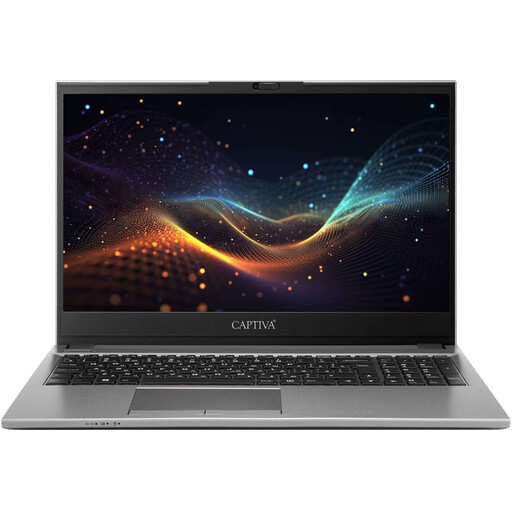 No image available
Captiva Power Starter, 15.6-inch
The 15.6-inch size is a good option for proofreading and layout work directly on your laptop.
Intel Core i7-1255U, 16 GB RAM, 500 GB SSD and Windows 11 Home.
View at Joybuy
Frequently asked questions
Do I need a laptop with 16 GB RAM to produce a theatre programme?
No, it depends on the software you use. Adobe lists 8 GB RAM as the minimum and 16 GB as the recommended amount for InDesign on Windows; also check the requirements for the programmes you actually use.
Is a good display enough to make a programme file print-ready?
No. Agree the PDF requirements with your printer and check the export. Adobe describes settings in InDesign for PDF/X, bleed and output profiles, among other things.
What should I check before connecting a monitor?
Compare the monitor’s video input with the video output on the specific laptop model, and allow for any adapters you may need. Check the device’s exact ports rather than assuming that USB-C alone guarantees a compatible video connection.
Can I return a laptop bought online in Germany?
For a distance-selling contract with a business, consumers generally have a 14-day right to cancel from the date the goods are delivered. Exceptions and specific rules on return costs apply. The statutory right to cancel is separate from a retailer’s voluntary returns policy. This information is from the European Union’s Your Europe service.
Is a manufacturer’s guarantee the same as statutory rights?
No. If a product is faulty, your statutory rights are against the seller; a manufacturer’s guarantee is an additional voluntary service with its own terms. Germany’s consumer advice centre, Verbraucherzentrale, explains the difference between these rights.


