What should you consider when choosing?
First decide what matters most for your theatre programme: typesetting, limited desk space, print colours or a laptop connection. Then check the relevant specifications of the model you’re considering.
| Your priority |
What to check before buying |
Who it matters to |
| Readable text and space for layouts |
Check the native resolution, screen size, aspect ratio and whether the scaling makes text easy for you to read. |
If I want to read programme pages and toolbars clearly at the same time, I look for a suitable workspace and text size. Around 31% of consumers put typesetting and layout first. |
| Fitting on your desk |
Compare the available width and depth with the monitor’s dimensions, including its stand. Check whether the particular model is height-adjustable. |
If I also need room for a keyboard and paperwork on my desk, I measure the space before choosing. For around 31% of consumers, fitting into a small space is the priority. |
| Colours for print |
Check the output requirements and profiles with the printer. Compare the colour mode, calibration options and, where relevant, Adobe RGB coverage. |
If I want to assess colours for a specific print job, I choose a monitor to suit that output process. For around 23% of consumers, assessing print colours comes first. |
| Laptop connection |
Check the video output supported by the laptop port, the charging power you need and the monitor’s stated Power Delivery rating. |
If I want to handle video and charging through the same connection where possible, I compare the specifications of both devices. For around 15% of consumers, the laptop connection is the most important buying criterion. |
Monitors at Joybuy for layout and editorial work
The Joybuy models below vary in screen size, resolution and connection options. Check the space available, the workspace you need for your layouts and laptop compatibility for each specific model.
 No image available
INNOCN CB27U1 27-inch 4K UHD monitor
An option for layout work where high native resolution and a wide colour gamut are important. Suitable profiles and output requirements are still needed for print work.
27 inches, 3840 × 2160 pixels, 99% Adobe RGB according to the product details, USB-C with 90 W Power Delivery and a height-adjustable stand.
View at Joybuy
 No image available
MSI Modern MD342CQPWDE 34-inch UWQHD monitor
The wide workspace could suit layouts with several areas visible at once. Check that the screen will fit on your desk.
34 inches, 21:9 aspect ratio, 3440 × 1440 pixels and 120 Hz according to the product name.
View at Joybuy
 No image available
Dell Pro Plus P2725DE 27-inch QHD monitor
An option for page layout at QHD resolution and a laptop workspace, provided the connections on both devices are compatible.
2560 × 1440 pixels, USB-C with up to 90 W Power Delivery and a height-adjustable stand according to the product details.
View at Joybuy
 No image available
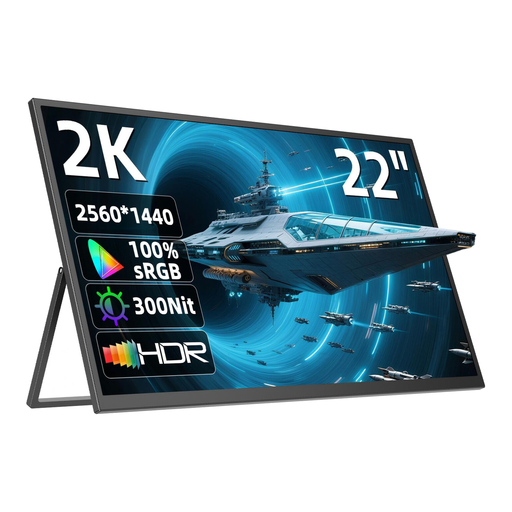
UPERFECT 22-inch QHD monitor
A smaller QHD option if you prefer a more compact screen. Check that the text size works for your needs.
22 inches, IPS and 2560 × 1440 pixels; adjustable stand and VESA compatibility according to the product details.
View at Joybuy
 No image available
MSI PRO MP275QPDGDE 27-inch WQHD docking monitor
An option for QHD layout work with USB-C docking. If your colour workflow requires full sRGB coverage, take the stated figure into account.
27 inches, 2560 × 1440 pixels and USB-C with 98 W Power Delivery. The product details state 84% sRGB, as well as height adjustment, tilt, swivel and pivot functionality.
View at Joybuy
Frequently asked questions
Is an sRGB monitor enough for designing a theatre programme?
A monitor with a suitable sRGB mode may work well for an sRGB-focused design. If you want to assess the colours in the finished print, check the output requirements and profiles with the printer. Colour-gamut coverage alone won’t reliably predict the print result.
Can I connect my laptop with just one USB-C cable?
Only if the laptop port supports the video output you need and the selected monitor provides enough power for your laptop. Specifications vary: for example, the BenQ PD2506Q provides 65 W, the EIZO EV2480 provides up to 70 W and the ASUS PA279CRV provides 96 W.
What should I consider when setting up the monitor and checking colours?
Measure the available space, including room for the stand, and adjust the height and tilt to suit your workspace. For a reliable assessment of print colours, you’ll also need a colour-management workflow suited to the output process. Germany’s ASR A6 applies to workplaces and certain teleworking environments; it is not a blanket requirement for equipment in a privately used student room.
What rights do I have when buying a monitor online in Germany?
When consumers buy online, they generally have 14 days from receiving the goods to withdraw from the purchase. Your statutory rights if goods are faulty are separate from any voluntary manufacturer’s warranty. The Verbraucherzentrale explains both sets of rules and their different legal bases.
What about energy labels and disposing of an old monitor?
For computer monitors, the Umweltbundesamt refers to the EU energy label. Check the details for the specific model on offer. An old monitor should not go in household waste. Take it to a separate electrical waste collection point, such as a recycling centre or an appropriate take-back point.


