When recording long theatre rehearsals, your choice will mainly depend on your editing software, recording format and the amount of original footage and working files you need to store. An expandable tower is an obvious option if future upgrades matter; a compact workstation saves space, but you’ll need to check the specification of the exact configuration more carefully. A Mac Studio is worth considering if macOS suits your workflow and Apple’s specified processing support for the codecs you use is relevant. For Adobe Premiere, Adobe recommends 32 GB or more of memory for 4K and above – this is not a general requirement for every editing programme.
Who benefits from each approach?
Rehearsal archive managers
If you manage lots of long original recordings, you’ll need a plan for working copies, free storage space and separate backups. Germany’s Federal Office for Information Security explains how backups can help protect against data loss.
Editors
If you review and edit long timelines, consider the recording format and playback preview. These factors help determine whether the processor, media drive or a proxy workflow should be your main focus. Adobe describes proxies as lower-resolution copies that can be used instead of the original files while editing.
Teams working on effects and colour correction
If you also work on graphics, effects or colour correction, check the requirements of your specific editing programme and project files. Adobe’s Premiere requirements distinguish between HD media and 4K or above.
What should you look for when buying?
| Buying consideration |
What to look for |
Who it matters to |
| Storage and backups |
Work out how much space your original footage will need, then allow room for working files and, where appropriate, proxies. Make provision for a separate backup. |
If I manage long original recordings and project files, I want to plan for working copies and backups separately. Around 36% of consumers prioritise storage and backups. |
| Reviewing footage and exporting |
Check that the codec, resolution and editing programme are a good match for the processor, memory and media drive. Consider a proxy workflow if needed. |
If I review lots of long recordings and export frequently, I want to take the requirements of my own footage into account. Around 29% of consumers prioritise playback preview and export. |
| Effects and colour correction |
Check the software requirements and graphics specification of the exact configuration, not just the product range. |
If I also work on effects or colour correction, I want to factor in the requirements of my projects. Around 21% of consumers prioritise effects and colour. |
| Expandability and cost |
Compare the components actually fitted and the available upgrade options. Also check which accessories are included in the specific offer. |
If I may need more storage drives or memory later, I want to know the upgrade options for the exact model. Around 14% of consumers prioritise upgrades and cost. |
Common buying mistakes
-
Treating the internal SSD as a complete archive and backup solution
Original footage, project files and proxy files can all take up space at the same time. A single internal SSD is no substitute for a separate backup.
Work out how much space you need based on your own recordings, and keep a backup copy separate from your working drive.
Working files and a separate backup need additional storage space and their own backup medium.
-
Assuming a high CPU or GPU specification guarantees smooth playback preview
Requirements vary depending on the editing programme, codec and resolution. A proxy workflow can help with some high-resolution footage, but it also means extra files and preparation.
Check your project files and the requirements of the software you use before choosing a different configuration based on a single component.
-
Confusing a product range’s top specification with the model on offer
Storage, graphics and upgrade options can vary by order number. Information about a product range does not automatically apply to the specific offer.
Compare full model or order numbers and the components actually included. If you plan to upgrade later, make sure the options available on your chosen model will suit your needs.
Key brands to consider
Apple
Mac Studio for a macOS workflow and Apple’s specified processing support for certain video formats.
- For the Mac Studio with M5 Max, Apple lists hardware-accelerated processing for H.264, HEVC, ProRes and ProRes RAW.
- The base specification described includes 36 GB of unified memory and a 512-GB SSD. Remember to allow space for long original recordings and working files.
Lenovo
ThinkStation P3 Tower Gen 2 is a Windows tower, with specifications that depend on the exact model.
- The 30HT00CXEZ model lists 64 GB of RAM, a 1-TB SSD and an RTX PRO 2000 Blackwell with 16 GB.
- These specifications apply to the model listed and cannot be assumed for every P3 configuration.
HP
The Z2 Tower G1i is a configurable tower, while the Z2 Mini G1a is an option for a more compact workspace.
- HP describes a range of memory options for the Z2 Tower series.
- HP lists integrated graphics for the Z2 Mini G1a. For both ranges, check the specification and upgrade options for the exact order number.
Dell
The Precision 5860 is a configurable tower that lets you compare specific configurations.
- Dell describes options for the processor, graphics and storage.
- The maximum specifications listed do not necessarily describe the base system. Dell says that selected configuration changes may affect other specifications.
Joybuy products on this topic
The Joybuy products below range from expandable towers to compact desktop systems. Compare the specification of each model with your editing programme, recording format and planned storage needs.
 No image available
Acer Predator Orion 3000 desktop, Core Ultra 5 225F, 16 GB, 512 GB SSD, RTX 5060
For a Windows-based desktop workflow. Whether the specification is right for long timelines depends on your software and project files.
The product details list 16 GB of RAM, a 512-GB SSD and an RTX 5060 with 8 GB GDDR7. The memory is upgradeable to up to 32 GB, according to the description; Windows 11 Home is also listed.
Joybuy
 No image available
Acer Nitro 20 N20-100 desktop, 32 GB, 1 TB SSD, 1 TB HDD, RTX 5060
The separate drives may appeal if you want to organise project files and long recordings across multiple internal storage devices.
The product description lists 32 GB DDR4, a 1-TB SSD and an additional 1-TB HDD. It also lists an 8-core processor with up to 4.60 GHz Turbo, dedicated NVIDIA graphics with 8 GB GDDR7 and Windows 11 Home.
Joybuy
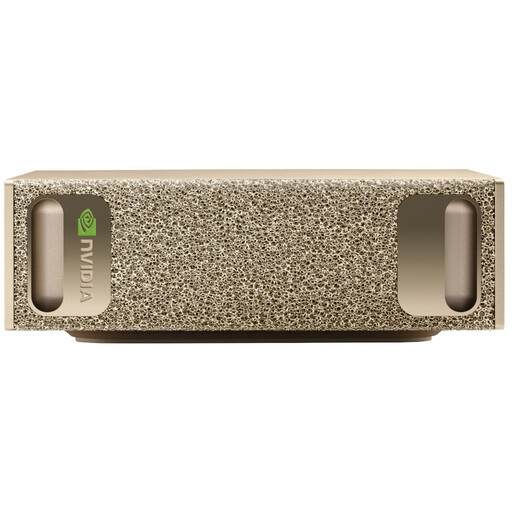 No image available
NVIDIA DGX Spark Founders Edition, GB10, 128 GB RAM, 4 TB SSD
Its compact form may suit a workspace with limited room, but the specifications listed alone do not confirm that it will work with a particular editing programme or video footage.
The title lists 128 GB of RAM and a 4-TB SSD. The product description lists an NVIDIA GB10 with 20 cores, integrated Blackwell graphics and NVIDIA DGX OS. Before buying, check that your software and formats are compatible with your workflow.
Joybuy
 No image available
HP Z2 Tower G1i A40MMET, Core Ultra 7 265, 32 GB DDR5
This tower is worth considering if you’re comparing desktop systems with clearly stated specifications. Check the exact configuration against your project needs.
The description lists an Intel Core Ultra 7 265 with 20 cores, 32 GB DDR5 and Intel graphics. Windows 11 Pro is also listed.
Joybuy
 No image available
Dell Pro Plus SFF QBS1250 Slim Desktop, Core Ultra 7 265, 32 GB
The SFF case is an option for a more compact workspace. How well it suits long recordings also depends on available storage and your workflow.
The specifications list an Intel Core Ultra 7 265 with 20 cores, 32 GB DDR5 and a 512-GB NVMe SSD. The system has integrated Intel graphics and Windows 11 Pro.
Joybuy
Frequently asked questions
Do I need at least 32 GB of RAM for every long rehearsal video?
No. Adobe recommends 16 GB for HD media and 32 GB or more for 4K and above in Premiere. This is a recommendation for that programme, not a general requirement for every editing programme.
Can proxies replace buying a more powerful computer?
Proxies can make it easier to edit high-resolution or demanding files, but they don’t automatically replace a well-balanced system. Adobe describes them as smaller working copies used instead of the originals while editing. Allow time and storage to create them, and check the export using the original files.
How should I back up long original recordings?
Keep backup copies separate from your working drive and check that you can restore them. Germany’s Federal Office for Information Security highlights drive failure, accidental deletion and malware as possible causes of data loss.
Is a manufacturer’s warranty the same as statutory consumer rights?
No. For consumer purchases in Germany, statutory rights relating to faulty goods are claims against the seller; a warranty is an additional voluntary promise subject to its own terms. If a theatre buys the computer as a business, check the specific contractual terms separately.


