A wireless repeater is an obvious option if there’s still a usable connection to your router where you plan to put it. If the signal is already weak there, consider a wired access point connected via Ethernet. If you can’t run a cable, powerline with Wi-Fi may be an alternative, although results depend on your home’s electrical wiring. Mesh features should be compatible with your existing router, so don’t judge a device by its advertised Wi-Fi data rate alone.
Which solution is right for you?
Video calls in a Wi-Fi dead zone
If you want to work without a cable, check whether there’s a spot on the router side of the thick wall where the repeater can still get a usable Wi-Fi signal. FRITZ! recommends minimising obstacles between the router, repeater and connected devices wherever possible.
Home office with an Ethernet connection available
If you can run a cable close to your home office, you can bypass the troublesome wireless connection to the router. FRITZ! documents a LAN bridge for this purpose, while TP-Link describes an access point mode over Ethernet for the RE705X.
Extending your existing router mesh
If you already have a mesh-capable router, check that the mesh feature on the specific device is compatible with your router model. TP-Link, Telekom and FRITZ! each specify which routers or systems their mesh features work with.
What to look for when buying
Wireless repeater
A good fit if: There’s still a usable connection to the router where you plan to put it, and you don’t want to run a cable.
The trade-off: A strong connection between your laptop and the repeater won’t make up for a weak wireless connection between the repeater and the router.
LAN bridge or access point
A good fit if: You can run an Ethernet cable to your home office or somewhere nearby.
The trade-off: You won’t need a wireless connection back to the router, but you will need to run a cable and set up the device. Check the operating mode supported by the specific model.
Powerline with Wi-Fi
A good fit if: The wireless connection isn’t strong enough and you can’t run an Ethernet cable.
The trade-off: The connection runs through your electrical wiring, so sockets and electrical interference can affect performance. devolo also notes that certain VDSL connections may be affected.
| What you need |
What to check before buying |
Who this matters most to |
| A reliable wireless connection |
Check the signal at potential repeater locations, then check the connection in your home office. |
If I want to work without a cable, I need a usable connection to the router where the repeater will go. Around 36% of consumers put a reliable wireless connection through the walls first. |
| A non-wireless connection back to the router |
Check for an Ethernet port and a suitable access point or LAN bridge mode; if using powerline, try it with the sockets you plan to use. |
If the wireless connection back to the router isn’t strong enough, I want to use Ethernet or try powerline with the sockets I plan to use. Around 29% of consumers prioritise an alternative connection back to the router. |
| A compatible router mesh |
Check your router model against the mesh features supported by the specific device. |
If I want to extend my existing mesh, the feature must be explicitly compatible with my router. Around 21% of consumers prioritise compatibility with their existing router. |
| Several devices in use at once |
Check the wireless radios and ports on the specific model; test the connection at your workspace first. |
If other devices are transferring data during my video call, I’ll consider the device’s specifications without assuming they guarantee a reliable connection through my wall. Around 14% of consumers prioritise use with several devices at once. |
Common buying mistakes
-
Plugging in the repeater in the shielded home office
With a wireless connection, the repeater itself needs a usable signal from the router. If it’s already behind the problem wall, its connection back to the router may be too weak.
First, try a spot on the router side of the wall, then test the connection where you work. If there’s no suitable place, consider a wired connection or try powerline.
-
Assuming advertised data rates reflect your video call connection
Wi-Fi data rate claims don’t tell you what sort of connection will reach your workspace through your walls.
Consider the whole connection from end to end, and test a video call at your intended workspace.
-
Ignoring your home’s wiring when considering powerline
Sockets and electrical appliances can affect the connection. devolo also notes that certain VDSL connections may be affected.
Try powerline using the sockets you intend to use and with your internet connection. devolo recommends plugging adapters directly into a wall socket wherever possible.
-
Assuming every mesh claim guarantees compatibility
The mesh features described each require a compatible router or system.
Check your router model against the mesh feature information for the specific device before choosing this operating mode.
Brands and systems to consider
FRITZ!
The FRITZ!Repeater range includes more compact models such as the 1700, as well as the tri-band 3000 AX and 6000.
- FRITZ! says that mesh settings are carried over when used with a compatible FRITZ!Box; LAN ports are documented for some models.
- Wireless radios and ports vary by model. They don’t guarantee a wireless connection through any particular wall.
TP-Link
According to TP-Link, the RE705X can be used as a wireless repeater or in access point mode over Gigabit Ethernet.
- TP-Link documents EasyMesh support for connecting to an EasyMesh-compatible router.
- General router compatibility doesn’t necessarily mean mesh compatibility.
Telekom
Speed Home WLAN is designed for households looking to extend a compatible Speedport router.
- Telekom describes the product as supporting Wi-Fi 6 and mesh.
- Compatibility depends on the model; advertised transfer rates aren’t measurements taken at your workspace.
devolo
devolo offers Wi-Fi repeaters and Magic powerline solutions as different ways to connect to a room of your choice.
- With powerline, data travels through your electrical wiring between the adapter connected to the router and the adapter in the room you want to reach.
- Sockets and electrical interference can affect the connection; devolo also notes that certain VDSL connections may be affected.
Joybuy products for repeaters and access points
The Joybuy products below include wireless repeaters and devices for a wired access point connection. The key question is whether your router’s Wi-Fi still reaches the repeater location, or whether you can run an Ethernet cable there.
 No image available
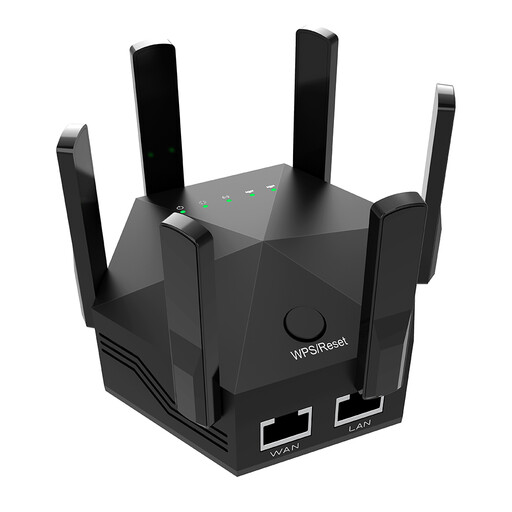
Dual-band Wi-Fi signal booster, 1200 Mbps, 6 adjustable antennas
Worth considering as a wireless repeater if there’s still a usable connection to the router where you plan to put it.
Dual-band Wi-Fi; 1200 Mbps; six adjustable antennas; EU plug.
View at Joybuy
 No image available
TP-Link RE190 AC750 wireless repeater, 433 Mbps
A wireless repeater for a spot where the router’s Wi-Fi still reaches; check the connection in your home office afterwards.
AC750; 433 Mbps.
View at Joybuy
 No image available
MERCUSYS ME80X Wi-Fi 6 range extender, AX3000 dual-band
Could work as an access point if you can run an Ethernet cable to your workspace; check that it has the operating mode you need.
Gigabit port; access point mode.
View at Joybuy
 No image available
TP-Link RE235BE BE3600 dual-band Wi-Fi 7 range extender
Worth considering as a wireless repeater if there’s still a usable connection to the router where you plan to put it. The EasyMesh feature requires a compatible system.
2.5 Gigabit port; EasyMesh compatible.
View at Joybuy
 No image available
Ubiquiti U7 Mesh, 5000 Mbps, Power over Ethernet
A wired Ethernet connection needs to reach the location where you plan to install the access point.
Ethernet uplink; Power over Ethernet (PoE). A compatible PoE power supply and Ethernet connection are required for operation.
View at Joybuy
Frequently asked questions
Where should I place a wireless repeater?
Put it somewhere it can still get a usable connection to the router and reach your workspace. FRITZ! recommends minimising obstacles between the repeater, router and connected devices wherever possible. Check the connection at your actual workspace.
Can I connect a repeater using an Ethernet cable instead of Wi-Fi?
Yes, if the specific model supports the right operating mode. FRITZ! documents a LAN bridge, while TP-Link describes an access point mode over Ethernet for the RE705X. Check the setup instructions for your model.
What should I check after installing powerline?
Test the connection using the sockets you plan to use. devolo recommends plugging adapters directly into wall sockets wherever possible and notes that electrical appliances can cause interference. Certain VDSL connections may also be affected.
What should I check when buying a Wi-Fi device in Germany?
When carrying out market surveillance, the Bundesnetzagentur checks, among other things, for the CE marking, product identification and accurate manufacturer details. Check this information for the specific device version rather than relying on the model name alone.


