Students with a Wi-Fi dead spot on one floor
If you join online lessons from a fixed spot, first check whether you can improve Wi-Fi there specifically. FRITZ! suggests using a repeater as an additional access point, among other options.


First, check the connection directly at the router and at your study space. A new router won’t automatically fix a weak internet connection or a poor Wi-Fi signal passing through several floors. If coverage is poor on just one floor, a suitable extension may be all you need. For study spaces on several floors, you could consider multiple nodes, while existing network cables can replace the wireless link between floors. The key factors are whether the equipment suits your internet connection, whether it’s compatible with your existing router and where you can place the devices.
If you join online lessons from a fixed spot, first check whether you can improve Wi-Fi there specifically. FRITZ! suggests using a repeater as an additional access point, among other options.
If you need Wi-Fi in different places, you’ll also need to plan the connections between potential access points. TP-Link offers mesh systems with multiple units for this purpose.
If an Ethernet cable reaches your study space or a suitable Wi-Fi node, it can replace the wireless link between floors. FRITZ! describes a LAN bridge for compatible FRITZ!Box and repeater combinations.
In a three-storey house, the number of floors isn’t the only thing that matters. Check the signal at your study space, the connection between devices and whether the system is suitable for your internet connection.
A good fit if: Wi-Fi is poor mainly in one study space and there’s still a usable connection to the router where you plan to place the repeater.
Consider: A wireless extension still depends on its connection to the router. The word “mesh” alone doesn’t guarantee compatibility between different manufacturers.
A good fit if: you need Wi-Fi on several floors, don’t have network cables and can position the nodes where they’ll have a usable connection to one another.
Consider: Each node needs a suitable location and a power supply. Advertised coverage doesn’t guarantee a signal through the specific walls and floors in your home.
A good fit if: a usable network cable reaches your study space or an access point on another floor.
Consider: The cable route must already be in place or be installed. A cable won’t improve the internet package you’re paying for.
A good fit if: your existing router isn’t suitable for your connection or doesn’t support the operating mode you need.
Consider: The replacement must suit your internet connection and will need to be set up and updated. A more powerful standalone router doesn’t guarantee coverage across three floors.
| Buying priority | What to look for when buying | Who is this most important to? |
|---|---|---|
| Wi-Fi at the study space | Check the signal at the actual study space and consider where the nodes could go. If you’re buying a set, check how many nodes it includes. | If I need reliable Wi-Fi at my regular study space, I want to check the signal there rather than rely on a coverage figure. Around 36% of consumers put Wi-Fi at their study space first. |
| Connection between floors | Check for existing LAN connections and Ethernet backhaul support. If there are no cables, test the planned positions for the wireless nodes. | If access points are going on different floors, their connection to one another matters to me too. Around 29% of consumers have this as their main priority. |
| Router and connection compatibility | Make a note of your connection type and exact router model. Check that the devices you’re considering support the right operating mode and are compatible. | If I want to keep using my existing router, I want to know before buying whether the extension will actually work with my model and connection. Around 21% of consumers prioritise keeping their existing router. |
| Security and maintenance | Check for ongoing updates and supported Wi-Fi encryption. Germany’s Federal Office for Information Security recommends keeping firmware up to date. For wireless devices sold on the German market, also check that the specific device carries the required CE marking. | If I manage my own router, I want to use secure login details and keep it up to date. Around 14% of consumers put secure maintenance first. |
According to TP-Link, actual throughput and coverage depend on factors including building materials, obstacles and the devices you use.
Check where you plan to put the devices and how they’ll connect to the router, rather than choosing based only on a maximum speed.
If the wireless link isn’t strong enough, you may need more nodes or a wired connection.
Your home Wi-Fi and your internet connection are two different parts of the connection to your online learning platform.
First, compare a wired speed test at the router with the connection at your study space. Extending Wi-Fi coverage won’t fix a problem that’s already present on the wired connection.
Telekom distinguishes between mesh-capable and non-mesh-capable Speedport models.
Before buying, check the exact router model, its firmware and the operating mode you plan to use.
Worth considering if you want to extend a compatible existing FRITZ! network in a specific area.
The Deco X50 and BE25 ranges are different multi-node mesh systems. Check the connections and pack sizes of the specific models before choosing.
The ZenWiFi XD5 is worth considering if you want to check the access point or router modes available on a mesh set.
Speed Home WLAN is worth checking if you already have a supported Speedport.
This selection includes routers to replace an existing device, Wi-Fi extenders and wired access points for compatible connections and network setups.
 No image available
Consider it as a replacement for a compatible DSL router if you want to extend a FRITZ! network.
Wi-Fi 6, dual-band, mesh, VPN and four Gigabit LAN ports.
Listed for ADSL/VDSL; VDSL Supervectoring 35b up to 300 Mbit/s. The stated Wi-Fi data rate is up to 2400 Mbit/s.
 No image available
Consider it as a range extender or in access point mode if you want to improve Wi-Fi in a particular area.
Wi-Fi 6, AX3000 dual-band, Gigabit LAN port and signal strength indicator.
Stated data rates: 574 Mbit/s at 2.4 GHz and 2402 Mbit/s at 5 GHz. For repeater mode, the device must be within range of your existing router.
 No image available
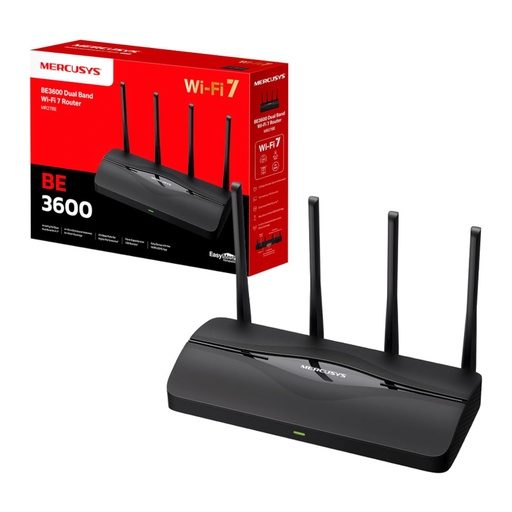
Consider it as a home router with EasyMesh extension if you need a compatible router replacement.
Wi-Fi 7, dual-band, BE3600, EasyMesh and WPA3.
Listed with two 2.5 Gbit/s ports and two Gigabit ports. The instructions specify an Ethernet connection to a modem for internet access.
 No image available
Consider it for extending a compatible EasyMesh network if you need a wired connection at the extension point.
Dual-band Wi-Fi 7, MLO, Smart Roaming and one 2.5 Gbit/s Ethernet port.
For the wireless extension described, the extender should be within range of your existing router. EasyMesh requires compatible devices.
 No image available
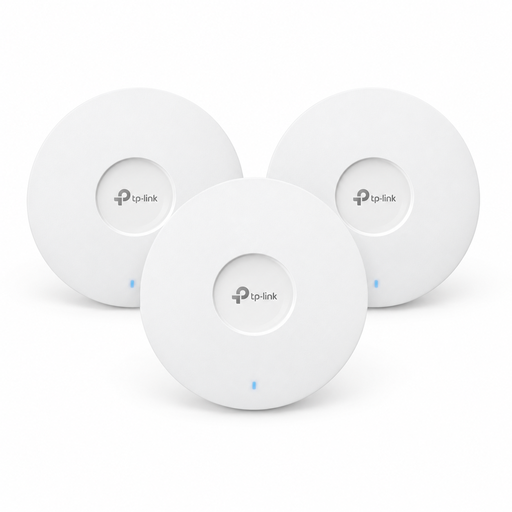
Consider these for several wired Wi-Fi access points if you have suitable network infrastructure and power.
Three Wi-Fi 6 access points with AX3000 and PoE+.
PoE+ requires a compatible 802.3at power source. The specified 12-V-DC adapter is sold separately.
Compare the connection at your study space with a wired test directly at the router. If the wired connection is already poor, extending Wi-Fi coverage won’t fix the underlying connection problem. Zoom recommends different bandwidths depending on the type of video call. These figures aren’t a universal minimum router requirement for every online learning platform.
No. What matters is where you need to study and how well the nodes connect to one another. Manufacturers’ coverage claims don’t guarantee a signal through the specific floors and walls in your home.
Check that the router is suitable for your internet connection and keep its firmware up to date. Germany’s Federal Office for Information Security recommends secure login details and Wi-Fi encryption, among other measures. Managing your own router also means taking care of setup and updates.
You don’t need an individual frequency allocation to use Wi-Fi within the applicable general frequency assignments. This isn’t blanket permission to use any frequency or power setting. Wireless devices sold in Germany must meet the applicable conformity requirements and carry the required marking.
As well as setup, you may need to install network cabling, depending on your home. If you manage your own router, you’ll also need to keep it updated. What’s required depends on your existing connection and cable routes.