Cookery class in a kitchen with weak Wi-Fi
If you want to follow the cookery class by the hob, first work out whether the Wi-Fi is weak in the kitchen or whether the internet connection itself is causing problems.


First, check that your internet connection is working and that there is still a usable connection to the router at the potential repeater location. A repeater extends existing Wi-Fi coverage, but it cannot fix an internet outage. For a single dead spot, a well-placed repeater may be enough. If you need coverage across several floors, or the wireless connection between them is weak, several compatible mesh stations or a LAN-connected access point may be a better option. Mesh features depend on your router, and advertised Wi-Fi data rates do not guarantee video playback where you cook.
If you want to follow the cookery class by the hob, first work out whether the Wi-Fi is weak in the kitchen or whether the internet connection itself is causing problems.
If you need coverage in the kitchen and elsewhere in the house, consider potential locations for intermediate stations and the connection between floors.
An existing network socket may be useful if you can connect the access point to the router via LAN, avoiding the need for a wireless signal to pass through floors.
First decide whether you need coverage just in the kitchen or across several floors, and whether a network cable is available at the point where you need it.
A good fit if: the kitchen is the main dead spot and there is a usable connection to the router at an intermediate location.
The trade-off: It works without a cable, but a single device will not automatically provide coverage across all three floors.
A good fit if: you need coverage in the kitchen and on other floors, and can find suitable locations for intermediate stations.
The trade-off: Additional stations need devices and power sockets; using the same mesh name does not fix a weak connection between stations.
A good fit if: a continuous LAN connection or network socket reaches the floor that needs coverage.
The trade-off: The cable carries the connection to the router; you will need a suitable connection and the right access point mode.
A good fit if: there is no suitable intermediate location for a wireless signal and running LAN is impractical, and you can test the connection at the sockets you need to use.
The trade-off: Performance can depend on the sockets and electrical interference; certain VDSL connections may also be affected by interference.
| What you need | What to check before buying | Who it's for |
|---|---|---|
| Video playback in the kitchen | Test the internet connection and video where you cook, then check the repeater at the intended intermediate location. | If you want to follow a cookery class without interruptions where you cook, pay particular attention to the actual connection there. Around 31% of consumers make kitchen video playback a top buying priority. |
| Connection across several floors | Check potential locations for intermediate stations and the connection between each station and the router. | If you need coverage beyond the kitchen, consider the connection between floors. Around 31% of consumers prioritise coverage across several floors. |
| Existing LAN cabling | Check that the network socket connects to the router and that the device offers a suitable LAN or access point mode. | If you want to use a network socket at the destination, it can bypass the wireless connection between the router and access point. Around 23% of consumers prioritise a wired connection. |
| Integration with your router | Check the router model, product generation and specific mesh features supported. | If you want to integrate the device with your existing router system, check compatibility before buying. Around 15% of consumers prioritise compatibility with their existing setup. |
Advertised wireless rates do not guarantee a particular connection where you cook. The actual connection also depends on the conditions in your home and any obstacles in the way.
Check the connection at the intended location and test playback there, rather than relying on the figure on the packaging alone.
A repeater can only extend a signal it can still receive. A location without a usable connection to the router is therefore unlikely to help.
Choose an intermediate location with a usable signal. If the wireless connection between floors is weak, consider a LAN connection.
Mesh features require compatible routers and devices. Deutsche Telekom distinguishes between mesh integration and standard repeater mode for Speed Home WLAN.
Before buying, check the exact router model, device generation and supported mesh setup.
Performance can vary depending on the socket and electrical interference. devolo also describes possible interference with certain VDSL setups.
Test the connection at the sockets you actually need to use, and check the stability of your internet connection if you have VDSL.
The FRITZ!Repeater 1200 AX and 6000 models are worth considering if you use a FRITZ! home network.
The RE705X is a dual-band Wi-Fi 6 repeater with a Gigabit port and EasyMesh compatibility, according to the manufacturer.
The WiFi 6 Repeater 5400 can be used as a repeater or access point, making it relevant for homes with existing LAN cabling too.
Speed Home WLAN may be a useful addition, particularly for homes with a compatible Speedport router.
The Joybuy products below are designed to extend Wi-Fi coverage around the home. They include standalone repeaters, a model with access point mode over LAN and an EasyMesh-compatible device.
 No image available
Could be suitable for a single dead spot if the intended intermediate location can still receive Wi-Fi from the router.
Compact design; plug-and-play setup is advertised.
 No image available
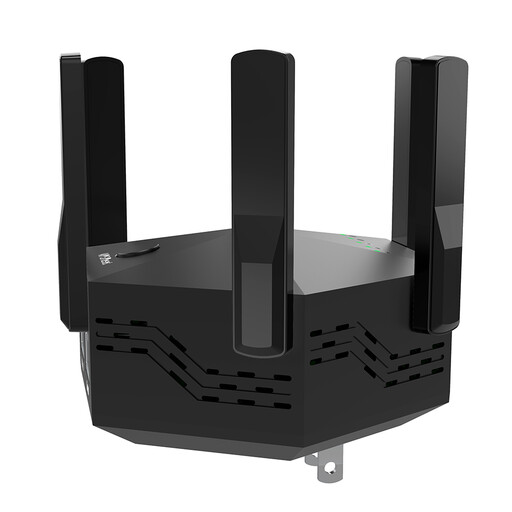
Could be an option for a wireless intermediate location, provided there is still a connection to the router there.
The title specifies dual-band and six adjustable antennas. The advertised rate is 1,200 Mbit/s, and it has two 10/100-Mbit/s LAN ports.
 No image available
Could be worth considering when looking for a suitable wireless intermediate location.
Described as a dual-band repeater with WPS setup and a signal strength indicator; the title specifies 433 Mbit/s.
 No image available
Could work as an access point at the destination if there is a working LAN connection to the router.
Features include a Gigabit port, access point mode and a signal strength indicator. The advertised rates are 574 Mbit/s at 2.4 GHz and 2,402 Mbit/s at 5 GHz.
 No image available
Could be suitable for extending coverage with EasyMesh if you have a compatible router or extender.
The title specifies dual-band Wi-Fi 7, EasyMesh compatibility and a 2.5 Gigabit port. Mesh integration requires a compatible device.
Choose an intermediate location where the repeater can still get a stable connection to the router. Then test the video right where you cook.
No. A repeater extends your existing Wi-Fi and cannot fix a slow or unreliable internet connection. If you experience dropouts everywhere, check your connection first; Germany's Federal Network Agency provides a broadband measurement tool for this purpose.
Yes, if the model has a suitable access point or LAN bridge mode and the socket provides a working connection to the router. This type of setup is documented, for example, for the FRITZ!Repeater 1200 AX and the devolo WiFi 6 Repeater 5400.
No. Mesh features depend on the supported devices and how they are set up. Check the exact router model and compatibility; for Speed Home WLAN, Deutsche Telekom distinguishes between mesh integration and standard repeater mode.
Check that the specific product version on offer has the required CE marking, an appropriate declaration of conformity, and instructions and safety warnings in German. Germany's Federal Network Agency explains the requirements for radio equipment; this does not confirm the conformity of any individual product listing.