
Lieferung heute & morgen

Qualitätsgarantie

Willkommens-Angebote freischalten: KOSTENLOSE Lieferung | Bis zu 80 % RABATT | Kostenlose 30-Tage-JoyPlus-Testphase
App herunterladen
As your Joybuy Product Recommendation Officer, my job is to provide clear, objective information to help you make the right purchasing decision for your tech needs. The world of cables and connectors can be confusing, especially when it comes to high-performance standards like Thunderbolt 4. This article is designed to help you understand the essential features of a Thunderbolt 4 cable and make an informed choice for your professional or demanding personal use.
The search for the right cable for high-end laptops, 8K monitors, or fast external SSDs often leads to a flood of technical specs. Terms like 40 Gbps, 240W Power Delivery, and 8K video are crucial, but not every cable with a USB-C connector meets these requirements. The goal is to give you the necessary criteria to find a cable that unlocks the full performance of your devices.
To separate the best from the rest, you should consider three core technical aspects. These will help you objectively evaluate a cable's performance.
A certified Thunderbolt 4 cable must support a data transfer rate of 40 Gbps. This is identical to the maximum standard for USB 4. This speed is critical for tasks like transferring large video files from an external NVMe SSD or running a docking station with multiple connected devices without performance loss. Ensure the cable is explicitly specified as Thunderbolt 4 or as a full-featured USB 4 cable with 40 Gbps. A key advantage of Thunderbolt 4 is its guaranteed backward compatibility with Thunderbolt 3 and standard USB-C ports.
With the introduction of the Power Delivery 3.1 standard, modern cables can transfer up to 240W (48V/5A) of power. This is a significant step up from the previous 100W limit. A 240W USB C cable is capable of powering even the most demanding workstation laptops or gaming notebooks with a single cable, eliminating the need for separate, bulky power adapters. If you're looking for a fast-charging cable for your laptop that is also ready for future devices, support for 240W PD 3.1 is an important feature.
Thunderbolt 4 is designed for high-resolution video applications. A compliant cable must support driving an 8K USB C cable at a 60 Hz refresh rate or two 4K monitors at 60 Hz each. For video producers, designers, and gamers who need flawless image quality and smooth performance, this capability is essential. Check the product specifications for explicit support for DisplayPort Alternate Mode and the resolutions mentioned.
Based on the criteria above, we have compiled a selection of cables that cover different use cases—from solid everyday needs to professional high-end setups.
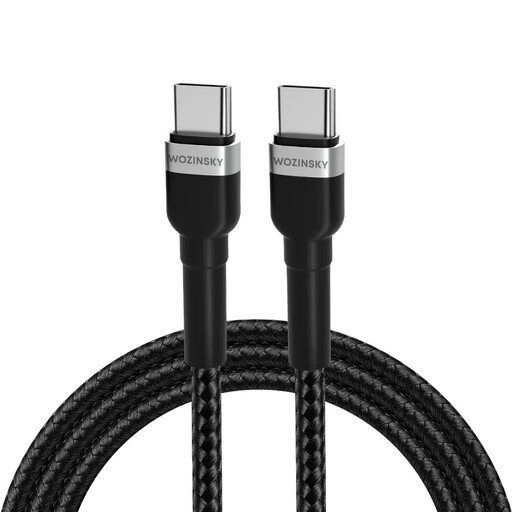
What makes it stand out The Wozinsky WNBCC2 is a durable USB C to USB C cable designed for daily use. It offers a solid 65W charging power and a data transfer rate of 480 Mbps (USB 2.0). The nylon braiding and reinforced connectors ensure high durability.
Advantages
Who is it for? This cable is a great choice for users who need a reliable and durable charging and data cable for standard applications and do not require the top speeds of Thunderbolt 4.
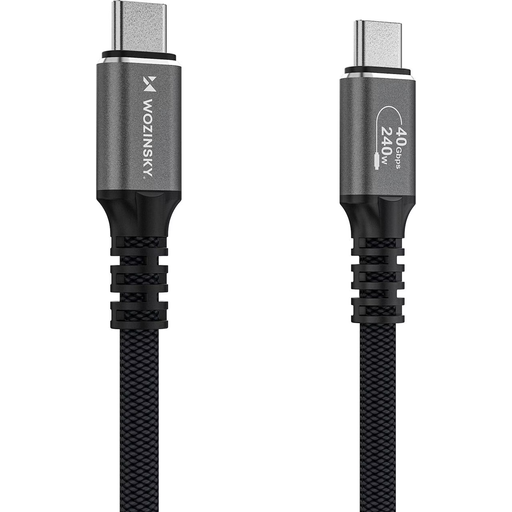
What makes it stand out This cable from Wozinsky meets all the requirements of the Thunderbolt 4 standard. It combines a massive 240W charging power with the maximum 40 Gbps data rate and full 8K video support. The construction, featuring an aluminum housing and a dense nylon weave, is designed for durability and demanding environments.
Advantages
Who is it for? Professional users such as video producers, developers, and demanding tech enthusiasts who are looking for a single-cable solution for data, power, and video at the highest level. It is ideal for connecting high-end laptops to docking stations and monitors.
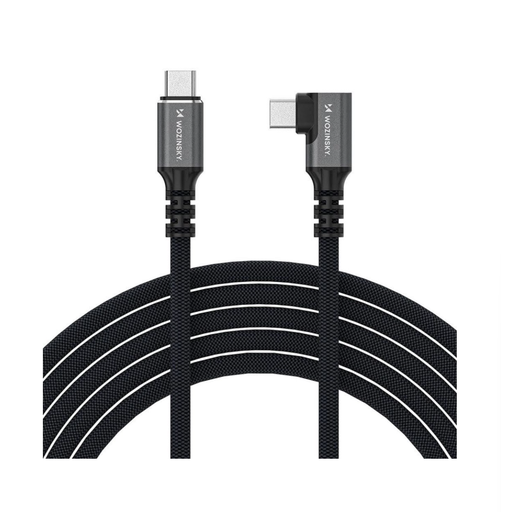
What makes it stand out The Wozinsky WPS1-UY41S offers the same impressive performance as the WPS-UY42S—240W charging, 40 Gbps data, and 8K video—but with a key advantage: a 90-degree angled connector. This angled Thunderbolt 4 cable reduces mechanical stress on the device's port and allows for space-saving cable management.
Advantages
Who is it for? Users who need the maximum performance of Thunderbolt 4 while also valuing neat, space-saving, and port-friendly cable management. It's perfect for laptops that are frequently connected to docking stations or monitors.
If the models presented here don't exactly match your requirements for length, color, or specific features, you can find a wider selection in our main category. There, you can compare different specifications to find the right solution for your setup.
Discover our entire range of Audio and Video Cables here.
1. What is the difference between a Thunderbolt 4 and a USB4 cable? A cable certified as Thunderbolt 4 guarantees compliance with the highest specifications of the USB4 standard. This mandatorily includes a 40 Gbps data rate, support for two 4K displays, and advanced security features. A generic USB4 cable could theoretically support only 20 Gbps. With a Thunderbolt 4 cable, you get the assurance of full USB4 performance.
2. Can I use a Thunderbolt 4 cable for a regular USB-C device? Yes, Thunderbolt 4 is fully backward compatible with all previous USB-C and Thunderbolt 3 standards. If you connect a Thunderbolt 4 cable to a device with a USB-C 3.1 port, it will work perfectly, but the performance (data rate and video output) will be limited to the capabilities of the USB-C 3.1 port.
3. Do I need a 240W cable if my laptop only requires 100W? It's not strictly necessary, but it is a future-proof decision. A 240W-capable cable is safe to use with devices that require less power, as the cable and the device automatically negotiate the correct charging power. Buying a 240W cable ensures you are also prepared for future, more powerful devices.