
Lieferung heute & morgen

Qualitätsgarantie

Willkommens-Angebote freischalten: KOSTENLOSE Lieferung | Bis zu 80 % RABATT | Kostenlose 30-Tage-JoyPlus-Testphase
App herunterladen
As a Joybuy Product Recommendation Officer, I see the demands on our tech gear increase every day. High-performance laptops, high-resolution monitors, and fast external storage require connections that can keep up. A single cable that reliably transmits data, power, and video is no longer a futuristic concept but a necessity for an efficient workspace.
This guide is designed to help you understand the technical specifications and make an informed decision on a Thunderbolt 4 Cable 240W that perfectly fits your needs. We will focus on objective features and practical use cases.
Choosing the right cable depends on the devices you plan to connect. Here are three key factors to consider in your decision.
A certified Thunderbolt 4 cable offers a guaranteed bandwidth of 40 Gbps. This speed is crucial for tasks like editing 8K video footage from an external SSD or transferring large project files in seconds. Ensure the cable is specified as a USB4 Cable, as this guarantees compatibility with a wide range of devices. Thunderbolt 4 is also fully backward compatible with Thunderbolt 3 and older USB standards, though the speed will be determined by the slowest link in the chain. Such a 40 Gbps data cable is a future-proof foundation for professional setups.
The 240W rating refers to the maximum charging power enabled by the Power Delivery 3.1 (PD 3.1) standard. Modern high-end laptops, especially models like the 16-inch MacBook Pro, require high wattage to charge efficiently under full load. A 240W USB C charging cable ensures your device receives a reliable power supply even during demanding applications, preventing battery drain. The cable communicates with the charger and the end device to always negotiate the maximum possible and safe charging speed.
For creative professionals and gamers, video transmission is a critical factor. Thunderbolt 4 supports driving a single 8K USB C Cable monitor at 60 Hz or two 4K monitors at 60 Hz. This enables highly productive multi-monitor setups. Also, pay attention to the physical design of the cable. For example, an angled Thunderbolt cable can be very practical in tight spaces or behind monitors, as it reduces stress on the device's port and facilitates clean cable management.
Based on the criteria mentioned, we have compiled a selection of cables that are well-suited for demanding users due to their technical specifications and design.
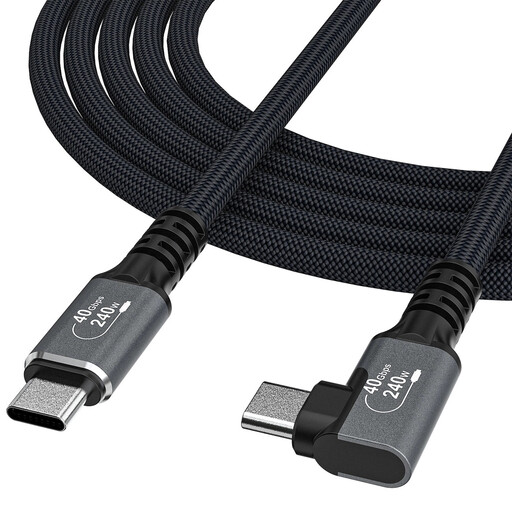
What sets it apart: This cable combines all the core features of Thunderbolt 4 with a thoughtful design. The 90-degree angled connector on one end is particularly useful for connecting devices in hard-to-reach places or minimizing mechanical stress on the USB-C port of a laptop or tablet. Its robust construction with an aluminum housing and cotton braid promises high durability.
Advantages:
Who is it for? Ideal for users who frequently connect their Thunderbolt cable for MacBook or other laptops to docking stations or monitors and who value clean cable management and port protection.
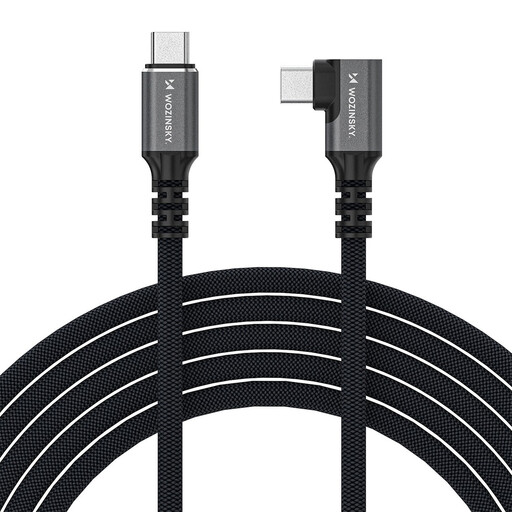
What sets it apart: At 2 meters long, this cable offers significantly more flexibility for workspaces where the computer is not placed directly next to the monitor or docking station. It also features an angled connector and supports the full range of Thunderbolt 4 features, including video output up to 4K at 144Hz, making it an interesting option for gamers.
Advantages:
Who is it for? Suitable for users with larger desk setups or tower PCs placed under the desk. The 2-meter length bridges the distance to monitors and peripherals without putting strain on the cable.
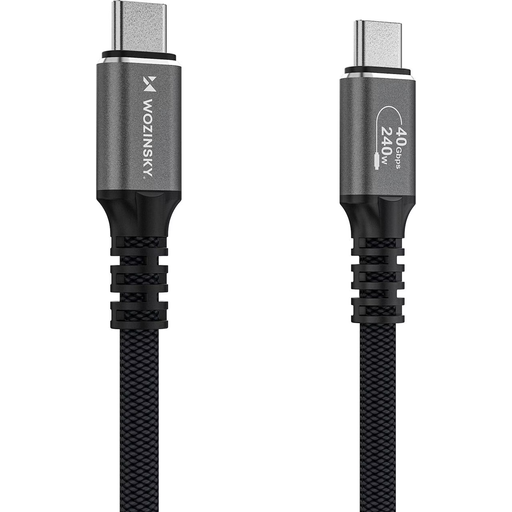
What sets it apart: This model is a classic, straight-connector version for those who don't need an angled design. It also offers a 2-meter length and the full performance of Thunderbolt 4. The robust construction with an aluminum housing and a dense nylon weave ensures resilience for daily use.
Advantages:
Who is it for? A universal choice for professional users and power users who need a long and powerful 40Gbps USB C cable for a variety of applications, from connecting to eGPUs to complex docking solutions.
Technology is constantly evolving. If the models presented here don't exactly match what you're looking for, or if you need different specifications, you might find the right product in our wider selection.
? Discover more black USB cables in our overview
1. Is a Thunderbolt 4 cable backward compatible? Yes, Thunderbolt 4 cables are fully backward compatible with devices that have Thunderbolt 3, USB4, USB 3.x, and USB 2.0 ports. The performance (data rate, charging power, video resolution) will be limited by the lowest standard among the connected devices.
2. Do I really need 240W of charging power? Whether you need 240W depends on your device. Many laptops and tablets are fine with 65W or 100W. However, a 240W-capable cable is future-proof and won't harm smaller devices, as the charging power is automatically negotiated between the power adapter, cable, and device. For power-hungry laptops like the 16-inch MacBook Pro or gaming notebooks, the high power is beneficial for fast charging, even under heavy load.
3. What is the difference between a Thunderbolt 4 and a standard USB-C cable? Although both use the same physical USB-C connector, there are significant differences. "USB-C" only describes the connector shape. The capabilities of a USB-C cable can vary widely (e.g., for charging only, slow data transfer). Thunderbolt 4, on the other hand, is a certified standard that guarantees strict minimum requirements: 40 Gbps data transfer, support for two 4K displays, and charging power up to 240W (with PD 3.1). A Thunderbolt 4 cable is therefore a high-performance, all-in-one cable.