
Lieferung heute & morgen

Qualitätsgarantie

Willkommens-Angebote freischalten: KOSTENLOSE Lieferung | Bis zu 80 % RABATT | Kostenlose 30-Tage-JoyPlus-Testphase
App herunterladen
A Ticktype EVO75 mechanical keyboard ISO-DE is aimed at users looking for a German layout, wireless use and customisation options in a compact format. Custom keyboards often feature impressive technical specifications at first glance. What matters, however, is whether the functions actually work well together in your everyday use.
Not every compact keyboard with German software settings has a genuine ISO-DE layout. A German ISO keyboard includes keys such as Ä, Ö, Ü and ß. The shape of the Enter key and the position of certain special keys also differ from the ANSI layout.
If you regularly write in German, you should therefore check the physical key arrangement. Changing the keyboard layout in the operating system afterwards does not replace missing keys or unsuitable keycaps.
Some models work exclusively via Bluetooth, while others use a USB receiver. A tri-mode keyboard, on the other hand, typically combines Bluetooth, 2.4 GHz wireless and a wired USB-C connection.
This distinction is practically important:
Before purchasing, check whether the required receiver is included and whether the target device supports Bluetooth or has suitable USB ports.
An RGB keyboard with per-key lighting can improve the visibility of the legends and provide visual customisation options. However, during wireless use, lighting brightness, connection type and usage time all affect energy consumption.
The stated 8000 mAh describes the capacity of the integrated battery, not a specific battery life. Actual operating time depends on factors including the RGB settings, wireless mode and usage. The lithium battery must not be opened, damaged or exposed to excessive heat.
A 75% keyboard takes up less space than a full-size model while generally retaining a function-row, arrow keys and part of the navigation cluster. The Ticktype EVO75 is specified with 80 keys and a German ISO-DE layout.
This format may suit users who:
However, anyone who frequently enters numbers at work should check whether a separate number pad is required.
A hot-swap keyboard allows compatible mechanical switches to be replaced without soldering the circuit board. The EVO75 supports 3-pin and 5-pin switches. When changing switches, the keyboard must be switched off and the USB-C cable removed. Switches should be inserted vertically and without excessive pressure, as bent pins can damage the hot-swap sockets.
The supplied Creamy Rye switches are part of the specified variants’ equipment. Sound, actuation feel and volume also depend on the keycaps, case construction, mounting, and your personal typing technique. If you plan to fit different switches later, check their compatibility and the actuation characteristics you want.
The case is described as a fully aluminium keyboard. Aluminium can enable a sturdy case construction, but on its own it says nothing about the weight, surface durability or noise levels.
The leaf-spring mount is a flexible mounting design. It can produce a different typing feel compared with a very rigid construction. The experience is subjective and is also influenced by the plate, foam, switches and keycaps.
Dedicated driver software is listed for customising the key layout, macros and RGB effects. The keyboard is also described as a VIA-compatible keyboard. Before setting it up, check which functions are available with your operating system and the relevant software version.
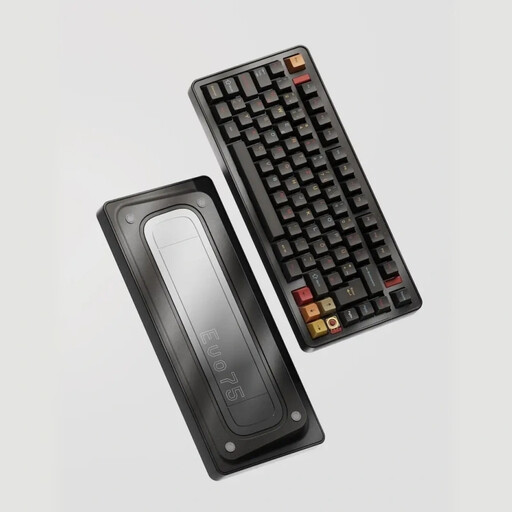
Why this product suits the profile: This variant combines ISO-DE, three connection modes and hot-swap functionality in a 75% format. This allows users to start with wireless use and later customise the switches or key mappings.
The specified ISO-DE layout reduces the risk of an unsuitable ANSI arrangement. Bluetooth, 2.4 GHz wireless and USB-C are explicitly listed as triple-mode connectivity.
80-key layout, 3-/5-pin hot-swap support, per-key RGB and 8000 mAh battery.
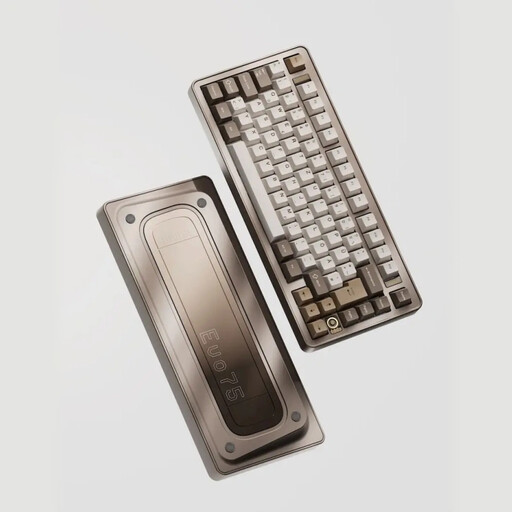
Why this product suits the profile: This model combines an aluminium case with customisable lighting, flexible mounting and multiple operating modes. It is suitable for users who want to consider case finish and customisation options together.
The product description specifies the mounting design, hot-swap support and software functions, rather than referring only to general ‘custom’ features.
Full-aluminium construction, leaf-spring mount, VIA compatibility according to the product details and customisable per-key RGB.
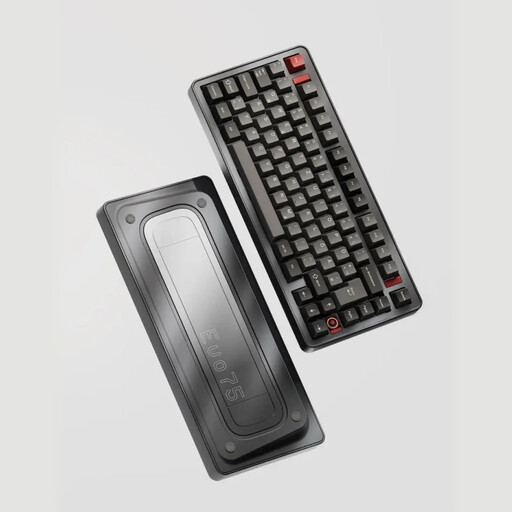
Why this product suits the profile: Frequent typists and gamers can choose between wired, Bluetooth and 2.4 GHz connections. The 75% layout retains important function keys without taking up the space of a full number pad.
The separate modes reduce reliance on a single wireless technology. For switch changes, the keyboard should be switched off, the cable disconnected and a suitable tool used.
8000 mAh battery, USB-C operation, 3-/5-pin hot-swap and understated Basalt Grey finish.
After unpacking, first select the ISO-DE layout in the operating system. Bluetooth or the 2.4 GHz receiver can then be set up. For gaming or applications requiring the most consistent connection possible, wired USB-C use may be preferable.
For care, a dry or slightly damp microfibre cloth is sufficient. Do not apply liquids directly to the keyboard. Remove the USB cable before cleaning. The case must not be submerged or treated with cleaning fluid.
Do not store the battery in a hot vehicle or at extreme temperatures. If the device becomes unusually hot while charging or develops a burning smell, disconnect the power supply immediately and stop using it. Small parts such as keycaps, switches, tools and the USB receiver must be kept out of the hands of children under three years of age.
We have put together a complete, regularly updated list of products that fully meet these strict selection criteria and the safety regulations applicable in the EU.
Yes. The product details list three connection modes: Bluetooth, 2.4 GHz wireless via USB receiver and a wired USB-C connection. The specific setup depends on the computer, tablet or laptop being used.
The Ticktype EVO75 is described as a hot-swap keyboard supporting 3-pin and 5-pin switches. Before changing them, the device should be switched off and the USB-C cable disconnected. The switches must be inserted carefully and straight.
A fixed battery life cannot be determined from the capacity specification alone. RGB brightness, wireless mode and usage intensity affect power consumption. The keyboard can be operated and charged via USB-C when the battery is empty.