If you often need to see a table and a chart at the same time, an adjustable-height 27-inch QHD monitor is a sensible starting point. Try your own layout at the font size you prefer. A compact 16:10 monitor may be enough for individual documents and a small desk, while 4K or USB-C docking is mainly worth considering if you need more detail or have a compatible laptop.
Who are the different monitor options suited to?
People working with tables and charts
If you want to see values, a chart and, when needed, the data source side by side as you work, compare 27-inch QHD and 4K models using your actual window layout. Dell and EIZO’s model specifications list the corresponding QHD and 4K resolutions. The Federal Maritime and Hydrographic Agency provides tide predictions and tidal constants.
Laptop users who work in different locations
If you regularly connect a laptop, check video output, charging power and the ports you need against the specific model. Dell and EIZO list different USB-C specifications, which shouldn’t automatically be assumed to apply to similar models.
Space-conscious users focused on documents
If you usually work on one table or report at a time, a more compact display could be an alternative to a 27-inch model. Philips lists the 24B2N3200D/00 at 24.1 inches with a resolution of 1,920 × 1,200 pixels. Check that your chart remains easy to read alongside it at your preferred font size.
What should you look for when buying?
| What you need |
What to check before buying |
Who is this important for? |
| Seeing a table and chart at the same time |
Try both views side by side at your preferred font size. |
If I want to compare values with a chart as I work, I need a screen area that suits my setup. Around 36% of consumers put side-by-side views first. |
| Reading figures comfortably for longer periods |
Check screen position, height adjustment, reflections and readability at your chosen scaling. |
During longer working sessions, I want to read figures clearly and position the screen to suit me. Around 29% of consumers prioritise a clear, adjustable setup. |
| Connecting a laptop correctly |
Check video output, monitor input, charging power and cables individually. |
If I want to connect my laptop through the monitor, the video connection and, where relevant, power supply need to be compatible. Around 21% of consumers put laptop connectivity first. |
| Considering desk space and energy use |
Compare the dimensions, including the stand, and the EU energy label for the specific model. |
With a limited amount of desk space, I want to keep enough room and be able to compare the model’s energy use. Around 14% of consumers prioritise compact dimensions and energy comparisons. |
An adjustable-height 27-inch QHD monitor can be a good starting point for two side-by-side views. A more compact 16:10 display may suit you if you mainly work with individual documents. With 4K, also check that the scaling and font size work for your table. The European Commission gives electronic displays an energy efficiency rating from A to G. Compare the label for the specific monitor rather than assuming its energy use from its size or resolution alone.
Which buying misconceptions should you avoid?
-
Similar model names mean the same specifications
The Dell P2725DE is described as a USB-C hub model; the similarly named P2725D version doesn’t automatically have the same specifications.
Before buying, compare the full model name and the video, data and charging ports you need.
If the ports aren’t compatible, you may need additional docking hardware or a suitable cable.
-
More pixels automatically mean larger, more readable text
Resolution describes the number of pixels, not the size of the text in your tide table on screen. With 4K, readability also depends on your chosen scaling.
Open a typical table and chart in your preferred layout before choosing between QHD and 4K.
-
A monitor confirms that tide data is accurate
A display shows values and charts, but it doesn’t check where the underlying data comes from or whether it’s suitable for your purpose.
Check the data source, location and reference values independently of screen quality and monitor specifications. The Federal Maritime and Hydrographic Agency provides tide predictions and tidal constants.
Which brands offer suitable monitor ranges?
Dell
The P2725D and P2725DE models provide useful points of comparison for QHD and laptop docking. The specifications apply to each specific model.
- The P2725D is listed as a 27-inch QHD monitor with an adjustable-height stand.
- The USB-C hub is a feature of the P2725DE; don’t assume the P2725D has the same specification.
EIZO
The FlexScan EV2740X and EV2490 differ in several respects, including resolution, size and connectivity.
- EIZO lists the EV2740X as a 4K model, with up to 94 W power delivery via its USB-C upstream port.
- The EV2490 is listed as a 23.8-inch model with a resolution of 1,920 × 1,080 pixels; its specifications aren’t the same as those of the EV2740X.
Philips
The models mentioned offer different formats: a more compact 16:10 display and a 27-inch QHD option.
- The 24B2N3200D/00 is listed as a 24.1-inch model with a resolution of 1,920 × 1,200 pixels.
- The 27E1N1600AE/00 is a 27-inch QHD model; check which ports and features you need on the specific model.
LG
The 27U631A-B is an example of a 27-inch QHD monitor with USB-C and basic stand adjustment.
- LG lists 15 W USB-C Power Delivery and a tilting stand for this model.
- Check that the listed charging power and adjustment options suit your laptop and workspace.
Joybuy monitors for tables and charts
The following Joybuy options focus on 27-inch QHD and 4K monitors for side-by-side views or when you need more detail. USB-C connectivity and charging power vary by model, so check the specifications against your laptop.
 No image available
Z-Edge AGEX 27-inch QHD monitor, white
The 27-inch QHD specification may suit side-by-side tables and charts.
Resolution: 2,560 × 1,440 pixels.
The stand is described as height-adjustable, tiltable, swivelling and pivotable.
Ports: DisplayPort and HDMI.
View at Joybuy
 No image available
MSI MAG 274UPDFDE E16M 27-inch UHD monitor
If you’re looking for a 27-inch 4K screen for tables and charts, check readability at your preferred scaling.
Resolution: 3,840 × 2,160 pixels; Mini-LED and Rapid IPS specifications.
The stand is described as height-adjustable and tiltable.
Ports: HDMI and DisplayPort.
View at Joybuy
 No image available
INNOCN CB27U1 27-inch 4K monitor
The 4K resolution may appeal if you need detailed views; check that the table and chart remain easy to read at your chosen scaling.
Resolution: 3,840 × 2,160 pixels; IPS panel.
USB-C with 90 W Power Delivery and PIP/PBP are listed. Check the video output and power requirements against your laptop.
The stand is described as height-adjustable.
View at Joybuy
 No image available
KTC M27P6 27-inch 4K monitor
The 27-inch 4K resolution is an option for detailed tables and charts; try it at your preferred scaling to check readability.
The model name specifies 4K at 160 Hz and Full HD at 320 Hz.
USB-C with video transmission and 65 W Power Delivery is listed. Check compatibility with your laptop.
The stand is described as height-adjustable.
View at Joybuy
 No image available
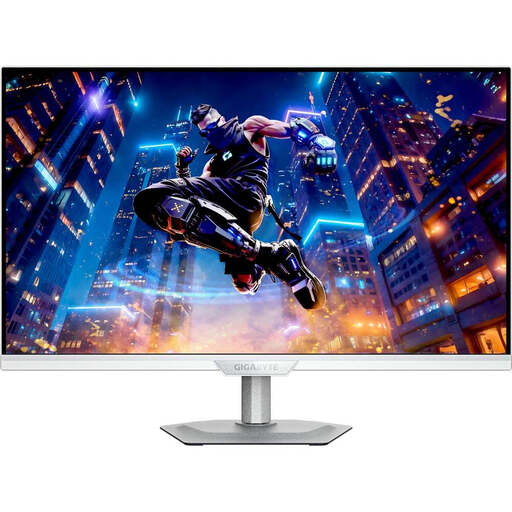
GIGABYTE M27UP ICE 27-inch 4K IPS monitor
If you’re considering a 27-inch 4K screen for tables and charts, try it with your own font size.
Resolution: 3,840 × 2,160 pixels; IPS panel; 144 Hz according to the product name.
The stand is described as adjustable.
Ports: HDMI and DisplayPort.
View at Joybuy
Frequently asked questions
How should I set up a monitor for long periods of work with tide tables?
Check the font size, reflections and viewing position using your own table; a height-adjustable stand can make it easier to get the right setup. The ASR A6 covers screen work in workplaces and teleworking environments, but its scope doesn’t automatically extend to every instance of personal screen use at home.
Does a 4K monitor make tide charts reliable?
No. Resolution affects how data is displayed, not whether the source data is accurate. The Federal Maritime and Hydrographic Agency provides tide predictions and tidal constants; check the location, reference values and data source independently of the monitor.
What should I check before connecting via USB-C?
Check your laptop’s video output and power requirements against the specifications for the specific monitor input. EIZO lists DisplayPort Alt Mode and up to 94 W at the EV2740X’s USB-C upstream port; this doesn’t mean it’s compatible with every laptop.
When buying in Germany, what’s the difference between statutory rights and a guarantee?
Your statutory rights cover claims against the seller if a product is faulty; a guarantee is an additional voluntary promise with its own terms. The Verbraucherzentrale says that, as a general rule, online purchases can be cancelled within 14 days of receiving the goods. Check for possible exceptions and the terms of your specific purchase.
Do monitors have an energy label?
Yes. The European Commission includes computer monitors among electronic displays, with an energy efficiency rating from A to G. Compare the label for the specific model rather than assuming its energy use from its screen size or resolution alone.


