
Lieferung heute & morgen

Qualitätsgarantie

Willkommens-Angebote freischalten: KOSTENLOSE Lieferung | Bis zu 80 % RABATT | Kostenlose 30-Tage-JoyPlus-Testphase
App herunterladen
As a Joybuy Product Recommendation Specialist, I analyse product information daily to provide you with objective, hands-on advice. The goal is to help you make informed decisions based on facts, not marketing hype.
For many PC gamers, a TKL (Tenkeyless) mechanical gaming keyboard is a core component of their setup. It promises faster response times and more desk space. However, the market is flooded with models whose specifications often create more confusion than clarity. Before you make a decision, you should be aware of the common pitfalls that can lead to a purchase you'll regret.
Common Pitfalls When Buying a TKL Keyboard:
To avoid these pitfalls, you should focus on three core parameters. These define the performance and utility of a gaming keyboard without a numpad far more than flashy marketing terms.
The switch under each key determines the typing feel and response speed. For gamers, linear switches have become a popular choice.
The term Tenkeyless keyboard (TKL) refers to a keyboard format that omits the number pad on the right side. This has two key advantages:
For users in English-speaking regions, the QWERTY layout is essential to ensure intuitive use without an adjustment period.
For flawless in-game performance, two technical features are indispensable:
Here are some models that represent a compelling option for specific user groups based on objective criteria.

Why This Fits Their Persona: This model is engineered for pure performance. The focus is on fast, linear switches and a lag-free wired connection—ideal for esports enthusiasts where every millisecond counts. The TKL format creates the necessary space for intense mouse movements.
It uses genuine CHERRY MX2A RED switches instead of imitations and offers flawless input registration thanks to Full N-Key Rollover, thus avoiding the most common performance pitfalls.
The combination of an internal metal plate and a high 1000 Hz polling rate ensures stability and near-instant signal transmission. The RGB lighting is controllable without any additional software.

Why This Fits Their Persona: For users seeking maximum customisation and an ultra-clean desk setup. The 65% layout is even more compact than TKL but retains the essential arrow keys. Its hot-swap capability allows you to change switches without soldering.
Instead of locking you into a single switch type, this model offers the freedom to change switches later thanks to its hot-swap sockets. This bypasses the "wrong switch choice" pitfall.
The super-scan technology, which scans all keys every 0.5 milliseconds, ensures extremely fast input detection. Additionally, a dual layer of sound-dampening material reduces unwanted noise.
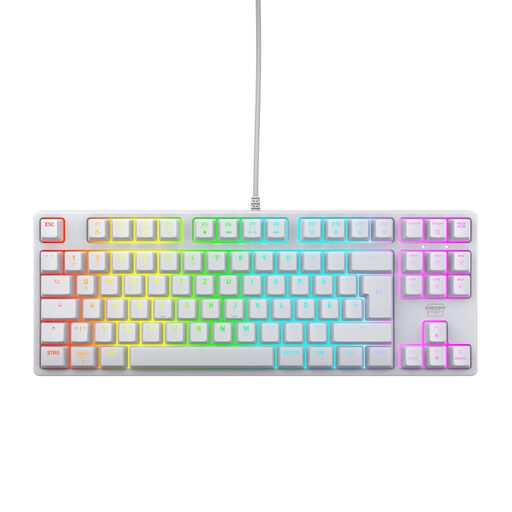
Why This Fits Their Persona: For users who want a high-performance gaming keyboard that also blends seamlessly into a bright, modern desk setup. It combines the same high performance as the black model with a clean, minimalist aesthetic.
This model proves that you don't have to compromise on technology for an appealing design. It uses the same high-quality components, avoiding the pitfall where aesthetics are prioritised over functionality.
It offers the identical performance features as the black version, including durable MX2A Red Switches and Anti-Ghosting, packaged in an elegant white chassis that stands out from the crowd.
We've compiled a complete, real-time updated list of products that fully meet these strict selection criteria and local regulations.
A TKL (Tenkeyless, 80%) keyboard removes the numpad but keeps the navigation and function key cluster (Del, Ins, etc.). A 65% keyboard is even more compact: it also removes this function block and integrates the arrow keys right next to the main keys to maximise desk space.
The lifespan of mechanical switches is measured in millions of keystrokes. High-quality switches like those from CHERRY MX are often rated for over 50 or even 100 million actuations per key. Under normal use, this translates to a lifespan of many years, making them significantly more durable than conventional rubber dome keyboards.
Not necessarily. Many modern RGB keyboards, including some of the models mentioned here, allow you to control lighting effects, colours, and brightness directly via key combinations (e.g., using the Fn key). Optional software usually offers more advanced customisation options, such as per-key effect programming or synchronisation with games, but it is often not required for basic functions.