Collectors with lots of inventory data
If you regularly enter reference numbers and several details for each item, choose a layout that suits the way you work. CHERRY and Perixx describe models with a number pad.


For entering lots of inventory numbers and catalogue details, a full-size keyboard with a number pad is a sensible place to start. If your software supports it, configurable actions can also make repeated tasks easier. A split design may be worth considering for long sessions, while a compact model leaves more room on your desk. You create file links in your catalogue software – the keyboard neither manages files nor keeps track of where they’re stored.
If you regularly enter reference numbers and several details for each item, choose a layout that suits the way you work. CHERRY and Perixx describe models with a number pad.
If you link photos or documents to catalogue entries, configurable actions can simplify repeated steps. Microsoft Support explains how to insert links in Excel, while Logitech describes Smart Actions for supported devices and Logi Options+.
If you spend long periods cataloguing at your desk, you may want to give more thought to the keyboard’s design and your workspace. Perixx notes that its split layout takes some getting used to; Germany’s Federal Institute for Occupational Safety and Health treats workplace equipment as part of the tools used for work.
A good fit if: you catalogue items at a fixed desk and enter numbers frequently. CHERRY lists the STREAM KEYBOARD as a wired model with SX scissor switches.
The trade-off: The cable restricts where you can position your keyboard, and linking source files is still the job of your catalogue software.
A good fit if: you repeat supported tasks and want to assign actions to a key or trigger. Logitech describes Smart Actions through Logi Options+.
The trade-off: Setup requires compatible software, and the keyboard won’t create or manage file links by itself.
A good fit if: you want to give more consideration to the keyboard’s design and hand position during long sessions. Perixx lists the PERIBOARD-512 B as having a split key layout and a number pad.
The trade-off: The layout takes some getting used to and needs space; its design alone does not guarantee any health benefits.
A good fit if: you want to leave room beside your keyboard for paperwork, toys or a mouse.
The trade-off: The CHERRY STREAM KEYBOARD TKL is listed without a number pad and with a US layout, so check the layout and variant carefully.
| Priority | What to check before buying | Who is this important to? |
|---|---|---|
| Lots of reference numbers and catalogue details | Check for a number pad, a German keyboard layout and the connection type of the specific variant. | If I’m regularly entering reference numbers and several details for each toy, having a separate number pad matters more to me than a particularly small keyboard. Around 40% of consumers whose main priority is handling lots of reference numbers and catalogue details pay particular attention to this feature. |
| Repeated steps involving source files | Check the supported operating system, the configuration software required and the specific workflow. | If I repeat the same steps to link photos or documents, I want to make the process easier without expecting the keyboard to manage my files. Around 30% of consumers whose main priority is repeating linking tasks look for suitable configurable actions. |
| Design for long sessions | Check the dimensions and key layout against your workspace; don’t assume it will have health benefits. | For long typing sessions, I want to choose a design that suits the way I hold my hands and the space on my desk. Around 20% of consumers whose main priority is working for long periods pay particular attention to the keyboard’s design. |
| Space beside the keyboard | Check the dimensions and layout; tell TKL and full-size variants apart. | If I want to leave room for toys, paperwork and a mouse beside the keyboard, I can do without a built-in number pad. Around 10% of consumers whose main priority is limited desk space pay particular attention to a compact design. |
Actions can make data entry easier, but linking to and accessing a file depends on your catalogue software and the file path.
Test a complete record with its source file, then check the link again before creating lots of entries.
Setting things up and updating links to source files if they’re moved can take extra time.
The CHERRY STREAM KEYBOARD TKL is listed without a number pad and with a US layout. That won’t necessarily suit frequent number entry on a keyboard with German labelling.
Compare the full product name, layout and number pad of the specific variant.
Perixx itself notes that its unfamiliar key layout takes some getting used to; the keyboard is only one part of your workspace.
Consider your desk and sitting position, and don’t judge health concerns based on product claims.
Wired models such as the STREAM KEYBOARD are worth considering for desk-based data entry; the TKL variant has a different design.
The MX Keys S is relevant if you want to configure repeated tasks, while the ERGO K860 has a different, split design.
According to Perixx, the PERIBOARD-512 B combines a split key layout with a number pad and a USB-A cable.
The K10 Pro ISO is a full-size option if individually programmable keys and mechanical switches matter to you.
This selection includes keyboards for entering lots of inventory data, including wired and wireless QWERTZ models and a variant with configurable actions. You create file links in your catalogue software; whether they work also depends on whether the file paths remain accessible.
 Image unavailable
For entering lots of inventory numbers, the listed full-size format is a sensible place to start.
Wired; full-size; German QWERTZ layout; MX2A Red switches; Full RGB.
 Image unavailable
This wired, full-size variant is an option for desk-based typing with a German layout.
Wired; full-size; USB Plug & Play; German QWERTZ layout; splash-resistant design according to the product name.
 Image unavailable
The three listed connection options let you choose between wireless and wired use at your desk.
Mechanical; German QWERTZ layout; Bluetooth, 2.4G and USB-C; hot-swappable switches.
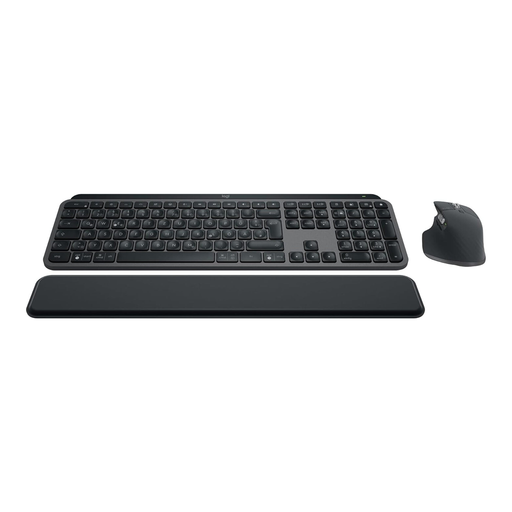 Image unavailable
The product name lists Smart Actions for repeated supported tasks; Logitech describes this feature as working through Logi Options+.
Keyboard and mouse; German QWERTZ layout; backlit keys; Bluetooth and Logi Bolt.
Smart Actions require Logi Options+ and don’t replace creating and managing file links in your catalogue software.
 Image unavailable
This wired variant is listed for desk-based typing with a German layout.
Wired; German QWERTZ layout.
No, not through its design alone. In Excel on Windows, you can press Ctrl+K to add a link to an existing file in a selected cell, as Microsoft Support explains. Configurable actions can trigger supported repeated steps; whether they suit your catalogue depends on the software you use and how it’s set up.
Check your links again after moving your collection. Microsoft Support notes that links can stop working if a linked file is moved to a different location; a different keyboard won’t fix those paths.
Check the connection type and operating system requirements for the specific variant, as well as any software you need. The Logitech Smart Actions described here require Logi Options+. A wired model doesn’t need keyboard batteries to be charged or replaced.
No. The Verbraucherzentrale explains that, in Germany, consumers can generally claim their statutory rights against the seller within two years of receiving newly purchased goods if there’s a defect. A warranty is an additional voluntary promise, with terms set by the provider.
Electrical waste must not go in household rubbish. The German Environment Agency lists local collection points among the disposal options; removable batteries should be taken separately to a battery collection point.