If several people use the same trackball, an ambidextrous design is well worth considering. If you’ll mostly be using it alone, a thumb-operated trackball may also suit you. At a shared desk, click noise, accessible controls and the right connection type matter too. Manufacturers’ ergonomic claims are no substitute for checking that each user finds the hand position comfortable.
Which trackball is right for you?
Writers using a desk shared with others
If several people with different dominant hands use the same space, a stationary design and easy-to-reach controls are important. Kensington describes the Orbit Wireless as ambidextrous, but everyone should still be able to reach the ball and scroll ring comfortably.
Writers working in a quiet environment
If you share a desk and want to keep clicking to a minimum while you write, check the buttons on the specific model. Logitech says the ERGO M575S clicks more quietly than its predecessor; this is not an independent noise measurement.
Writers switching between computers
If you switch between a laptop and a desktop computer, make sure the connection type and operating system are compatible with each device. Also check whether you’re allowed to install any required additional software on the computers you use.
What should you look for when buying?
First, check who will use the trackball and which hand they’ll use. Then consider click noise, your preferred hand position and the connections available on the computers you use.
| Consideration |
What to look for |
Who is it important to? |
| Desk space and different users |
Check whether the design suits both right- and left-handed users, and whether everyone can reach the ball and buttons easily. |
If I need space for notes beside the keyboard and other people share the desk, it’s important that everyone can use the trackball comfortably. Around 36% of consumers prioritise saving space and sharing the device. |
| Click noise |
Check the buttons on the exact model; quiet ball movement doesn’t tell you how loud the clicks are. |
If other people are sitting at the same desk while I write, I want to avoid distracting clicks as much as possible. Low click noise is the top priority for around 29% of consumers. |
| Personal hand position |
Check the size of your hand, the position of the ball and buttons, and how the device feels at your own desk. |
If I’m writing for a long time, I want a hand position that feels right for my hand and forearm. Hand position is the main consideration for around 21% of consumers. The Federal Institute for Occupational Safety and Health notes that awkward joint angles and prolonged static postures can put strain on the body when working at a computer. |
| Connections and switching between computers |
Check that Bluetooth or USB connectivity is compatible with the computers you use, and make sure any required software is available and permitted. |
If I switch between several computers, I want to use the trackball without an incompatible connection or unauthorised additional software. Connection type and switching between computers are a priority for around 14% of consumers. |
Common buying misconceptions
-
A right-handed thumb-operated trackball will automatically suit everyone at the desk
A stationary design saves space for movement, but it doesn’t mean that people with different dominant hands will all be able to use the device.
Before choosing, find out who will actually use the trackball. If right- and left-handed people will take turns, specifically look for an ambidextrous design.
If other users find the design uncomfortable, you may need another input device.
-
Customisable buttons will work with scriptwriting shortcuts straight away
Additional button functions may depend on compatible software. Perixx says the programmable buttons on the PERIMICE-520 require a driver download; Logitech points users to Logi Options+ for the customisable functions on the ERGO M575S.
Before buying, check whether you’re allowed to install and use the required software on the computers you plan to use. Start by choosing a device that feels right to use without any customisation.
-
A stiff ball means the device is faulty
Kensington notes that dust and debris in the ball socket may affect how smoothly the ball moves.
Check the cleaning instructions for the specific model and follow them carefully. If the problem continues, contact the seller.
Brands worth considering
Kensington
Orbit models with a scroll ring may suit shared desks where an ambidextrous design is important.
- Kensington describes the Orbit Wireless as ambidextrous and lists Bluetooth and a 2.4 GHz connection. The wired Orbit model connects via USB.
- Check that users are comfortable operating the ball with their fingers and using the scroll ring, and that the connection type suits their computer.
Logitech
The ERGO M575S and MX Ergo S are thumb-operated trackballs for people who prefer this style of control.
- Logitech says the ERGO M575S clicks more quietly than its predecessor. The ERGO M575S connects via Bluetooth or Logi Bolt; according to the technical specifications, an AA battery is included.
- A right-handed, thumb-operated design may not be suitable for a mix of right- and left-handed users. Logitech lists USB-C charging and a tilt feature for the MX Ergo S; the charging cable is not included.
Perixx
The wired PERIMICE-520 is a thumb-operated trackball option if you’d rather not use a wireless connection.
- Perixx lists a 1.8 m USB-A cable and a tilting four-way scroll wheel.
- Perixx says the programmable buttons require a driver download. Check that your computer has a USB-A port and that users are comfortable with the thumb-operated design.
Trackballs at Joybuy
This selection includes a thumb-operated trackball for a shared writing desk, provided users are comfortable with a right-handed design.
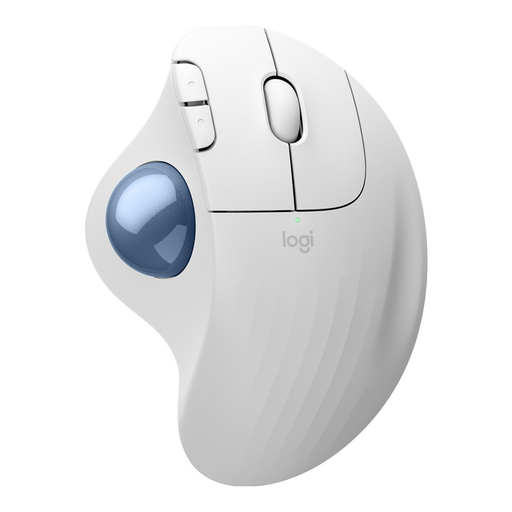 No image available
Logitech ERGO M575S, White, 910-007030
A good option if you’re looking for a thumb-operated trackball for a compact writing space and a right-handed design suits you. Logitech says it clicks more quietly than its predecessor.
Connection: Bluetooth or Logi Bolt; an AA battery is included, according to the technical specifications.
View at Joybuy
Frequently asked questions
Does a trackball need to be ambidextrous for everyone at a shared desk?
An ambidextrous design is particularly important only if people with different dominant hands will be using the same device. Kensington describes the Orbit Wireless as ambidextrous, but everyone should still be able to reach the ball, buttons and scroll ring easily.
Do I need additional software for customisable buttons?
It depends on the model and the functions you want. Logitech lists Logi Options+ for the customisable functions on the ERGO M575S; Perixx says the programmable buttons on the PERIMICE-520 require a driver download. If you’re using a managed computer, check in advance whether you’re allowed to use the software on it.
What can I do if the pointer jumps or the ball becomes stiff?
First check whether the ball or its socket is dirty, and follow the cleaning instructions for the specific model. Kensington notes that debris may affect movement; this doesn’t mean the same cleaning products are suitable for other models.
What additional costs and rights should I be aware of when buying online?
Check whether any accessories you need are included: Logitech says the MX Ergo S doesn’t come with a USB-C charging cable, while the ERGO M575S technical specifications list an AA battery. When you buy from a retailer in Germany, the seller is generally responsible for the statutory consumer guarantee; this is separate from any voluntary manufacturer’s warranty. Many online purchases by consumers are also generally covered by a 14-day right to cancel, although exceptions may apply. The Verbraucherzentrale explains these rights and the conditions that apply.


