Choose a card reader to match both the card format and the connection on the device you’re taking with you. To access footage directly on your phone, you’ll need a compatible mobile reader; if you use different devices, a model with USB-A and USB-C may be more convenient. For larger transfers, the card and host device matter too – a stated maximum speed isn’t a guaranteed transfer rate.
Which option is right for you?
View footage directly on your phone
If you want to open the card at your hotel without a laptop, the connector, support for external storage and card format all need to work with your smartphone. Apple Support and Files by Google explain the different ways to access files on iPhones and supported Android devices.
Travel with different devices or cards
If you use both a phone and a laptop, or different camera cards while travelling, look for suitable connectors and separate SD and microSD slots. UGREEN and Hama list these features for selected card reader models.
Back up footage while you’re away
If you want to copy trail camera images at your hotel as well as view them, you’ll need a suitable storage location and should check that the copy works. Files by Google explains how to copy files on supported Android devices, while the consumer advice centre explains the purpose of backing up data.
What should you look for when buying?
These proportions refer to consumers who want to view or back up trail camera footage at a hotel using a card reader.
| Priority |
What to look for |
Who is it important to? |
| View footage on a phone |
Check that the connector, access to external storage and SD or microSD slot are compatible with your device. |
If I want to open the footage directly on my phone at the hotel, the connection and file access need to work together. Around 36% of consumers put direct access first. |
| Switch between devices and cards |
Check whether you need SD or microSD, and SDHC or SDXC; also check the USB connections on the devices you’re taking with you. |
If you use different camera cards, or both a phone and a laptop, you’ll need suitable slots and connectors. Around 29% of consumers prioritise this flexibility. |
| Copy footage |
Check that the target device has enough storage and can copy and then open the files. |
If I want to keep an extra copy while travelling, I’ll need a suitable storage location as well as a card reader. Around 21% of consumers prioritise backing up their footage. |
| Transfer large amounts of data |
Compare the card’s UHS standard with the support offered by the reader and host device; don’t assume maximum speeds are guaranteed. |
If you regularly copy large numbers of images or videos, pay particular attention to the card and interface standards involved. Around 14% of consumers prioritise large transfers. |
Avoid common buying mistakes
-
Choosing by USB-C connector shape alone
A connector that fits doesn’t necessarily mean your device can access the attached storage, or that the card slot is compatible with your trail camera card.
Before buying, check the connection on the device you’re taking with you, its support for external storage and the card format.
-
Assuming SDHC and SDXC are the same
The SD Association classifies cards with capacities over 32 GB and up to 2 TB as SDXC. Conflicting capacity labels on a product page aren’t a reliable way to judge compatibility.
For cards over 32 GB, check specifically whether the reader supports SDXC.
-
Assuming an advertised top speed is your actual copy speed
The SD Association distinguishes between interface speed and memory card performance. Lexar also notes that results depend on the card and system configuration.
Compare the standards supported by your card and host device first, before choosing a reader with a higher stated interface speed.
-
Assuming that viewing footage also backs it up
Opening images doesn’t create an extra copy. Apple notes that reformatting an SD card deletes all the images on it.
Copy important files to a suitable location and check the copy before resetting or formatting the card.
Brands and models to consider
SEISSIGER
The manufacturer describes model SW10061 as a card reader that lets you view trail camera footage on a smartphone.
- According to SEISSIGER, the model has Lightning, Micro-USB, USB and USB-C connectors.
- The compatibility information focuses mainly on older devices. For cards over 32 GB, check specifically for SDXC support: the product page also describes 64 and 128 GB cards as SDHC, whereas the SD Association classifies these capacities as SDXC.
UGREEN
UGREEN describes model 50706 as a dual-interface reader with USB-A and USB-C connectors, plus SD and microSD slots.
- The manufacturer says you can access both card slots at the same time, and that the reader supports UHS-I cards up to 2 TB.
- The stated USB interface speed isn’t a guaranteed transfer rate for your memory card.
Hama
Hama describes model 00200131 as a compact USB-C card reader for SD and microSD cards.
- The manufacturer’s German website lists SDHC/SDXC and microSDHC/microSDXC as supported card formats.
- This model is listed with a USB-C connector; use with USB-A or Lightning isn’t specified. Check that it works with your particular mobile device too.
Lexar
Lexar positions its Multi-Card 2-in-1 USB 3.1 Reader for users of SD and microSD cards who want to use UHS-II.
- Lexar states read speeds of up to 312 MB/s and simultaneous access to both slots.
- The manufacturer notes that results depend on the system configuration and card speed. This information doesn’t confirm compatibility with a specific smartphone.
Anker
According to the German manufacturer’s website, the Anker 553 USB-C Hub combines SD and microSD slots with additional connections for a laptop setup.
- Anker also lists USB-A, HDMI and Ethernet for this model.
- If you only need to read cards, the extra connections may be unnecessary. Anker’s stated 18-month manufacturer’s warranty applies to the hub described, not to every product from the brand.
Card readers and hubs at Joybuy
This selection includes mobile card readers, USB-C hubs and a storage enclosure with a card reader. What matters is whether the card format and connection match the device you’re taking with you.
 No image available
Acer 7-in-1 USB-C Hub ODK6V0
An option if you want to combine card reading with additional connections on a compatible USB-C host device.
- SD and TF card reader
- USB-C connection, 3 × USB 3.0 at 5 Gbit/s, HDMI at 4K/30 Hz and 100 W PD charging, according to the product title
View at Joybuy
 No image available
4-in-1 USB-C card reader with USB-A
A suitable choice if you want to read SD or microSD cards on compatible USB-C or USB-A devices.
- Slots for SD, MicroSD and TF
- USB-C and USB-A; SDHC is also mentioned in the product title
View at Joybuy
 No image available
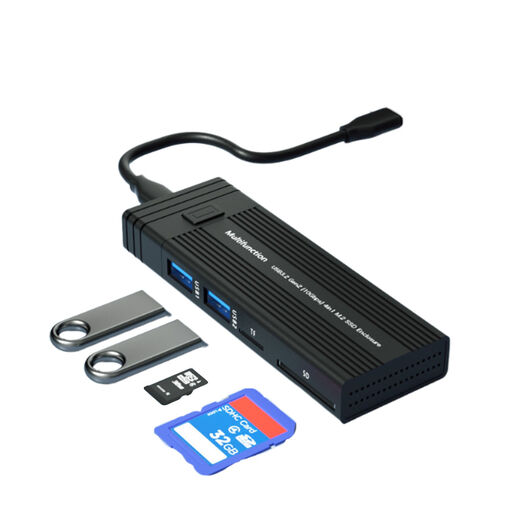
4-in-1 M.2 SSD enclosure with USB hub and card reader
An option if you want to combine a card reader with an M.2 SSD enclosure and a USB hub.
- Supports NVME/SATA and B-Key/B&M-Key, according to the product title
- Transfer rate stated in the title: 10 Gbit/s
View at Joybuy
 No image available
HOCO HB45 Spirit 2-in-1 USB 3.0 card reader
A good fit if your camera uses SD or TF cards and your host device has a compatible USB-A connection.
- Supports SD and TF cards, according to the product description
- USB-A connection and USB 3.0 are listed for this model
View at Joybuy
 No image available
Baseus Lite Series USB-A card reader for SD/TF
An option if you want to read SD or TF cards on a device with a compatible USB-A connection.
- SD and TF cards, according to the product title
- USB-A connection; grey, according to the product title
View at Joybuy
Frequently asked questions
How can I open the card on my phone without importing the images straight away?
On a compatible iPhone, Apple Support says you can access connected storage through ‘Files’ and ‘Browse’. Files by Google explains how to access connected USB storage through ‘Storage devices’ on supported Android devices. The connection and storage access must be compatible with your device.
Can I format the card straight after viewing it?
If you want to keep the footage, copy it to a suitable storage location first and check the copy. Apple notes that reformatting deletes all the images on the SD card; simply viewing them doesn’t create a backup.
What else should I plan for when backing up footage?
Check that your device has enough free storage and whether you need a suitable adapter for the connection. You’ll also need a suitable destination for the files. Open a few files from the copy before relying on it.
Can I share trail camera footage showing identifiable people without any concerns?
There’s no blanket permission to do so. North Rhine-Westphalia’s data protection authority notes that the legal assessment depends on the circumstances, and that footage of people outside a personal or family setting may be subject to the GDPR. Reading the card at your hotel doesn’t determine whether recording or sharing the footage is lawful.


