Commuters with limited table space
If you edit minutes at your train seat, both the screen and keyboard need to fit on the limited table space. Deutsche Bahn points out that fixed or fold-down tables are available at many ICE seats.


For taking meeting minutes on the train, a compact, separate Bluetooth keyboard is a flexible starting point if you switch between devices or have limited luggage space. Just check that it has a German layout and is compatible with your device. However, it won’t provide a stable stand for your tablet: COMPUTER BILD recommends an additional stand case for the Logitech Keys-To-Go 2, while a compatible keyboard case can combine the screen and keyboard but will only fit specific tablet models. At your seat, both the screen and keyboard need to fit on the table space available.
If you edit minutes at your train seat, both the screen and keyboard need to fit on the limited table space. Deutsche Bahn points out that fixed or fold-down tables are available at many ICE seats.
For longer editing sessions, easy-to-reach keys and suitable cursor controls can make a difference. A keyboard case can prop up your tablet, but make sure you check the exact tablet generation and accessory model.
If you start taking minutes on a laptop and continue on a tablet, for example, check that your operating systems are supported and find out how to switch between connected devices. Logitech says the Keys-To-Go 2 can connect to up to three devices; CHERRY says the KW 9200 MINI has two Bluetooth channels.
When choosing a portable keyboard for taking meeting minutes on the train, your priorities will depend on whether table space, extended typing, switching between devices or power is most important to you.
| Priority | What to check before buying | Who is it most relevant to? |
|---|---|---|
| Pack size and set-up | Check the dimensions when in use, whether there’s room for an open case and whether you’ll need a separate tablet stand. | If I need to fit both a screen and keyboard on the train table, the total workspace matters. Around 36% of consumers prioritise available table space and pack size. |
| Typing feel and text editing | Check the German QWERTZ layout, punctuation keys, navigation keys and your preferred cursor controls. | If I regularly edit longer passages, I want to work accurately with the keys and cursor controls. Around 29% of consumers prioritise extended typing. |
| Compatibility and switching between devices | Check the operating system, Bluetooth support and how many device slots are in use. For a case, check the full tablet model name. | If I edit minutes on several work devices, I need a keyboard that’s compatible with each one and supports switching between them. Around 21% of consumers prioritise switching between devices. |
| Power | Check whether the specific keyboard uses a rechargeable battery or disposable batteries, and which charging cable or replacement batteries it needs. | If I want to minimise the hassle of charging or changing batteries, power is an important factor in my choice. Around 14% of consumers prioritise keeping this effort to a minimum. |
According to Logitech, the cover on the Keys-To-Go 2 protects the keys but doesn’t prop up the tablet. COMPUTER BILD lists the need for an additional stand case as a drawback.
Plan how you’ll position the screen as well as the keyboard, and check that both will fit on the table space available.
The fit depends on the exact tablet model: Samsung lists specific Galaxy Tab models for the EF-DX715, while Apple lists specific iPad Pro models for its 11-inch keyboard.
Before buying, check the full model names of both the tablet and case, as well as the layout version.
The Logitech Keys-To-Go 2 uses two replaceable CR2032 coin cell batteries; a T5 screwdriver is needed to change them. By contrast, CHERRY says the KW 9200 MINI has a rechargeable battery.
Check the power source against the exact model name, and dispose of used batteries at a collection point.
The range includes separate portable keyboards such as the Keys-To-Go 2, as well as keyboard cases for specific iPad models.
The KW 9200 MINI is a compact, separate keyboard with Bluetooth, wireless and wired connection options.
The Smart Keyboard Trio 500 is a separate Bluetooth keyboard, while the Book Cover Keyboard EF-DX715 is designed for specific Galaxy Tab models.
The Magic Keyboard for 11-inch iPad Pro models combines a keyboard, trackpad and stand in a device-specific design.
The BK08 is a folding keyboard with a touchpad for consumers who want a compact option for travelling.
This selection includes folding Bluetooth keyboards with touchpads, separate keyboards and an iPad keyboard case. Compare the portable format, device compatibility and the type of screen stand you need.
 No image available
A good choice if you’re looking for a folding keyboard with a touchpad and multiple Bluetooth connections for use on the go.
QWERTZ; three Bluetooth channels; compatible with iPadOS, Android and Windows. Stated weight: 228 g. Folded dimensions: 7,1 × 4,5 × 0,7 Zoll; key width: 15 mm; key travel: 1,5 mm.
 No image available
A good choice if you’re looking for a separate, slim QWERTZ keyboard with a touchpad for typing on the go.
228 g; 5 mm thick; connects to three Bluetooth devices; touchpad. The product name lists iPad, Android tablets and Windows devices as compatible.
 No image available
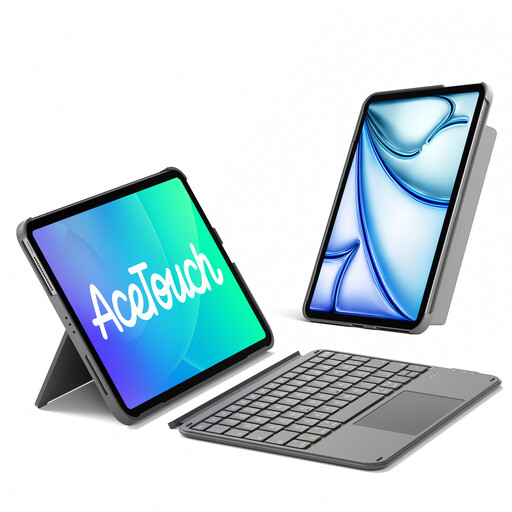
A good choice if you want to prop up a compatible iPad with a keyboard and trackpad; the keyboard is detachable.
QWERTZ; adjustable stand for landscape and portrait use. According to the product name, it fits iPad 11 (A16 2025) and 10th Gen, iPad Air 11" M4/M3/M2 (2026/2025/2024), Air 5/4 and Pro 11 4/3/2/1. Compatibility is limited to the iPad models listed.
 No image available
A good choice if you want to take a foldable Bluetooth keyboard with you for use with different devices.
65-key layout; compatible with iOS, Windows, macOS and Android. Stated weight: 175 g; folded dimensions: 167 × 105 × 13 mm. USB-C charging; up to 26 hours of use according to the product description.
 No image available
A good choice if you’re looking for a folding keyboard with a touchpad for a computer, mobile phone or tablet.
63 keys; compatible with iOS, Android and Windows. Folded dimensions: 152 × 97 × 12 mm; stated weight: 300 g; battery: 140 mAh.
Check that you have a stable tablet stand and enough room for both the screen and keyboard. COMPUTER BILD recommends an additional stand case for the Keys-To-Go 2. Deutsche Bahn says fixed or fold-down tables are available at many ICE seats, but not every seat.
According to Logitech, select “Keys-To-Go 2” in your device’s Bluetooth settings. For Android, Logitech also says to press Fn + G to activate the Android layout. For other keyboards, check the relevant instructions.
Logitech says the Keys-To-Go 2 uses two replaceable CR2032 coin cell batteries; a T5 screwdriver is needed to change them. In Germany, the Verbraucherzentrale distinguishes between your statutory rights against the seller and a voluntary guarantee.
Deutsche Bahn says other noisy activities are not welcome in the quiet carriage. Please be considerate and keep your typing as quiet as possible.
According to the Umweltbundesamt, used batteries and rechargeable batteries should be taken to collection boxes in shops or to local collection points, not put in household waste. When returning an old device, remove any easily removable batteries first.