For training demonstrations in daylight, consider the screen’s position and adjustable blinds first, then check the anti-reflection performance of the specific model and how it displays standard video content. A high HDR peak brightness alone is no guarantee of good visibility. Test the actual demonstration file from the back and sides of the room, check that your playback device can be connected, and factor in the risk of burn-in with OLED if you’ll be showing static images for long periods.
Who these TVs are for
Trainers in bright training rooms
If you show videos or demonstrate tasks during the day near tall windows, assess reflections and blinds alongside the picture quality at the intended screen position. The German Social Accident Insurance (DGUV) identifies daylight glare and reflections as factors to consider when lighting screen workstations.
Trainers working with large groups
If people at the back or sides of the room need to make out small details, check the screen size and the viewing angles of the specific model separately.
Teams using a variety of demonstration formats
If you switch between laptop videos, slides and longer demonstrations, consider the connection options and how much static content you’ll show. For example, Sony Germany lists four HDMI inputs for the BRAVIA 9 K-75XR90.
What to consider when choosing
Start with the room’s lighting and the screen position, then check visibility from the least favourable seats and finally confirm the playback connections and expected usage. The German Social Accident Insurance highlights the risk of direct and reflected glare from daylight.
| Consideration |
What to check before buying |
Who it matters most to |
| Visibility in light from windows |
Choose the screen position and blinds; check the specific model’s anti-reflection performance with standard video content at the intended location. |
When daylight from tall windows falls on the screen during demonstrations, I need videos to remain visible without distracting reflections. Around 36 % of consumers say window light is their main concern. |
| Visibility of details |
Watch the actual demonstration file from the back and sides of the room; check the available surface or mounting position. |
If small hand movements need to be visible from the back or sides, I want to assess the demonstration file from those exact seats. Around 29 % of consumers say visibility from their seats is their main concern. |
| Reliable playback |
Test your laptop, adapter and demonstration file; check the number of HDMI inputs on the exact model. |
If I switch between a laptop and different demonstration formats, I need a connection that works with my device. Around 21 % of consumers say playback is their main concern. |
| Long usage and static images |
Check the proportion of static content and the energy label for the specific model variant. |
If slides, menus or logos stay on screen for a long time, I want to consider my usage pattern when choosing display technology. Around 14 % of consumers say long usage and static images are their main concerns. |
Avoid common selection mistakes
-
Using HDR peak brightness as your only daylight test
An HDR figure alone doesn’t show how clearly standard demonstration videos will appear next to tall windows.
Check anti-reflection performance, the screen’s position in the room and the demonstration content you’ll actually use separately.
-
Checking only the seats in the middle
Screen size alone won’t tell you whether small details are visible from seats at the sides or further away.
Check the smallest important details in the image from the least favourable seats.
Depending on what you find, you may need to reposition or mount the screen appropriately.
-
Choosing OLED without checking how much time slides stay on screen
Static images displayed for long periods or shown repeatedly can increase the risk of burn-in on OLED screens.
If slides often remain on screen, review your usage pattern and the specific warranty terms before deciding.
-
Assuming similarly named models are identical
Different model numbers don’t guarantee the same screen finish or features. For example, features of a Samsung QN70F can’t automatically be attributed to the GQ75QN90FATXZG.
Before comparing models, check their full model numbers and the features that matter in your room.
Key brands at a glance
Sony
The BRAVIA 9 K-75XR90 is a model-specific option to consider if anti-reflection performance and laptop connectivity matter to you.
- Sony Germany lists X-Anti Reflection and four HDMI inputs for this model.
- Manufacturer specifications don’t show how well the TV will perform in your particular room or from seats at the sides.
Samsung
The GQ75QN90FATXZG may be worth considering if you’re interested in a manufacturer-described anti-reflection screen finish.
- Samsung describes this model’s screen finish as Glare Free.
- This description isn’t an independent measurement of anti-reflection performance in a training room; check the full model number.
TCL
The 75C8K is a large-format QD-Mini LED model to consider when comparing screen sizes for group seating.
- TCL Germany lists a 75-inch screen and an HDR figure of 4500 nits.
- The manufacturer’s HDR figure doesn’t measure everyday visibility of training videos or guarantee low reflection from windows.
LG
The OLED65G59LS may be more suitable if you’ll show a variety of videos and can control the lighting conditions.
- LG promotes Brightness Booster Ultimate for this OLED model.
- The manufacturer’s claim doesn’t establish whether the TV is suitable for slides left on screen for long periods. Consider the potential risk of burn-in and check the warranty terms for your specific use.
Hisense
The 75U8Q is another 75-inch option to include in a screen-size comparison.
- Hisense Germany lists 4K and Mini-LED PRO for this model.
- These specifications don’t replace checking reflections from windows or assessing visibility from seats at the sides.
Joybuy TVs for large groups
This selection includes 75- to 100-inch models to help you compare screen sizes for seats further away. Actual visibility still depends on viewing distance, demonstration content and viewing angle.
 No image available
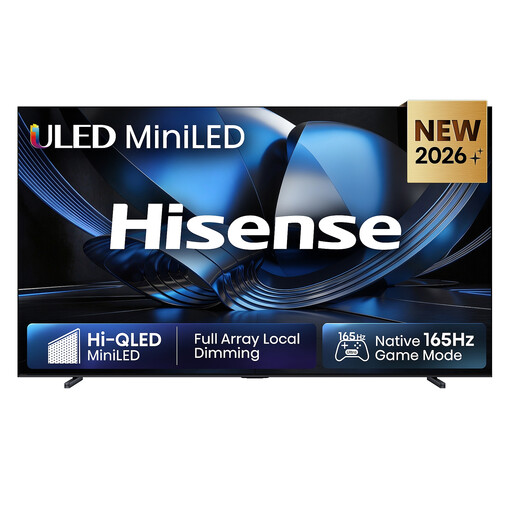
Hisense 100U7DSE, 100-inch, 4K, ULED Mini LED, 165 Hz
The large screen may be worth considering for groups with seats further away; check the demonstration file from the back of the room.
100 inches; 4K; ULED Mini LED; 165 Hz. Make sure you have enough space and a stable stand or suitable wall mount for this 100-inch TV.
View at Joybuy
 No image available
Hisense 85E8S, 85-inch, 4K Ultra HD, Mini-LED, 144 Hz
This 85-inch model can be included in your screen-size comparison for groups; check that details are visible from seats at the sides too.
85 inches; 4K Ultra HD; Mini-LED; 144 Hz.
View at Joybuy
No image available
Hisense 75E8S, 75-inch, MiniLED, 4K, QLED, 144 Hz
The 75-inch version is an option if you’d like to assess this screen size for your seating plan; check the picture using the demonstration file you’ll actually show.
75 inches; 4K; MiniLED; QLED; 144 Hz.
View at Joybuy
 No image available
TCL 75Q7C, 75-inch, QLED Mini LED, 4K HDR Premium
This 75-inch model can be included in a screen-size comparison for groups; check viewing angles and reflections at the planned location.
75 inches; 4K HDR Premium; QLED Mini LED.
Plan for a sturdy piece of furniture or secure mounting.
View at Joybuy
 No image available
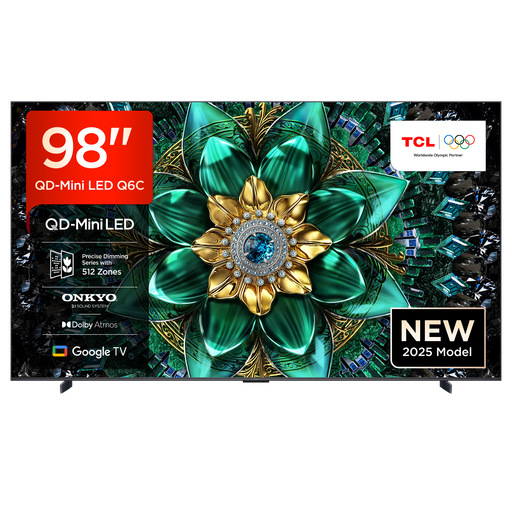
TCL 98Q6C, 98-inch, QD-Mini LED, 4K HDR Premium
The 98-inch screen may be worth considering for seats further away; first check the room dimensions, mounting position and visibility from seats at the edges.
98 inches; 4K HDR Premium; QD-Mini LED.
At least two people should lift this heavy TV; according to the product information, wall mounting should be carried out by a qualified professional.
View at Joybuy
Frequently asked questions
Do blinds help even if the TV has an anti-reflection screen?
Yes. Blinds and anti-reflection performance should be considered together. The German Social Accident Insurance describes glare from daylight and recommends suitable adjustable blinds for screen workstations. You’ll still need to check whether the TV is clearly visible from every seat in the training room.
Can I mount the TV on the wall myself?
The mount, TV and wall must be compatible. Sony’s installation guidance warns of the risk of injury, refers users to the relevant instructions and recommends using an authorised professional installer. This does not mean there is a general legal requirement to use one.
What should I check about energy use and business use?
Compare the EU energy label for the exact model variant and check that the warranty and service cover suit the buyer and intended use. LG publishes separate terms for B2B product ranges, which don’t automatically apply to a consumer TV.
Does the energy label have to be visible for a TV sold online?
Yes. The European Commission includes TVs among the electronic displays covered by its rules; its energy-labelling information also requires the label to be displayed visibly for online offers. This does not mean there is an additional minimum energy-efficiency class for the selection described here.


