If you have the source text and translation open on the same computer, a 34-inch ultrawide with a 3,440 × 1,440 resolution can give you one continuous screen area for two windows; you don’t need Picture-by-Picture for this. Two separate monitors are a better fit if you want to position the displays independently or reuse a screen you already own. If you’re using two computers, check the inputs, Picture-by-Picture and, where relevant, KVM support – as well as text size, connections and the space available on your desk.
Which screen setup is right for you?
Translators working with two document windows
If you check the source text and translation side by side on one computer, a wide display can fit both windows next to each other. Microsoft Support explains how to snap windows and view documents side by side in Word.
Proofreaders with a laptop-based workspace
If you regularly connect a laptop, consider not just the usable screen area for text but also positioning and suitable video and power connections. Check that the laptop works with the specific monitor rather than relying on the presence of a USB-C port alone.
Proofreaders using two computers
If your text sources are on different computers, suitable video inputs and, where relevant, Picture-by-Picture or KVM may be useful. Samsung describes these features for the ViewFinity S65UC; they aren’t necessary for displaying two windows from a single computer.
What should you look for when buying?
First, work out whether you want to display two windows from one computer or actually connect two computers. You can then compare screen space, readability and connections more effectively.
| Priority |
What to check when buying |
Who is it important to? |
| Space for both texts |
Open typical documents side by side and check that the text, toolbars and window widths suit the way you work. Dell lists a 3,440 × 1,440 resolution in a 21:9 format for the P3425WE. |
If I want to see the source text and translation at the same time on one computer, usable width is what matters most to me. Around 36% of consumers prioritise having space for both text windows when making this comparison. |
| Readability and positioning |
Check text size at your usual viewing distance, as well as the height and tilt adjustments and the desk space required by the specific model. |
When checking text for longer periods, I want to read both texts comfortably and position the screen to suit me. Around 29% of consumers put readability and positioning first. |
| Laptop connection |
Check your laptop’s video output and power requirements against the monitor and cable. Dell lists USB-C power delivery of up to 90 W for the P3425WE; this doesn’t guarantee that every laptop can be charged at that rate. |
If my laptop is regularly connected to the monitor, I need a connection that supports its video output and, if required, charging. Around 21% of consumers prioritise the laptop connection. |
| Connecting two computers |
Check the inputs on the specific model and whether you actually need Picture-by-Picture or KVM for your devices. Samsung lists both features for the ViewFinity S65UC. |
If my text sources are on two computers, I want to check whether both can be displayed at the same time or controlled with one keyboard and mouse. Around 14% of consumers prioritise using two computers. |
Common misconceptions
-
Confusing “two texts” with “two video sources”
You can use your computer’s window-management features to arrange two documents side by side. Picture-by-Picture and KVM, on the other hand, are for displaying or controlling multiple connected computers.
First, check how many computers the files are open on. Microsoft Support explains how to snap two windows to the edges of the screen on a Windows computer.
-
Assuming a USB-C port guarantees compatibility
A port on a monitor doesn’t automatically mean that a particular laptop can output a picture through it or receive enough power to charge. Dell lists USB-C power delivery of up to 90 W for the P3425WE; compatibility still depends on the laptop and cable.
Check the laptop connection, video mode and power requirements against the specifications for the specific monitor.
Depending on your laptop, you may also need a cable, adapter or separate power supply.
-
Comparing screen size alone
A larger screen doesn’t automatically make text easier for you to read. A 34-inch 21:9 model and a 49-inch 32:9 model also differ in the space they take up and their horizontal pixel count.
Measure the space needed for the screen and stand, then check how two typical document windows look at your preferred text size.
Relevant brands and model ranges
Dell
Dell’s Pro P3425WE is a 34.1-inch 21:9 model with a 3,440 × 1,440 resolution, USB-C hub and RJ45.
- Dell says this specific model offers USB-C power delivery of up to 90 W and height adjustment of up to 150 mm.
- Check that your laptop and cable support video output and the charging power you need; these specifications don’t apply to all Dell monitors.
LG
LG offers the 34U650A-B, a 34-inch 21:9 model, and the 49U950A-W, a much wider 32:9 option.
- LG lists resolutions of 3,440 × 1,440 and 5,120 × 1,440 for the two models respectively.
- The 49-inch format needs plenty of space. LG notes that some Mac models with Intel graphics are limited in the maximum resolution they can support over USB-C.
Samsung
The ViewFinity S65UC, model number LS34C652UAUXEN, is an option if you need to connect two computers.
- Samsung lists Picture-by-Picture and KVM for controlling two connected devices with one keyboard and mouse on this model.
- You don’t need these multi-device features to display two document windows from the same computer.
Philips
The Philips 34B2U6603CH/01 is a 34-inch business ultrawide with a 3,440 × 1,440 resolution.
- Philips lists Thunderbolt 4 and Smart KVM for this model.
- How useful these features are depends on the devices you connect; to display two windows from one computer, the operating system’s window-management features are enough.
Joybuy monitors for comparing text
This Joybuy selection includes ultrawide monitors for a wide, continuous text area, as well as models whose product details list features for multiple sources. Before you buy, check that the format, connections and space required suit your workspace.
 No image available
CRUA 49-inch DQHD ultrawide monitor
The 32:9 format is designed to give you an especially wide, continuous screen area; measure the space needed for the screen and stand before you buy.
49 inches; 5,120 × 1,440 pixels; 32:9; 165 Hz.
Joybuy
 No image available
INNOCN E34A1R 34-inch monitor
The product details list PIP and PBP for multiple sources; check that the monitor’s inputs are suitable for your two computers.
34 inches; 3,440 × 1,440 pixels; 21:9; VA; PIP/PBP; height-adjustable stand.
Joybuy
 No image available
INNOCN 40C1U 40-inch ultrawide monitor
If you want to connect multiple sources, check the supported inputs and your laptop’s video and charging requirements.
40 inches; 5,120 × 2,160 pixels; 21:9; PIP/PBP; USB-C with 65 W Power Delivery; height-adjustable stand.
Joybuy
 No image available
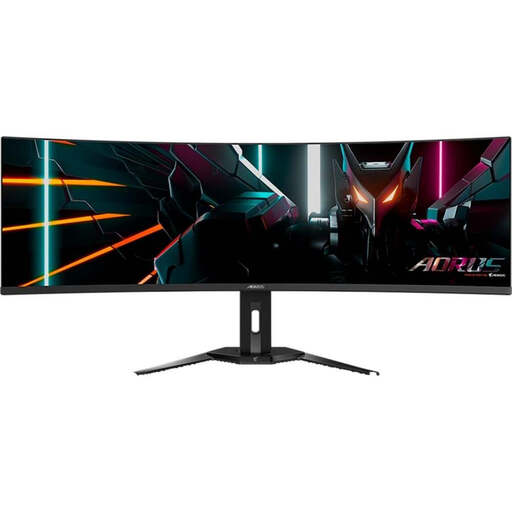
GIGABYTE AORUS CO49DQ OLED
The KVM feature listed in the product name is useful for switching between connected devices. Check that the available connections suit your setup.
OLED; 5,120 × 1,440 pixels; 144 Hz; KVM.
Joybuy
 No image available
Xiaomi G34WQi 34-inch ultrawide monitor
The 34-inch size is a useful starting point for displaying two text windows; check readability at your preferred text size.
34 inches; WQHD; 180 Hz.
Joybuy
Frequently asked questions
Do I need Picture-by-Picture to view the original and translation side by side on one computer?
No. In Windows, you can snap two windows side by side; Word also offers a view for two documents, with optional synchronous scrolling. Picture-by-Picture is for multiple video sources, such as two connected computers.
How do I set up a text comparison on one screen?
Open both documents and arrange their windows on the left and right in Windows. Alternatively, in a supported version of Word, select ‘View Side by Side’ and turn on synchronous scrolling if needed.
What should I know about laptop connections, returns and faults?
Before buying, check that your laptop supports the video output you want and, if needed, power delivery through the connection you plan to use; you may need additional cables or adapters. For online purchases by consumers in Germany, the withdrawal period is generally 14 days from delivery. Your statutory rights and a voluntary manufacturer’s warranty are separate entitlements.
Does German law require an ultrawide or a particular screen size for a translation workspace?
BAuA ASR A6 does not create a general obligation to buy an ultrawide or a particular screen size for comparing texts. It sets out requirements for screen-based work within its scope, including workplaces and covered teleworking locations; private use outside that scope is treated differently.


