For track building in Transport Fever 2, a conveniently positioned scroll wheel and a shape that suits your hand are good starting points. The game manual explains that the wheel is used to zoom, while pressing it lets you rotate and tilt the camera. Extra buttons are most useful if you want to assign commands you use often. When choosing between wired and wireless, consider your desk and the power requirements of the specific model.
Who should think carefully about their mouse choice?
Track builders who spend a lot of time on the map
If you regularly plan and check rail routes, easy-to-reach mouse controls for zooming and moving the camera are important. The Transport Fever 2 game manual explains how to use the scroll wheel for these functions.
Home workers with long sessions
If you use the same mouse for work and gaming, check that its shape and button layout suit your hand and grip. How comfortable it feels can vary from one model to another.
Players who use commands frequently
If you want to trigger recurring in-game actions using your mouse buttons, check that the relevant buttons are easy to reach and can be assigned to suit your preferences.
What should you look for when buying?
For Transport Fever 2, the game manual says to use the scroll wheel to zoom and to press and hold the middle mouse button to rotate and tilt the camera. So first, check that you can easily reach and use the wheel and buttons in your own game.
| Buying priority |
What to look for |
Who is this important to? |
| Camera control and placement |
Check how easy it is to reach the scroll wheel and use its in-game functions. |
If I zoom and rotate the camera often while building routes, I want the wheel to feel easy and reliable to use. Around 33% of consumers put camera control and precise placement first. |
| Comfort for work and gaming |
Check the shape, handedness and reach of the side buttons. |
During long sessions, I want to hold the mouse comfortably and reach the important buttons without shifting my grip. Around 27% of consumers prioritise a comfortable fit. |
| Assignable extra buttons |
Check the number and position of the buttons, along with any configuration software you may need. |
If I use certain commands often, I want to assign them to buttons that are easy to reach. Around 27% of consumers prioritise being able to assign their own commands. |
| A cable-free desk |
Check the connection type and how the mouse is powered. |
If a cable gets in the way at a desk I use for both work and gaming, a wireless mouse may be a better choice. Around 13% of consumers put a cable-free desk first. |
Common buying mistakes
-
Assuming a high DPI count will help with track building
The Transport Fever 2 game manual describes mouse controls for zooming and moving the camera, but does not specify a maximum DPI requirement.
Start by checking the scroll wheel, buttons and grip shape. Treat the maximum DPI as a model specification, not proof that the mouse is suitable for track building.
-
Assuming similarly named model variants are the same
The Razer Basilisk V3 35K is wired, while Razer describes the Basilisk V3 Pro 35K as a wireless model. Features and connectivity can differ, even when the names are similar.
Compare the full model name, connection type and features of the specific variant.
-
Buying a mouse with lots of buttons without planning how to use them
Extra buttons only help with recurring actions if you can assign them usefully in the game you play.
Make a note of the commands you use most before buying, then check that you can easily reach the buttons you plan to use.
Notable brands and specific models
Logitech G
The G502 HERO is a wired option for buyers considering a mouse with lots of assignable buttons and adjustable weights.
- Logitech lists 11 programmable buttons and adjustable weights for the G502 HERO.
- In its review of 13.09.2026, COMPUTER BILD rated the extra buttons positively, but noted the fixed cable and non-adjustable size as drawbacks. This assessment applies to the G502 HERO.
Razer
The wired Basilisk V3 35K is worth considering if different scroll modes are important to you.
- Razer describes three configurable scroll modes for this model, including Free-Spin and Smart-Reel.
- The Basilisk V3 35K is not the same as the separately sold wireless Basilisk V3 Pro 35K.
CHERRY XTRFY
The wired CHERRY MC 2.1 could suit you if two programmable side buttons are enough.
- CHERRY lists two freely programmable side buttons, onboard memory and a flexible cable.
- The model is described as a right-handed mouse, so its shape will not necessarily suit every hand.
SteelSeries
The wireless Aerox 5 Wireless is an option if you want to avoid a mouse cable and programme several buttons.
- SteelSeries lists nine programmable buttons for the Aerox 5 Wireless.
- Check the connection and power supply of the specific model. The manufacturer’s battery-life figures are not a measure of how long it will last with your own usage.
Wireless gaming mice at Joybuy
The Joybuy products below are wireless gaming mice. When choosing, check the buttons, connections and features listed for each model, and make sure the shape suits your hand.
 No image available
Razer DeathAdder V3 Pro Wireless, White
This wireless gaming mouse is worth considering if you want to avoid having a fixed mouse cable on your desk.
The product name lists a weight of 64 g, a Focus Pro 30K sensor and the colour white.
The mouse needs to be charged via USB cable for wireless use.
View at Joybuy
 No image available
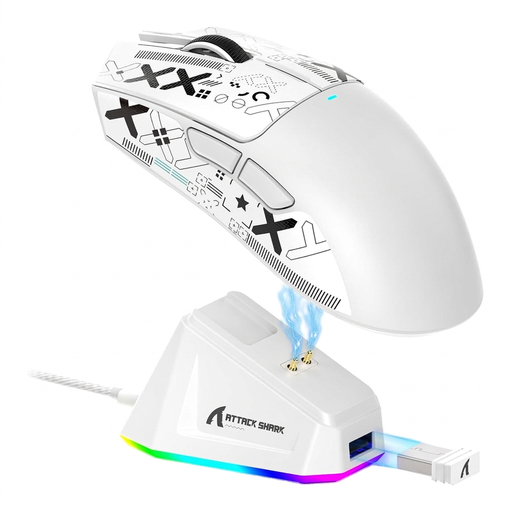
ATTACK SHARK X11 Wireless Gaming Mouse
This wireless mouse is worth considering if you want to choose between wireless, Bluetooth and a wired USB-C connection.
The product name lists a PAW3311 sensor, five programmable buttons and a charging dock.
View at Joybuy
 No image available
Razer Naga V2 HyperSpeed
Consider this model if you are looking for a wireless mouse with plenty of programmable buttons.
The product name lists 19 programmable buttons, 2.4 GHz wireless and Bluetooth, along with a Focus Pro 30K sensor.
The model is described as a right-handed mouse.
View at Joybuy
 No image available
AJAZZ AJ200 AI MC Wireless Gaming Mouse
This wireless option is worth considering if you want to switch between connection types to suit your setup.
The product name lists Bluetooth, 2.4 GHz wireless and USB-C, as well as a PAW3311 sensor.
A charging dock is listed in the product name.
View at Joybuy
 No image available
AULA SC620 Wireless Gaming Mouse
This wireless mouse is worth considering if you want to choose between Bluetooth, 2.4 GHz wireless and USB-C.
The product name lists a PixArt PAW3311 sensor and seven programmable buttons.
View at Joybuy
Frequently asked questions
Do I need lots of extra buttons for Transport Fever 2?
No, not necessarily. The game manual describes mouse controls as well as keyboard shortcuts. First, check which commands you use most, then decide whether extra mouse buttons would be useful for your own setup.
How can I test a mouse for track building in the game?
Try the documented default controls in Transport Fever 2: right-click and drag to move the camera, press and hold the scroll wheel to rotate and tilt, and use the wheel to zoom. Then check that you can easily reach any extra buttons you have assigned.
What are my rights if a mouse I order online doesn’t fit or is faulty?
When you buy online from a business seller, you generally have a 14-day right to cancel from the date of delivery, subject to legal exceptions. Faulty goods are covered by a legal guarantee of at least two years against the seller; this is separate from any voluntary manufacturer’s warranty. This information is based on guidance from Your Europe and applies under the EU rules described there.


