What should you look for when choosing?
First, check how you can safely compare duplicate entries. Then choose a layout, connection and key arrangement that suit your data-entry habits.
| Priority |
What to check before buying |
Who is this important to? |
| Checking duplicates carefully |
Check whether your data-entry software supports the shortcuts you need and can flag or compare potential matches. |
When I see similar dates or titles, I want to compare the original entries before deleting anything. Around 36 % of consumers put careful duplicate checking first. |
| Entering lots of text and numbers |
Compare the DE-QWERTZ layout, number pad and key feel with your usual workflow. |
If I regularly enter descriptions, dates and page numbers, a familiar layout with an easy-to-reach number pad matters to me. Around 29 % of consumers give particular importance to extensive text and number entry. |
| Hand position during long sessions |
Consider the key layout, wrist rest and position at your workstation; a split layout may take some getting used to. |
When I work at a screen for long periods, I want to arrange my keyboard and workstation to suit the way I work. Around 21 % of consumers prioritise hand position during longer sessions. |
| Desk space and connection |
Measure the available space and check the layout, connection type and compatibility with your devices. |
If there’s room for original journals alongside my keyboard and screen, or I switch between devices, the right size and connection matter to me. Around 14 % of consumers prioritise desk space or device connectivity. |
Keyboards at Joybuy
The keyboards below are designed for repeated text and number entry, switching between devices, or typing on tablets and computers while on the move. Before choosing, compare the layout, features and intended use of each model.
 No image available
Wireless QWERTZ keyboard with LCD display and rotary dial
A good fit if you want to handle recurring tasks across several devices.
The product description lists QWERTZ, an LCD display and rotary dial, as well as Bluetooth for up to four devices, 2.4 GHz wireless connectivity and USB-C.
It also lists a 2,000 mAh battery and backlighting.
Joybuy
 No image available
Wireless keyboard and mouse set, QWERTZ, full size
A good fit if you often enter numbers and are looking for a keyboard and mouse set.
Features include a separate number pad, quiet keys and a detachable wrist rest.
The set is described as using a 2.4 GHz USB connection; the product description lists Windows and Mac as compatible systems.
Joybuy
 No image available
AJAZZ AK35I V4, mechanical, German QWERTZ
A good fit if you’re looking for a mechanical keyboard with a German QWERTZ layout and replaceable switches.
Connection options include Bluetooth, 2.4 GHz wireless and USB-C.
The product description also lists a 10,000 mAh battery and a 1.14-inch TFT colour display.
Joybuy
 No image available
Inateck KB01105 tablet keyboard with touchpad
A good fit if you want to type on a tablet or computer while travelling and use an integrated touchpad.
The product description lists a German QWERTZ layout and Bluetooth connections for up to three devices.
Compatible devices listed include iPad, Android tablets, Windows devices, laptops and PCs.
Joybuy
 No image available
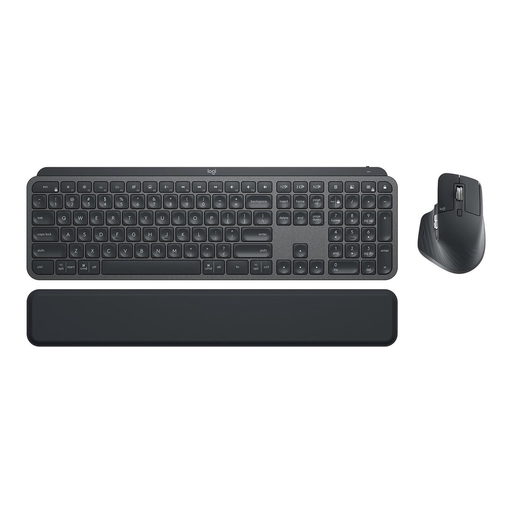
Logitech MX Keys Combo for Business Gen 2, German QWERTZ
A good fit if you’re looking for a full-size keyboard and mouse set for regular text and number entry.
According to the product description, the set includes an MX Keys keyboard and an MX Master 3S mouse.
Features listed include German QWERTZ, backlighting, Bluetooth, Logi Bolt and support for multiple devices.
Joybuy
Frequently asked questions
Can a programmable keyboard detect duplicate diary entries?
No. Programmable features trigger workflows you’ve set up, but they don’t compare the contents of entries themselves. If you use Excel, you can first highlight potential duplicates and check them; Microsoft notes that ‘Remove Duplicates’ deletes data. Back up your original data and decide which columns genuinely identify an entry.
What should I consider during longer data-entry sessions?
Set up your keyboard and other equipment to suit your workstation, and try out the key layout. The German Federal Institute for Occupational Safety and Health’s ASR A6 applies, within its scope, to display screen workstations in workplaces and home offices; it is not a blanket product recommendation for keeping a diary at home.
What are my rights if a keyboard I’ve bought is faulty?
When you buy from a business seller in the EU, you’re generally entitled to a legal guarantee of at least two years from the date you receive the goods. This legal guarantee is separate from any additional manufacturer’s warranty offered.
What should I check to make sure a wireless or Bluetooth keyboard complies with regulations?
The German Federal Network Agency lists CE marking, manufacturer information, and operating and safety instructions in German among the things it checks when monitoring the market. CE marking is required only for products covered by harmonised EU rules that require it; it is not independent proof of typing comfort or data quality.


