Occasional document access
If you only occasionally open a booking on your phone while travelling, first check whether a smartphone hotspot and secure offline copies will meet your needs.


If you only occasionally need to access bookings on one device, your smartphone hotspot may be enough. It’s also worth saving important documents securely offline before you set off. A battery-powered LTE router is more useful if several devices regularly need a connection that doesn’t rely on your phone. 5G is worth considering for this purpose mainly if you also use data-intensive applications and the network and plan are suitable. Neither option can provide coverage along your route or solve problems caused by a flat battery or lack of data.
If you only occasionally open a booking on your phone while travelling, first check whether a smartphone hotspot and secure offline copies will meet your needs.
If several people travelling with you regularly need to access bookings or travel plans, simultaneous connections and the ability to use the internet without relying on one person’s phone may be important considerations.
If you need access to copies of identity documents or bookings while travelling, remember to secure offline copies and device access as well as choosing a router.
A good fit if: You only occasionally need to download documents online and your phone has enough coverage and data.
The trade-off: You won’t need an extra device, but using your phone as a hotspot and accessing documents online will use its battery and data allowance.
A good fit if: Several people travelling with you regularly need to access travel information on their own devices.
The trade-off: You’ll also need to plan for the router, a SIM and somewhere to charge it. The manufacturer’s battery-life claims are no guarantee of how long it will last on your journey.
A good fit if: You regularly download larger files or do other data-intensive tasks, as well as accessing documents, and your device, plan and route support 5G.
The trade-off: There’s no proven extra benefit over LTE for occasional document access, and 5G won’t help where there’s no coverage.
| What matters | What to check before buying | Who is it most relevant to? |
|---|---|---|
| Coverage and signal blackspots | Check the network and plan for your intended route; save important documents securely offline beforehand. | If I want to access travel documents even in a signal blackspot, I’ll make sure I have a secure offline copy. Around 33% of consumers put coverage and reliability first. |
| Several devices and battery life | Compare the number of devices, the battery-life claim for the exact model version and charging options. | If several people travelling with me will regularly connect their devices, I’ll look for simultaneous connections and a suitable way to charge the router. Around 27% of consumers prioritise multiple devices and battery life. |
| SIM and data allowance | Check the SIM format, whether your plan allows router use and the data allowance for the countries you’re visiting. | If I want to avoid an extra SIM and the cost of data, I’ll check my plan and the countries on my route in advance. About 20% of consumers put SIM requirements and ongoing costs first. |
| Protecting personal documents | Check how to change the password and update the firmware; store copies of documents securely. | If I’m carrying copies of identity documents or bookings, I’ll make sure the files and device access are protected. Around 20% of consumers prioritise data protection. |
It also matters whether your chosen mobile network is available along your route. A device’s maximum speeds don’t tell you what connection you’ll get on your journey.
Check the network and plan for your route, and save important documents securely offline. Choose 5G only if you have another use for it in mind.
MERCUSYS’s specifications for the MT110 V1 and V2 differ in areas such as battery capacity and Wi-Fi details.
Ask the seller to confirm the hardware version before buying, and compare only the specifications that apply to that version.
Having your own Wi-Fi connection won’t solve a signal blackspot or automatically protect files on your device or your accounts.
Prepare secure copies, change any default passwords that are still in place and keep the firmware up to date. The German Federal Office for Information Security recommends these precautions for routers and stored travel documents.
It’s worth comparing different types of device: the M7000 is a battery-powered LTE hotspot, while the M8550 is a separate 5G model.
The MT110 is an LTE hotspot for up to 10 devices. Check which hardware version is on offer before buying.
According to the manufacturer, the Nighthawk M7 Pro MR7450 is a battery-powered 5G hotspot with WiFi 7.
According to the manufacturer, the Mudi V2 GL-E750V2 combines a battery-powered LTE travel router with configurable VPN settings.
The following Joybuy options include LTE hotspots and other mobile routers. For each device, check that the power supply, setup and intended use are right for your journey.
 No image available
For several devices that need to access LTE on the go using a compatible Nano SIM. Check the exact hardware version before buying.
The product name specifies 2200 mAh. MERCUSYS lists different battery specifications for the MT110 depending on the version, so check which one is on offer.
 No image available
An option for people travelling together who want a battery-powered LTE hotspot for several devices. Your connection will depend on the network and plan.
The product name specifies a 2000-mAh battery. TP-Link says the M7000 can connect up to 10 devices and run for up to 8 hours; the manufacturer says actual battery life depends on usage and surroundings.
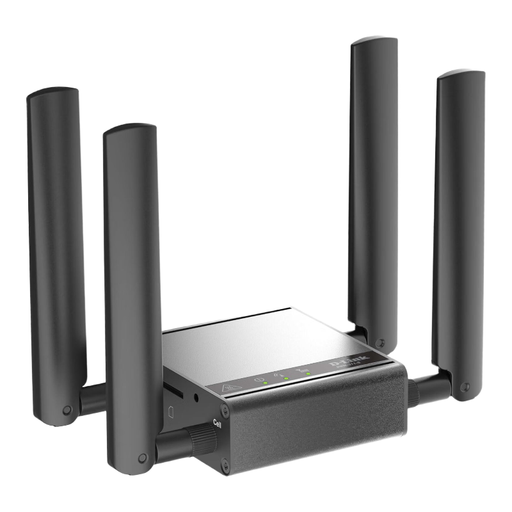 No image available
The product description presents this model for indoor M2M applications. Check whether this use and the Ethernet setup suit your needs in a vehicle.
 No image available
This could be a good fit if there’s a USB-C power source where you’ll use it. Bear in mind that it needs one to operate away from a mains power supply.
The product name specifies 4G LTE, Nano SIM, USB-C power, Wi-Fi 6 AX 600 Mbit/s and a Gigabit LAN port.
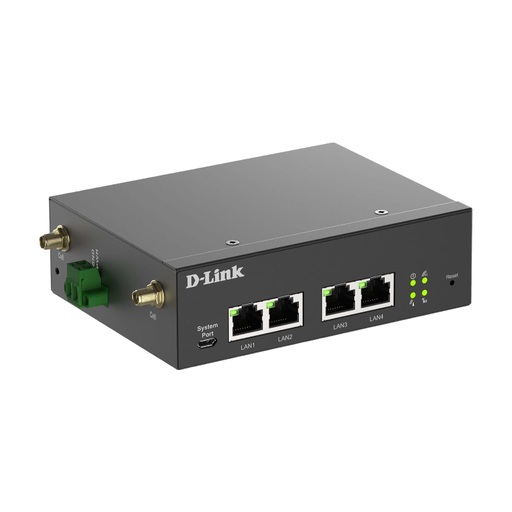 No image available
The product description positions this device as an industrial gateway. Check that the power supply, Ethernet setup and intended installation suit your needs on a car journey.
The specifications list a 9–36 V DC power supply, four Gigabit Ethernet ports and wall or DIN rail mounting.
Save secure copies on a device before you set off. The German Federal Office for Information Security recommends encrypting or password-protecting stored copies of identity documents and bookings. Also check whether you’ll need to present an original document at your destination.
Insert an activated SIM that’s compatible with the device, test the connection and check the battery level and connected devices. The German Federal Office for Information Security recommends changing any default passwords that are still in place and keeping the router’s firmware up to date.
For occasional trips to other EU countries, you’ll generally be charged domestic rates, although fair use rules may limit the data you can use. Check the terms of your specific plan and the countries on your route before you travel. This doesn’t mean you’ll be covered for charges in countries outside the included area.
Yes. The German Federal Network Agency says that identity verification is required before prepaid mobile services are activated. This requirement applies to SIM activation, not to a general registration requirement for the router you’ve bought.
Before you buy, check what support is available for the device, firmware updates and SIM or plan issues from your mobile network provider. The available update and support options depend on the model and its hardware version.