Travellers who type a lot
If you edit longer diary entries on your smartphone or tablet, the right layout and a stable typing position are important.


Choose a keyboard based first on your writing device and the space you’ll actually have to use it: for longer editing sessions, the right layout and a stable typing position matter, while a folding keyboard saves space when packed away. If you often use the pointer while editing, a touchpad can be useful; if you’re considering a keyboard case, check the exact tablet model it fits. Manufacturer specifications are no substitute for trying it out on your usual train route.
If you edit longer diary entries on your smartphone or tablet, the right layout and a stable typing position are important.
A folding keyboard packs away neatly. However, you’ll need a suitable surface to place it on when unfolded.
If you often move between sections of text while editing, or want to avoid carrying separate accessories, look for a touchpad or a keyboard case that fits your tablet exactly.
A good fit if: you write longer passages on a smartphone or tablet and have a flat surface to use. Logitech says the Keys-To-Go 2 works with several operating systems.
Consider: It doesn’t fold down any smaller, and you’ll also need a separate way to prop up your screen.
A good fit if: a compact folded size matters to you and you have a stable surface to type on. ProtoArc recommends using the XK01 on a stable surface rather than your lap.
Consider: You’ll need another way to control the pointer.
A good fit if: you often move between sections of text while editing and don’t want to set up a separate mouse. The ProtoArc XK01 TP combines a keyboard and touchpad.
Consider: ProtoArc lists the XK01 TP as weighing 297 g and measuring 386,4 mm wide when unfolded. Check that the touchpad works with your writing app.
A good fit if: you have a tablet that’s specifically listed as compatible and want to carry the keyboard and case together. Inateck lists its iPad cases by model generation.
Consider: A case like this won’t fit every device, so check the exact model name and generation.
| What matters | What to look for when buying | Who particularly values this? |
|---|---|---|
| Typing feel and German layout | Check for a QWERTZ layout, special characters, key spacing and the keyboard’s dimensions when unfolded. | When I edit longer diary entries, a familiar layout and easy-to-reach keys matter more to me than the most compact packed size. Around 29% of consumers prioritise typing feel and layout. |
| Packed size and typing stability | Compare the folded and unfolded dimensions, and check whether you’ll usually have a suitable table space available. | When I’m short on luggage space, a compact packed size matters — as long as I can set the keyboard up on a suitable surface. Around 23% of consumers prioritise packed size. |
| Compatibility | Check the operating system and layout; for a case, also check the exact tablet model and generation. | Before travelling, I want to know that my keyboard and writing device will work together; with a case, the tablet generation must also match. Around 18% of consumers prioritise compatibility. |
| Navigation and set-up | Check that the touchpad works with your writing app, and consider how much space the keyboard needs when unfolded. | When editing, I often jump between sections of text, so I need a suitable way to control the pointer and enough space to set everything up. Around 18% of consumers prioritise navigation and set-up. |
| Power on the go | Check the battery type or charging port, the cable you’ll need and whether the keyboard will need charging before you set off. | Before setting off, I want to know whether I’ll need to charge the keyboard or bring spare batteries. Around 12% of consumers prioritise power. |
To type, a folding keyboard needs to be unfolded and placed on a suitable surface. ProtoArc recommends using the XK01 on a stable surface rather than your lap.
Also compare its dimensions when ready for use with the space you can usually expect to have on the train.
Compatibility may depend on the tablet model and generation. Inateck lists its cases for specific iPad models.
Check the full model name and generation against the compatibility list for the version you’re considering.
The Verbraucherzentrale distinguishes between a voluntary guarantee and your statutory rights against the seller.
Keep your proof of purchase and check the specific terms of any additional guarantee.
Logitech describes the Keys-To-Go 2 as a slim Bluetooth keyboard with a protective cover, compatible with several operating systems.
The German-layout XK01 variants cater to different input needs: a folding keyboard without a touchpad, and the XK01 TP with a touchpad.
Inateck offers device-specific keyboard cases, including versions in the BK2007 range for certain iPads.
Samsung describes the Smart Keyboard EJ-B7800BBEGDE as a portable QWERTZ keyboard for compatible devices.
The products below include portable Bluetooth keyboards, including folding models, as well as a keyboard case for specific iPad models.
 No image available
A folding QWERTZ keyboard with a touchpad for travelling and switching between devices.
The product name lists three Bluetooth channels and compatibility with iPadOS, Android and Windows.
 No image available
The product name describes a rechargeable keyboard with a magnetic stand for smartphones and tablets.
The product name also specifies an aluminium case.
 No image available
A portable input solution with a folding keyboard and wireless mouse.
The product name lists USB-C charging, connection to up to three devices, and support for Windows, Android and iOS.
 No image available
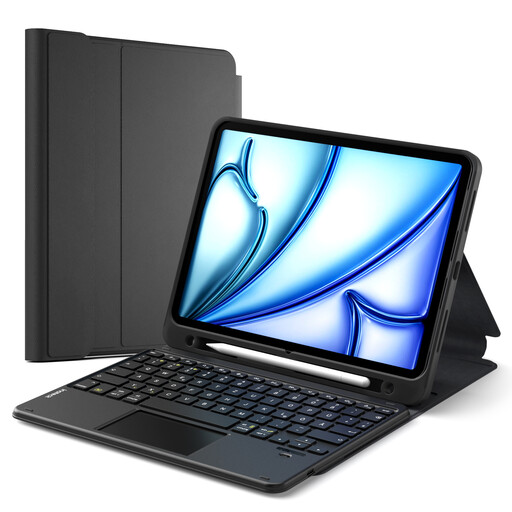
A detachable QWERTZ keyboard case with a touchpad and pen holder for the iPad models specified in the listing.
The product name lists compatible versions including iPad 11 (A16 2025), iPad 10, iPad Air 11 M4/M3/M2, Air 5/4 and Pro 11. Check your exact model and generation.
 No image available
A portable keyboard with a German QWERTZ layout and built-in touchpad.
The product name lists compatibility with iPad, Android tablets, Windows, laptops and PCs.
Don’t assume that you can: ProtoArc recommends using the XK01 on a stable surface rather than your lap. Deutsche Bahn says many ICE seats have fixed or folding tables, but not every seat does.
Pair the keyboard with your writing device at home and test it in your diary app. For the Samsung Smart Keyboard Trio 500, Samsung describes pairing using a Bluetooth key, followed by switching devices at the press of a button; other models may work differently.
The Bluetooth connection between your keyboard and writing device is separate from the train’s Wi-Fi. If your diary app needs internet access to save or sync your work, check whether it has an offline mode. Deutsche Bahn notes that mobile reception can vary during a journey.
According to Logitech, the Keys-To-Go 2 uses two CR2032 coin-cell batteries; the manufacturer says the ProtoArc XK01 TP is rechargeable and lists a USB-C charging cable. Before you travel, consider whether you’d rather take spare batteries or charge the keyboard.
The Bundesnetzagentur lists a correctly applied CE mark and clear product identification among the things it checks during market surveillance. The CE mark is based on the manufacturer’s own declaration of responsibility and is not an independent quality mark; it doesn’t mean that a particular model has been individually tested.