Digital travel journal creators
If you’re putting travel photos and text together for on-screen viewing, look for a clear display, a suitable colour mode and text scaling that suits the way you work.


For a digital travel journal, look for a clear display of photos and text, a suitable colour mode and a monitor that fits on your shared desk. If you plan to print later, calibration and the right colour profiles become more important; a wide colour gamut alone won’t guarantee a good print result. If several computers share the space, check the video connection, power delivery and whether KVM is explicitly listed as separate features: USB-C alone doesn’t confirm that switching is supported.
If you’re putting travel photos and text together for on-screen viewing, look for a clear display, a suitable colour mode and text scaling that suits the way you work.
If you connect your laptop at a shared desk or switch between computers and accessories, check the connections, power delivery and switching features of the specific model.
If you want to assess photos for a printed journal, consider calibration, profiling and your intended printing process as well as the monitor itself.
First decide whether your priority is digital layout or the option to print. Then check how well the monitor will fit the shared workspace and the computers used there.
| Priority | What to check before buying | Who is it important to? |
|---|---|---|
| Photos and digital layouts | Check the resolution, screen size, sRGB mode, text scaling and usable desk space required by the specific model. | If I assess photos and page layouts digitally, I need a clear view of both together. Around 29% of consumers are likely to prioritise viewing photos and layouts digitally. |
| Switching between computers at a shared desk | Check video transmission, USB upstream, KVM if needed, and the power delivery required and provided as separate features. | If I switch between computers and accessories at a shared desk, I want to avoid unnecessary cable swapping. Around 29% of consumers are likely to prioritise switching between computers. |
| Assessing colours for print | Check the colour gamut of the specific model, its calibration and profiling options, and the profiles used in your intended printing process. | If I want to print my journal, I need to include both the display and the output in my colour workflow. Around 21% of consumers are likely to prioritise print colours. |
| Text comfort and desk space | Check the dimensions of the monitor and stand, height adjustment, screen position and legible text scaling at your own desk. | If I write and design pages at a shared desk, I want the text to remain legible without taking up too much space. Around 21% of consumers are likely to prioritise text comfort and desk space. |
USB-C can carry video, data and power, but that doesn’t automatically mean you can switch a shared keyboard and mouse between two computers.
Check whether KVM is explicitly listed for the specific model, and which video and USB upstream connections your computers need.
Without a suitable switching feature, you may need to swap cables frequently or buy a separate switch.
A colour gamut specification doesn’t describe the whole process from what you see on screen to the printed journal.
If you plan to print, consider calibration and profiling alongside the profiles and conditions of your intended printing process.
At a shared desk, the stand, adjustability and text legibility also affect how well the monitor fits your workspace.
Measure the available space and check text scaling and screen position in your actual setup before you decide.
The SW242Q is a compact model for photo and text work at a shared workstation.
The ProArt PA279CRV is a 27-inch 4K model for image and layout work.
The UltraSharp U2724DE combines a 27-inch QHD display with Thunderbolt hub features.
The UltraFine 27UP850K-W is a 27-inch 4K model with USB-C.
EIZO describes the ColorEdge CS2731 as designed for photography and image editing with colour management.
These 27-inch 4K models are a good starting point for viewing travel photos and journal text together. At a shared workspace, check the connections, desk space and any explicitly listed KVM feature for each specific model.
 No image available
A 27-inch 4K option if you want to view photos and journal text together on one screen.
Listed specifications include 3840 × 2160 pixels, 10-bit colour depth and 99% sRGB. The details also list HDMI, DisplayPort and a height-adjustable stand.
 No image available
A 27-inch 4K option for viewing travel photos and page layouts together.
The product specifications list 3840 × 2160 pixels, IPS, 99% sRGB, HDMI and DisplayPort. The stand tilts.
 No image available
A 27-inch 4K option if you want to connect a laptop at a shared workstation.
Listed features include 3840 × 2160 pixels, IPS, 99% sRGB, DeltaE < 1 and USB-C with up to 90 W Power Delivery. The stand is height-adjustable. The product specifications state that KVM isn’t available; picture-in-picture and picture-by-picture don’t confirm that shared input devices can be switched between computers.
 No image available
A 27-inch 4K option for viewing photos and layouts; its listed connections and switching features may be useful at a shared desk.
The title lists 4K at 160 Hz or FHD at 320 Hz, USB-C with 65 W, KVM and a height-adjustable stand.
 No image available
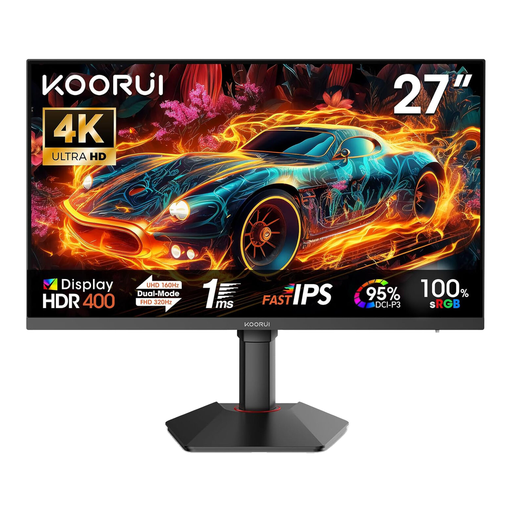
A 27-inch 4K option for viewing travel photos and journal text together.
The specifications list 3840 × 2160 pixels, 100% sRGB, 95% DCI-P3, height adjustment, tilt and pivot. HDMI and DisplayPort are listed as connections.
No. USB-C alone doesn’t confirm that KVM is supported. Check the video and USB upstream connections on the specific monitor, and look for KVM to be explicitly listed; BenQ lists it for the SW242Q.
No. High Adobe RGB coverage alone doesn’t guarantee accurate print colours. Calibration and profiling work together to ensure consistent on-screen colour; also consider the profiles and conditions of your intended printing process.
Adjust the height, position and text scaling to suit the people using it and the space actually available, and watch out for distracting reflections. Germany’s ASR A6 sets out requirements for screen-based work within its defined scope of workplaces and teleworking; it doesn’t apply generally to private desks.
For print matching, allow time for the calibration and profiling steps you’ll need, and make sure you have suitable connections. According to the Verbraucherzentrale, consumers generally have a 14-day right to cancel online purchases from the day they receive the goods; terms and possible exceptions depend on the specific purchase.
Yes. The European Commission states that electronic displays such as computer monitors are labelled on an efficiency scale from A to G. Check the label for the specific model if you want to compare its efficiency rating.