A compact tablet is a good choice for short entries and limited café table space. For sketches and handwritten notes, compatibility with the specific stylus is key, while a suitable keyboard is better for longer pieces. A larger writing setup takes up more room in your bag and at the café. If you want to access entries without Wi-Fi and keep them safe afterwards, also test how your chosen note-taking app handles offline use and backups.
Which type of tablet suits you?
Travellers packing light
If you add short entries between stops, a compact device may be easier to slip into your bag and takes up less table space. For the Wi-Fi models described, Apple lists the iPad mini at 255 g and the 11-inch iPad Air at 464 g; these figures apply to the specific models and variants.
Journal writers who prefer handwriting
For sketches and handwritten passages, check stylus compatibility for the specific model and what comes in the box. Samsung describes the Galaxy Tab S10 FE as including an S Pen, while Apple lists the Pencil models supported by the iPad Air.
Travellers writing longer pieces
If you regularly write longer pieces, a keyboard designed for your exact tablet model is one option. Lenovo lists keyboard and stylus options for the Tab P12; before buying, check what’s included in your chosen variant and how much space the set will take up on the table.
What to consider when choosing
Compact all-purpose tablet
A good fit if: you mainly capture short notes and photos, and have limited space in your bag or on the café table.
The trade-off: The smaller screen leaves less room for longer texts or viewing multiple things at once. Check stylus and keyboard compatibility for the exact model.
11-inch tablet with stylus
A good fit if: you want to combine handwriting, sketches and photos on a versatile tablet.
The trade-off: A larger device takes up more room than a mini tablet. Check which generation of Pencil is compatible with the iPad Air; Samsung describes the Galaxy Tab S10 FE as including an S Pen.
Larger tablet with keyboard
A good fit if: you mainly type longer travel stories and have enough space at the café table.
The trade-off: The tablet, stand and keyboard take up more room. Check what’s included in the bundle and whether the keyboard is compatible with your exact model version.
Paper tablet designed for writing
A good fit if: handwritten pages and focused writing matter more to you than a versatile photo and app experience.
The trade-off: Check in advance that photo importing, editing and exporting work for your journal. The Type Folio is model-specific.
| Priority |
What to check before buying |
Who it matters most to |
| Compact size |
Compare the dimensions and weight of the specific Wi-Fi or mobile data variant, and factor in the space needed for a case or stand. For the Wi-Fi models described, Apple lists the iPad mini at 255 g and the 11-inch iPad Air at 464 g. |
When I’m travelling with limited space in my bag and at the café, I want a device that’s easy to stow and leaves room for my notes. Around 29 % of consumers put compact size first. |
| Handwriting and sketches |
Check the compatible stylus, what’s included, how notes are organised and the export options on the specific model. Samsung describes the Tab S10 FE as including an S Pen; Apple lists the Pencil models supported by the 11-inch iPad Air. |
If I want to sketch or write down what I see by hand, the stylus needs to work with my tablet and be available for my needs. Around 23 % of consumers prioritise handwriting. |
| Longer texts |
Check the keyboard for your exact model version, its layout, the space it needs on a table and the weight of the complete set. Lenovo lists a keyboard option for the Tab P12; reMarkable Support gives the Paper Pro Type Folio’s weight as approximately 485 g. |
When I write in detail in my travel journal, a keyboard that works with my tablet matters to me, even if the set takes up more room. Around 18 % of consumers prioritise longer texts. |
| Total cost of the set |
Check what’s included with your chosen variant and whether you’ll need to buy a stylus, keyboard or case separately. A voluntary guarantee is different from your statutory rights. |
When I’m putting together a complete writing setup, I want to know in advance which accessories I actually need. Around 18 % of consumers look at the total cost first. |
| Offline use and security |
Before travelling, test your chosen note-taking app in aeroplane mode with text and any photos available on the device. Then check that syncing works and that you have a separate backup. The BSI advises avoiding access to confidential data over unfamiliar Wi-Fi wherever possible. |
When I’m writing in a café without reliable Wi-Fi, my entry needs to be available offline and protected afterwards. Around 12 % of consumers prioritise offline use and security. |
Common buying misconceptions
-
Comparing only the tablet’s weight
A keyboard and case add to the weight of your travel setup. reMarkable Support gives the Paper Pro Type Folio’s weight alone as approximately 485 g.
Compare the complete set you plan to take with you, and consider how much space it will need on the table.
-
Assuming stylus support means one is included
Compatibility and what’s in the box are two different things: Apple lists the Pencil models supported by the iPad Air, while Samsung describes the Galaxy Tab S10 FE as including an S Pen.
Check the exact device variant and what’s included before deciding which accessories you need.
-
Relying on syncing as your only backup
Samsung distinguishes between syncing, which keeps changes up to date across multiple devices, and a backup, which creates an additional copy.
After making an entry offline, test both syncing it later and restoring it from a separate backup.
Key brands at a glance
Apple
For short entries or a larger writing area, the iPad mini and iPad Air models described by Apple offer different size options.
- Apple lists Pencil support for specific models; according to Apple Support, the Notes app can capture photos and videos.
- Weight and Pencil compatibility vary by model and variant. Check the generation and accessories before buying.
Samsung
The Galaxy Tab S10 FE is an Android tablet option with features for text, handwriting and photos in Samsung Notes, as described by Samsung.
- Samsung describes the Galaxy Tab S10 FE as including an S Pen; according to Samsung, Samsung Notes supports typed text, handwriting and photos.
- The right setup for offline use, photos and backups depends on the app and device configuration you choose.
Xiaomi
According to Xiaomi, the 11.2-inch display on the Xiaomi Pad 7 makes it another size option between compact and larger writing setups.
- Xiaomi lists the Pad 7’s weight as 500 g.
- Check separately what stylus and keyboard accessories are included with your chosen variant. A manufacturer’s maximum screen brightness figure isn’t an independent test of how easy the screen is to read in a café.
Lenovo
The Tab P12 may suit longer pieces if a larger screen and keyboard option work for the way you write.
- Lenovo lists a 12.7-inch display, as well as keyboard and stylus options.
- A larger tablet and its accessories take up more room. Check whether the stylus and keyboard are included with the exact variant you’re buying.
reMarkable
The Paper Pro is designed for a writing setup with handwritten pages and an 11.8-inch colour display.
- reMarkable describes a Marker and a model-specific Type Folio as input options.
- Check that photo importing, editing and exporting work for your journal. reMarkable Support gives the Type Folio’s weight as approximately 485 g; it isn’t compatible with the Paper Pro Move.
Joybuy products for writing travel entries in cafés
These products include compact tablet and keyboard sets, larger tablets and a note-taking device designed for handwriting, for writing entries while travelling.
 No image available
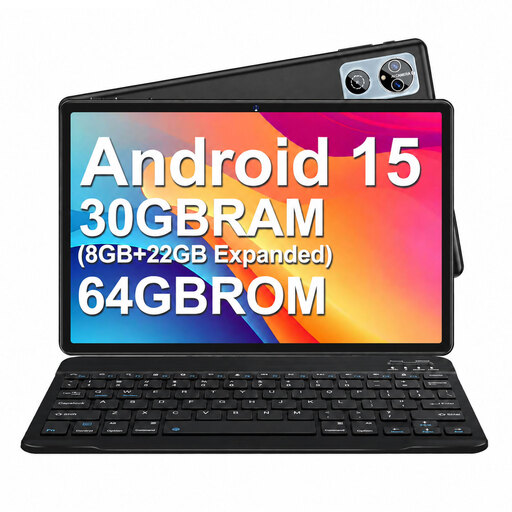
MEBERRY M6, 10.1-inch, Android 15, with keyboard, mouse and case
Its compact size and the included keyboard make it suitable for short entries at the table when you also want to type.
10.1-inch display; 64 GB ROM; keyboard, mouse and case listed as included in the product name.
Joybuy
 No image available
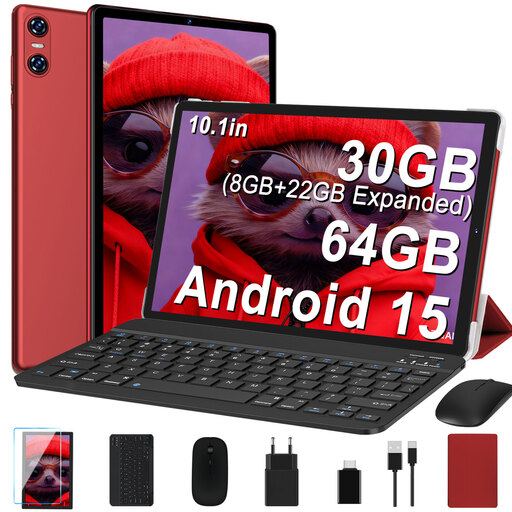
YESTEL T10 2-in-1, 10.1-inch, red
The included keyboard gives you the option of typing longer entries on a 10.1-inch tablet.
Android 15; 64 GB ROM; keyboard, mouse and case listed as included in the product name.
Joybuy
 No image available
iFLYTEK AINOTE 2, 10.65-inch E-Ink tablet
Described as a digital note-taking device with a stylus, it’s an option for handwritten travel entries.
10.65-inch E-Ink display; the described voice transcription feature requires an internet connection.
Joybuy
 No image available
UXD, 13.4-inch, Android 16, 256 GB
The included keyboard is one option for typing longer travel stories, while the large screen needs plenty of space on a café table.
1920 × 1200 FHD IPS display; keyboard, mouse and stylus listed as included in the product name.
Joybuy
 No image available
TECLAST ArtPad Pro, 12.7-inch, 256 GB, with T-Pen and keyboard
For longer typed stories or handwritten additions, this larger tablet comes with a keyboard and T-Pen according to the product details. It takes up more space on a café table than a compact device.
2K display; the included Bluetooth keyboard is listed as English-language.
Joybuy
Frequently asked questions
Can I update my travel journal without the café’s Wi-Fi?
It depends on whether your chosen app keeps the content you need available on your device. Before travelling, test in aeroplane mode to see whether you can edit entries and photos already available on the device. For access across multiple devices, you’ll need to set up syncing appropriately.
What should I keep in mind when using public café Wi-Fi?
The Federal Office for Information Security advises avoiding access to confidential data over unfamiliar Wi-Fi wherever possible. If you can’t avoid it, the BSI recommends using a VPN if possible.
Is a synced note already backed up?
Not necessarily. Samsung explains that syncing keeps changes up to date across connected devices, while a backup creates an additional copy. Check that your chosen app provides both functions, and test them separately.
What are my rights in Germany if my tablet is faulty?
Your statutory rights against the seller are different from a voluntary guarantee. The consumer advice centre explains that the first step when there’s a fault is to request that it’s put right, either by repair or replacement. For newly purchased goods, you can exercise your statutory rights within two years of delivery.
Does every tablet have an EU energy label?
No. From 20 June 2025, EU requirements apply to covered smartphones and slate tablets placed on the EU market from that date. The European Commission distinguishes these devices from, among others, tablet computers with desktop-like operating systems, so check the device type and when it was placed on the market.


