Who might benefit from a mobile hotspot?

Travellers who upload regularly

If you regularly upload photos or videos while travelling, consider network coverage, upload speed and data allowance together. The German Federal Network Agency’s mobile coverage monitoring shows outdoor coverage, but does not predict upload speeds at individual stops.

Travellers making long stops without a power socket

If you edit and upload entries away from a charging point, compare the stated battery life of the specific model with the length of your stops, and plan how you’ll recharge if needed. TP-Link notes that the M7000’s battery life depends on usage and operating conditions.

Travellers with several devices

If you want a laptop, smartphone or fellow travellers’ devices to be online at the same time, check the number of supported devices and the shared data allowance. A dedicated hotspot can spare your smartphone from providing the hotspot connection; an independent F.A.Z. Kaufkompass review notes that this function can drain your phone’s battery.

What should you look for when buying?

Keep using your smartphone as a hotspot

A good fit if: you upload infrequently, connect only a few devices and your existing plan has enough data for your files.

The trade-off: You won’t need extra router hardware, but using your phone as a hotspot for longer periods will drain its battery.

LTE hotspot with its own SIM

A good fit if: you regularly upload at stops and want to provide a separate connection for your laptop or other devices.

The trade-off: Check that your chosen network offers LTE at your stops and that the SIM and plan are compatible with the device.

5G hotspot

A good fit if: you often transfer larger files and have a suitable 5G plan and 5G coverage at your planned stops.

The trade-off: A high advertised peak speed doesn’t guarantee fast transfers while travelling; compare it with network coverage, your plan and power supply.

Hotspot with a cloud SIM or travel data packages

A good fit if: your journey crosses borders and you want to compare country-specific data packages with a single domestic plan.

The trade-off: Check the packages available in each country you’re visiting, how long they’re valid for and the terms of your own mobile contract.

What matters What to look for Who is this important for?
Uploading at stops Check the network operator and LTE or 5G coverage at planned stops, as well as the stated upload speed. If I need to upload entries at planned stops, reception there matters more to me than peak download speed. Around 36% of consumers focus on being able to upload at a stop.
Data allowance Compare file sizes and upload frequency with your plan’s data allowance and the terms that apply once you’ve used it. If I regularly transfer photos or videos while travelling, I want to know whether my data package will cover it. Around 29% of consumers prioritise the available data allowance.
Battery life Compare the stated battery life and the conditions it depends on with the length of your stops; also consider the charging port and how you’ll recharge. If I’m working during a long stop without a power socket, I need a connection that suits my power supply. Around 21% of consumers pay particular attention to use between charging points.
Several devices Check how many devices you need to connect at once and how the shared data allowance will be divided. If I want my laptop and smartphone online at the same time, I need to be able to use both with a suitable connection. Around 14% of consumers prioritise connecting several devices.

Common pitfalls

  • Assuming a high 5G download speed guarantees fast uploads

    Advertised peak speeds relate to the specific model and don’t predict the upload speed you’ll get at a particular stop. The German Federal Network Agency’s coverage map shows outdoor coverage, not the connection at every individual stop.

    Before choosing 5G for its higher peak speed, compare the stated upload speed, network operator and coverage at your planned stops.

  • Assuming the device includes your data connection

    A mobile hotspot doesn’t automatically come with a data allowance. Different plan terms may also apply if your journey crosses borders.

    Check the device, SIM and plan separately. The German Federal Network Agency describes roam-like-at-home as applying in the EU, as well as Liechtenstein, Norway and Iceland, when your mobile contract includes roaming; the terms of your specific contract apply to your journey.

  • Assuming similarly named model versions are identical

    Differences in Wi-Fi and battery specifications can make it harder to choose the version you think is right for you. TP-Link Germany lists IEEE 802.11b/g/n Wi-Fi at 2.4 GHz and a 2000-mAh battery for the M7000.

    Check the full model and version name, and compare the features that matter to you with the manufacturer’s specifications.

Key brands at a glance

TP-Link

The range includes LTE models such as the M7000 and M7450 V3, as well as the M8550 5G hotspot.

  • TP-Link states that the M7000 offers up to 8 hours of battery life and supports up to 10 connected devices; for the M7450 V3, the manufacturer quotes up to 15 hours and up to 32 devices.
  • These are manufacturer specifications for specific models, not measurements taken on your route. Check the version, plan and coverage at your planned stop.

Netgear

The Nighthawk M3 and M7 Pro hotspots are 5G options for users who want to connect several devices.

  • Netgear states that the M3 supports up to 32 devices and offers up to 13 hours of battery life; the M7 Pro supports up to 64 devices and also offers up to 13 hours.
  • Battery life and the number of supported devices don’t, on their own, guarantee a particular upload speed or a faster connection at your stops.

Huawei

The Mobile WiFi 3s E5785 is an LTE option with 2.4 and 5 GHz Wi-Fi.

  • Huawei states theoretical speeds of up to 300 Mbit/s for downloads and up to 50 Mbit/s for uploads for this model.
  • These figures don’t automatically apply to similarly named E5785 variants; check the specifications for the exact model.

GlocalMe

The G4 Pro combines a Nano-SIM slot with a cloud SIM service, which could be useful for journeys across borders.

  • GlocalMe states that the device supports up to 10 connected devices and offers at least 12 hours of operating time.
  • Cloud SIM packages are sold separately. The G4 Pro is described as a 4G device, so check the package terms and network coverage in each country you’re visiting.

Joybuy products for travel

The options below range from LTE routers with Nano-SIM slots to mobile routers designed for industrial use. Pay particular attention to whether the power supply and intended use suit your stops.

AVM FRITZ!Box 6825 4G LTE wireless router

AVM FRITZ!Box 6825 4G LTE

An option if you’re looking for an LTE router with a Nano-SIM slot and USB-C power supply.

LTE Cat 6; up to 50 Mbps upload; Wi-Fi 6; USB-C power supply.

View at Joybuy

MERCUSYS MT110 4G LTE mobile Wi-Fi

MERCUSYS MT110 4G LTE Mobile Wi-Fi

A portable LTE hotspot for travelling when you want to connect several devices.

Nano-SIM; up to 50 Mbps LTE upload; up to 10 connected devices; 2200-mAh battery with a stated battery life of up to 10 hours. This model is described as a 4G LTE device.

View at Joybuy
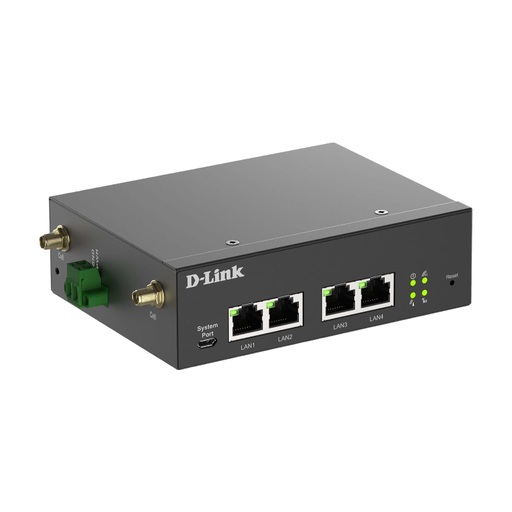
D-Link DWM-314-G mobile router

D-Link DWM-314-G

This industrial option is only suitable if its power supply and design meet your needs.

5G NR; 4G LTE Cat 19; two SIM slots; four Gigabit Ethernet ports; 9–36 V DC input.

View at Joybuy
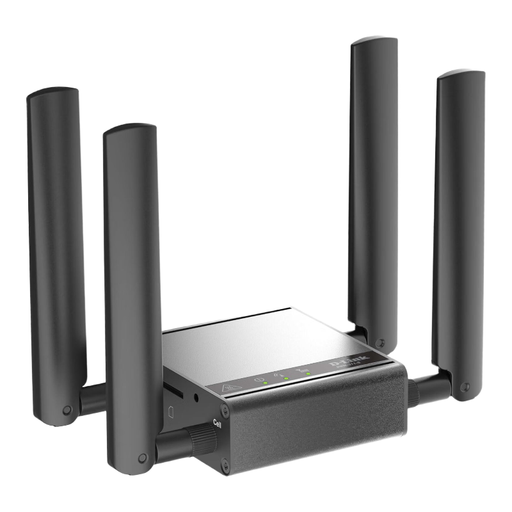
D-Link DWM-311-G mobile router

D-Link DWM-311-G

An industrial M2M model for suitable fixed installations, not necessarily a practical choice for mobile stops.

5G NR; 2.5GbE support; four mobile network SMA antennas. The description states that it is designed for indoor use.

View at Joybuy

TP-Link M7000 mobile 4G LTE Wi-Fi router

TP-Link M7000

An LTE hotspot with a Nano-SIM slot for uploading while travelling and connecting several devices.

Up to 50 Mbps upload; 2000-mAh battery with a stated battery life of up to 8 hours; up to 10 connected devices; 2.4 GHz Wi-Fi. Check the exact model version and its features before buying.

View at Joybuy

Frequently asked questions

How do I set up a hotspot for my first upload?

For a model with a SIM slot, you’ll need an activated SIM and a suitable plan. TP-Link explains how to insert the SIM and switch on the M7000. Then check the connection, connected devices and data usage; setup may vary by model.

Is the stated download speed enough to estimate video upload times?

No. For uploads, the upload speed is what matters. TP-Link states that the M7450 V3 offers up to 50 Mbit/s upload; this is a manufacturer’s maximum, not a guaranteed speed at a stop. Reception and your plan along the route also matter.

What should I consider when it comes to power during a longer stop?

Compare the stated battery life of the specific model with the length of your stop, and plan to recharge if needed. TP-Link notes that the M7000’s battery life varies depending on usage and operating conditions; the product description lists Micro-USB as its power connection.

Do the same roaming terms automatically apply when I cross a border?

No, it depends on your destination and plan. According to the German Federal Network Agency, roam-like-at-home generally applies in the EU, as well as Liechtenstein, Norway and Iceland, if your contract includes roaming; exceptions may apply. Check the terms of your specific plan before crossing the border.

Does a new German prepaid SIM need to be verified before use?

Yes. According to the German Federal Network Agency, providers must verify the subscriber details they collect against an identity document before activating a prepaid SIM. This applies to activating the SIM, not to choosing a particular hotspot model.