Photographers who upload regularly
If you upload large batches of photos at several stops, plan for signal strength, usable upload speeds and data allowance along your route.


A smartphone hotspot may be enough for occasional uploads from one device. For longer uploads or several devices, a mobile router is worth considering. What matters most is the signal at your stops and a suitable data plan – advertised peak speeds won’t tell you how quickly your photos will actually upload there.
If you upload large batches of photos at several stops, plan for signal strength, usable upload speeds and data allowance along your route.
If you want to use the same mobile connection for your laptop and smartphone, compare the number of devices you need to connect and check the power supply and SIM plan.
If you’ll be travelling outside Germany, check plan usage and roaming conditions for every destination.
Suitable if: You only upload occasionally from a few devices and your existing plan has enough data.
Consider: Using your phone as a hotspot for long periods puts a strain on its battery, as reported in the F.A.Z. Kaufkompass practical test.
Suitable if: You regularly upload from a laptop or several devices and want a dedicated mobile connection.
Consider: A separate device needs power and may require its own plan. LTE or 5G only helps if the network and plan are suitable at your stops.
| What matters | What to check before buying | Who is this important to? |
|---|---|---|
| Signal and upload | Mobile network coverage and upload information at your planned stops; download and Wi-Fi figures are no substitute. | If I want to upload photos at several stops, I need a connection that’s actually available there. Around 36% of consumers prioritise signal and usable upload speeds. |
| Data allowance and plan | Estimate your upload needs based on your own files, and check the data limit, speed restrictions and conditions for every country you’ll visit. | If I regularly upload large batches or cross borders, I want to understand the data allowance and plan conditions in advance. Around 29% of consumers focus primarily on data allowance and plan costs. |
| Battery and power supply | Match the model’s stated battery life, charging port and available power source to how you plan to use it. | If an upload stop away from a power socket takes a while, I want to know how I’ll power my router and devices. Around 21% of consumers cite battery life and power supply as their main concern. |
| Several devices | Count the devices you need to connect at the same time and check Wi-Fi compatibility; all devices will still share the same mobile connection. | If I want my laptop and smartphone online at the same time, I need enough compatible connections. Around 14% of consumers prioritise using several devices. |
Uploads depend on the mobile network connection available to you. Signal and performance can vary with your location and network congestion.
Check mobile upload figures separately from Wi-Fi and download speeds, and, if possible, test the connection at the stops where you plan to upload.
A router doesn’t replace the data allowance you need or the need to check roaming and data bundle conditions.
Estimate your needs based on your own files, then check your plan, data limit and destination countries before you travel.
Actual battery life depends on factors including usage and the number of connected devices. TP-Link highlights these variations for the M7200.
Plan how you’ll charge the device and check the port on the specific model.
The M7200 and M7650 are LTE hotspots designed for different device requirements.
The Nighthawk M3 (MH3150) is a 5G option with a battery, for travellers checking whether a suitable 5G plan and support for several devices meet their needs.
The Mudi V2 (GL-E750V2) is an LTE travel router with VPN features, for buyers who want to set up and use these functions.
According to the provider, the G4 Pro combines Cloud SIM data bundles with a Nano-SIM slot.
The following Joybuy products include mobile hotspots and mobile routers. If you’ll be stopping somewhere without a power socket, pay particular attention to the power supply each model needs.
 No image available
Consider this model if you’re looking for a 4G LTE router with a Nano-SIM and USB-C power supply.
The product name lists Cat 6, Wi-Fi 6, Gigabit LAN and USB-C power supply. For mobile use, you’ll need a suitable USB-C power source.
 No image available
This mobile hotspot is an option if you want to use a Nano-SIM connection for several devices while travelling.
The product name lists 150 Mbps, a Nano-SIM slot and a 2200mAh battery.
 No image available
Consider this model if you’re looking for a battery-powered mobile router for your laptop and smartphone.
The product name lists upload speeds of up to 50 Mbit/s, download speeds of up to 150 Mbps and a 2000mAh battery. Battery life is listed as up to 8 hours.
 No image available
This LTE modem router is worth considering if a suitable power socket is available at your upload stop.
The product name lists Wi-Fi 6, dual-band Wi-Fi and Gigabit Ethernet. According to the device specifications, the power adapter needs to be plugged into a suitable socket.
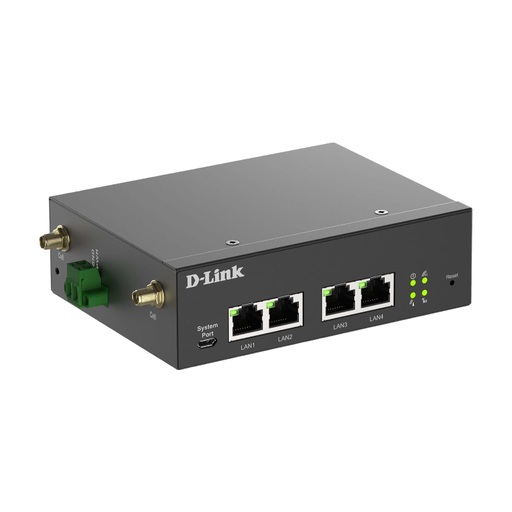 No image available
This model is better suited to a planned gateway installation than a straightforward hotspot to carry with you.
The device specifications describe an Ethernet set-up and wall or DIN-rail mounting.
Check mobile network coverage along your route and, if possible, test the connection where you plan to upload. The Bundesnetzagentur notes that signal and performance depend on factors including location, contract, device and network congestion. Its Mobilfunk-Check app is also available for mobile connections.
A smartphone hotspot may be enough for occasional uploads from a few devices, provided your plan and signal are suitable. For longer upload sessions or several devices, a dedicated router may be an alternative. Bear in mind that it’s an extra device to power and may need a separate plan.
No. A quoted peak speed doesn’t guarantee a particular speed at your stop. Mobile network coverage and congestion there also matter; don’t compare mobile upload figures with Wi-Fi or download speeds.
For temporary trips to countries covered by EU roaming rules, roaming at domestic prices generally applies, subject to fair-use rules. The Bundesnetzagentur recommends checking the conditions of your specific contract and each destination. These rules don’t apply across the board to non-EU countries.
Check your usage with your plan provider and compare it with your plan’s data limit. TP-Link also lists a usage display and data limit on the M7650; check as well that the uploaded photos have arrived in the service you’re using.