If you want as much peripheral vision as possible when practising virtual pit entries, three matching monitors are a good option, provided you have the space and the right mounts and graphics outputs. A single ultrawide can simplify your setup, but it won’t give you the same triple-screen geometry; compare the field of view in your simulation. A pit limiter won’t replace braking before the pit lane, as iRacing Support makes clear.
Which setup is right for you?
Triple-screen rig with a focus on peripheral vision
If you want to keep an eye on the trackside and traffic alongside the pit entry, position three displays to suit your seating distance and viewing angle. iRacing Support recommends taking your seating position and display widths into account during setup.
Sim racers with limited GPU performance
If clear, readable displays matter to you, check the resolution and refresh rate against the simulation you actually use and your PC. Don’t assume the monitor’s Hz rating is the same as the frame rate your game will achieve.
A setup for limited space
If rig width, mounts or graphics outputs are limited, check these first and consider a single ultrawide too. For iRacing, the manufacturer describes separate methods for triple-screen use and recommends factoring in your seating position and screen dimensions.
What should you consider when buying?
Three monitors
Best if: you want peripheral vision on a fixed rig and have the space and connections for three displays.
Things to consider: Mounts, cables and settings all need to work across the three displays. For AMD Eyefinity, iRacing Support recommends setting the same resolution on each display. Matching models are recommended, but not essential.
A single ultrawide
Best if: you want to save space and simplify setup, and don’t need separate, angled side views.
Things to consider: A single screen won’t automatically provide the same peripheral view as a correctly configured triple-screen setup. Compare the field of view in your simulation.
| Priority |
What to check before buying |
Who considers this important? |
| Peripheral vision |
Check your seating distance, display width including bezels, and the side angles your rig can accommodate. |
If I want to see the trackside and traffic to the side as I enter the pits, the screen arrangement needs to suit my seating position. Around 36% of consumers put this peripheral view first. |
| Readable displays |
Check the resolution of all displays and the refresh rate supported by the connection you’ll use against your PC’s performance in the simulation. |
If I want to read speed and warning displays clearly without assuming a frame rate my PC can’t reach, the combination matters. Around 29% of consumers prioritise graphics performance and readability. |
| Mounting and connections |
Check the VESA size and mount capacity, as well as the number and modes of your graphics card’s outputs. |
If space on my rig is limited, or I need to make sure mounts and outputs will work together, I want to plan the connections and mounting early. Around 21% of consumers prioritise setup. |
| Overall cost and running costs |
Consider the planned number of displays and any mounts you’ll need together; use the labels for the specific models to compare energy use. |
If I want to keep track of the cost and running costs of the complete setup, comparing individual monitors isn’t enough. Around 14% of consumers put overall cost first. |
Common buying mistakes
-
Mixing three different monitor sizes based on connections alone
According to iRacing Support, displays of different sizes can be harder to align neatly in an Eyefinity setup.
Before buying, compare the size and selectable resolution of all three monitors. iRacing Support recommends matching models, but says this isn’t essential.
-
Choosing the highest Hz rating without checking the resolution and connection
LG and Dell list different maximum refresh rates for specific monitors, depending on the resolution or connection used.
Always check the stated combination of resolution, refresh rate and the connection you actually plan to use.
-
Planning a triple-screen setup around the displays alone
As well as the monitors, you may need suitable mounts and cables for the complete setup. The European Commission rates electronic displays on an energy-efficiency scale from A to G.
Plan your complete shopping list and compare the energy labels for the specific monitors.
-
Assuming a pit limiter means you don’t need to brake
iRacing Support points out that the pit limiter won’t slow the car down for you.
Use the displays and field of view to practise, but brake yourself before the pit lane line and check the rules for your simulation.
Key brands at a glance
MSI
The MAG and MPG ranges include a variety of QHD models. Compare the exact model with your planned setup.
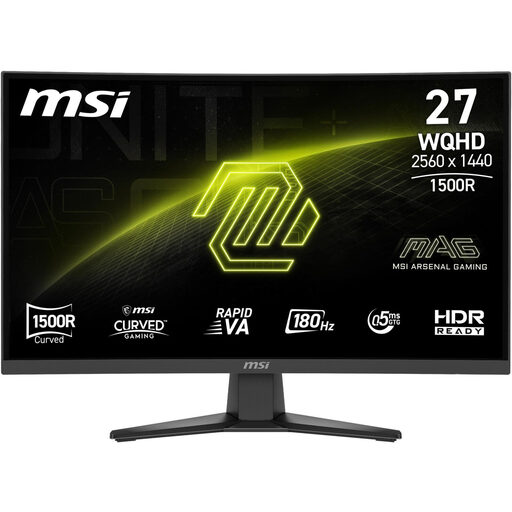
- MSI lists a resolution of 2560 × 1440 pixels, 180 Hz and 1500R curvature for the MAG 275CQFDE E18.
- MSI lists QHD and 360 Hz for the MPG 271QRXDE QD-OLED. This monitor specification doesn’t tell you what frame rate your gaming PC will achieve.
LG
UltraGear includes QHD IPS and QHD OLED models; the specific version is important when comparing them.
- LG lists up to 540 Hz at QHD and up to 720 Hz at HD for the 27GX790B-B.
- These figures apply to different resolutions, so they aren’t directly comparable.
Samsung
The Odyssey G81SF is a 4K UHD OLED option for buyers considering a high-resolution display.
- For the German version, LS27FG814SUXEN, Samsung lists 4K UHD and 240 Hz.
- With three 4K displays, the total number of pixels needs to match your PC’s performance and the simulation you use.
Dell
The G series includes the G2725D, a good example of a flat 27-inch QHD Fast IPS monitor.
- Dell lists up to 180 Hz at QHD over DisplayPort and up to 144 Hz over HDMI for the G2725D.
- The maximum refresh rate for this model depends on the connection you use.
Joybuy monitors for a triple-screen setup
This selection from Joybuy includes 27-inch QHD gaming monitors you can compare as options for a triple-screen setup. Before buying, check that the resolution and connections work with your other displays and graphics card.
 No image available
TCL 27P2A Pro
Compare the stated size and resolution with the other displays in your planned setup.
27 inches; QHD (2560 × 1440); Mini-LED; HFS-IPS panel; 320 Hz.
View at Joybuy
 No image available
Gigabyte GS27QCA
The curved design is an option to compare if you want to align three displays on your rig.
27 inches; QHD; curved; 180 Hz.
View at Joybuy
 No image available
INNOCN 2751S PLUS
The QHD resolution and stated size are useful points of comparison for a group of three displays.
27 inches; QHD; Mini-LED with 1152 zones; IPS; 275 Hz.
View at Joybuy
 No image available
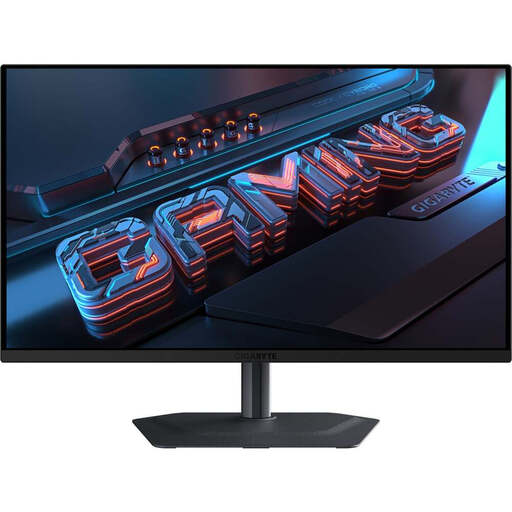
GIGABYTE MO27Q2A
The QD-OLED panel is a specific feature to compare when putting together a multi-display setup.
27 inches; QHD (2560 × 1440); QD-OLED; 240 Hz.
View at Joybuy
 No image available
MSI MAG 275CQFDE E18
Compare the curved design with the distances and angles your rig can accommodate.
27 inches; QHD (2560 × 1440); Rapid VA panel; 180 Hz; 1500R.
View at Joybuy
Frequently asked questions
How do you set up three monitors for iRacing?
iRacing describes using a game window stretched across three displays, or combining them into one screen with NVIDIA Surround or AMD Eyefinity. Connect the monitors to the dedicated graphics card you intend to use, then measure your seating distance, display widths and side angles so you can enter the values in iRacing.
Can a fast monitor alone stop you entering the pits too fast?
No, a fast monitor won’t brake the car. iRacing Support explains that neither the manual pit limiter nor the automatic one available in certain session conditions will brake for you. Make sure you slow down sufficiently before entering.
What running costs and rights should you consider when buying in Germany?
Compare the energy labels for the specific monitors rather than estimating energy use from screen size alone. The EU’s Your Europe website explains that consumer purchases come with a minimum legal guarantee of two years from receipt; an additional manufacturer’s warranty doesn’t replace it.
Can you put an old monitor in your household rubbish?
No. The German Environment Agency points out that waste electrical equipment must be collected separately in Germany. This includes municipal recycling centres and suitable take-back points at retailers.
Do gaming monitors in Germany have an energy label?
Yes. The European Commission includes computer monitors within the scope of EU energy labelling for electronic displays. The label uses a scale from A to G; the information for the specific model is what matters when comparing products.


