Sofa gamers who use a mouse
If you play from the sofa, you’ll need a stable surface for your mouse as well as your keyboard. Corsair offers the K63 Wireless Lapboard as a model-specific solution for the K63 Wireless.


For turn-based strategy games on a big screen, where you play makes all the difference. On the sofa, you’ll need a suitable wireless connection and a stable surface for your mouse and keyboard; at a desk, a wired model may be a good fit. Choose a layout with the keys you need to reach directly, and check compatibility and what’s included if you’re considering a lapboard.
If you play from the sofa, you’ll need a stable surface for your mouse as well as your keyboard. Corsair offers the K63 Wireless Lapboard as a model-specific solution for the K63 Wireless.
If you want to access in-game commands without frequently relying on secondary key functions, choose a layout that gives you direct access to the arrow, function and number keys you actually need. Corsair and ASUS ROG offer different layout sizes and key arrangements.
At a desk, you can choose between wired and wireless to suit your setup and available space. ASUS ROG describes wireless connection options, while Logitech G offers gaming keyboards in different sizes, with wired and wireless connections and a German layout.
First decide whether you’ll be playing from the sofa or at a desk. Then choose a connection and layout to suit your PC and the keys you need.
| What matters | What to look for | Who is this important to? |
|---|---|---|
| Connection and distance from the PC | Check which connections your PC supports and whether the wireless receiver you need is included. | When I play from the sofa, I want a connection that works with my PC without a cable restricting where I can sit. Around 33% of consumers put connection and distance first. |
| In-game commands within easy reach | Compare the specific key layout with the commands you use in your games, and check which version you’re buying. | If I often use the arrow, function or number keys directly, I don’t want to keep switching to secondary key functions. Around 27% of consumers prioritise having in-game commands within easy reach. |
| Space for your keyboard and mouse | Measure the space available and check the compatibility, weight and included items for any lapboard or tray. | On the sofa, I want to use my mouse and keyboard together on a stable surface. Around 27% of consumers prioritise having enough space to use their devices. |
| Typing noise and ongoing upkeep | Check the switch type and charging connection. If possible, listen to the typing noise on the exact version you’re considering. | When I play in a shared room, I consider typing noise and how often the keyboard needs charging. Around 13% of consumers put noise and ongoing upkeep first. |
A wireless connection won’t give you a stable surface for your mouse. Corsair notes that the keyboard and mouse are sold separately with the K63 Wireless Lapboard.
Before you buy, check what’s included, the dimensions and the stated keyboard compatibility.
A 75% or 96% layout doesn’t tell you on its own whether the in-game commands you use most are within easy reach.
Compare the keys you use in your games with a layout diagram or an image of the exact version.
ROG Strix Scope II 96 Wireless and ROG STRIX SCOPE II X CH are different model names. The brand name alone doesn’t prove that their specifications are the same.
Check the full model name and exact version instead of choosing based only on “ROG Strix Scope II”.
The K65 PLUS WIRELESS (DE) is an example of a compact wireless model, while the K63 Wireless Lapboard is a separate, explicitly model-specific sofa solution.
The ROG Strix Scope II 96 Wireless is a comparison model for anyone looking to combine wireless connectivity with a number pad.
The BlackWidow V4 Tenkeyless HyperSpeed is a wireless option without a number pad, for anyone who values customisation.
The German manufacturer’s range includes gaming keyboards in different sizes, with wired and wireless connections.
The Joybuy models below include wired keyboards for a fixed setup, as well as compact options with wireless and/or wired connections. Check the layout of the exact version, especially if you need a German keyboard layout.
 No image available
An option for a fixed setup where a cable to your PC works for you.
Full-size layout with German QWERTZ; CHERRY MX2A Red switches.
 No image available
A compact option if you want to switch between wireless and wired connections to suit your setup.
75% layout with 80 keys and ISO-DE; Bluetooth, 2.4 GHz wireless and USB-C are listed.
Hot-swappable; the model name lists 8000 mAh.
 No image available
A compact option for anyone looking for an ISO-DE layout and multiple connection options.
Bluetooth, 2.4 GHz wireless and USB-C are listed; the model name specifies V3 Pro Cream Yellow switches and hot-swappable RGB.
 No image available
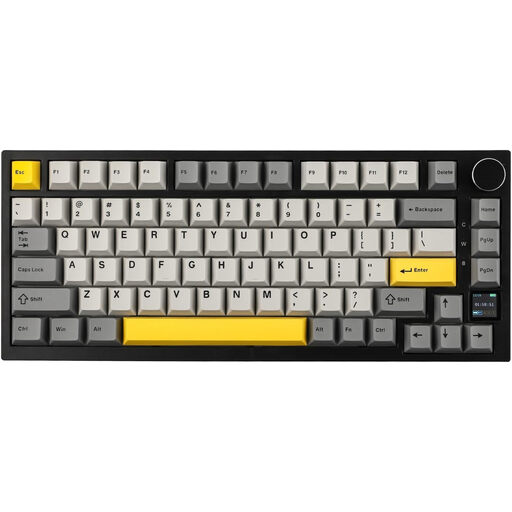
Before buying, check that the stated US layout suits the key arrangement you need.
75% layout; Bluetooth, 2.4 GHz wireless and USB-C are listed. The model name specifies a TFT display and hot-swappable switches.
 No image available
A compact option if you’re looking for a German layout and multiple connection options.
The model name lists Bluetooth, 2.4 GHz wireless and USB-C, as well as hot-swappable switches, RGB and PBT keycaps.
Not just because of the genre. Choose based on your distance from the screen, the connections supported by your PC and the keys you need. A manufacturer’s wireless specifications don’t prove that your game requires a particular latency.
No. Corsair explicitly lists the K63 Wireless as the compatible keyboard; the keyboard and mouse are sold separately.
Use a connection method supported by both the specific keyboard model and your PC. ASUS lists USB, Bluetooth and 2.4 GHz wireless for the ROG Strix Scope II 96 Wireless. Then check that your in-game commands are assigned to the keys you want.
For consumer purchases in the EU, the seller is generally responsible for legal guarantees against faults for at least two years. Online purchases also generally come with a 14-day right to cancel. These statutory rights are separate from any voluntary manufacturer’s warranty. The European Union’s Your Europe website explains these rules.