If several people sit to the side of the TV, check the specific model’s horizontal viewing angle before buying. OLED may be a good fit, as may an LCD model with a demonstrably wide viewing angle. Also compare your own video files, reflections in the room where you plan to place the TV, and screen size with your viewing distance and available space. A position in CHIP’s TV best-buy list does not, on its own, prove that a model has a wide viewing angle or is compatible with your files.
Which features matter to you?
Families with a wide seating arrangement
If you watch from the sofa and seats to the side at the same time, faces and colours should remain clear even when you’re not sitting directly in front of the screen. RTINGS highlights wide viewing angles as important for wider seating arrangements.
Families with their own video collection
If you play recordings from USB storage devices or external players, check the file system, video codec and connection against the files you already have. Sony UK lists playback details for individual models.
Families with a bright living room
If you watch during the day, assess the picture from the side seats as well as checking for reflections and the effect of the room’s lighting. RTINGS and Samsung UK cover viewing angles and anti-reflective screens as model-specific features.
What should you look for when buying?
OLED TVs
A good fit if:You’ll use lots of side seats and want a picture that looks as consistent as possible across the group. Still, check the viewing angle and reflections for the specific model.
Things to consider:If photos, menus or other static images are displayed for long periods, bear in mind the possibility of image retention. LG highlights this type of use.
IPS LCD TVs
A good fit if:Side seating matters and you’re considering a specific LCD model with a wide viewing angle.
Things to consider:In the comparison described by RTINGS, IPS typically offers wider viewing angles than VA, but lower contrast. The performance of the specific TV is what matters.
VA or Mini-LED LCD TVs
A good fit if:You’ll mainly watch from directly in front, or a bright room is a major factor in your choice. Even so, check the picture from the seats at either end.
Things to consider:According to RTINGS, VA LCDs generally have narrower viewing angles. Mini-LED describes a type of backlighting and, by itself, does not prove that a TV has a wide viewing angle.
| Priority |
What to check before buying |
Who is it most important to? |
| Picture from the side |
Check horizontal viewing angle measurements and how the picture looks from the seats at either end. |
If several family members sit to the side, I want to make out faces and colours even when I’m not in the centre of the screen. This is a priority for around 36% of consumers who consider viewing angle most important. |
| Your own video files |
Check the file system, video codec and audio track against the exact model; distinguish between USB playback and external playback devices. |
If I play my own family recordings, I want to know in advance whether they’ll work on the TV. Around 29% of consumers put playback of their existing recordings first. |
| Daylight and reflections |
Assess reflections and picture quality together, under the lighting conditions where you’ll actually place the TV. |
If lots of daylight falls on the screen in my living room, I still want to be able to see my recordings clearly. Around 21% of consumers prioritise using a TV in a bright room. |
| Size and power consumption |
Consider your viewing distance and available space; if models are a similar size, compare their figures on the EU energy labels. |
If available space and ongoing electricity use are deciding factors for me, I want to choose a screen size that fits. This is the main priority for around 14% of consumers. |
Common buying mistakes
-
Choosing based only on OLED, QLED or Mini-LED
Technology labels don’t tell you everything about how the picture will look from the seats at either end. Mini-LED describes a type of backlighting and doesn’t guarantee a wide viewing angle.
Compare independent measurements for the specific model, or watch the same video from several seating positions.
-
Assuming a USB port means universal video compatibility
Supported file systems and codecs vary by model and recording. Even support for a particular format doesn’t guarantee that every individual file will play.
Before buying, check several representative files, including their audio tracks, against the specifications for the exact model.
If your recordings don’t play directly, you may need an additional compatible playback device.
-
Not checking size and energy use together
The Verbraucherzentrale notes that larger TVs generally use more electricity.
Measure your viewing distance and available space, then compare the energy consumption figures on the EU energy labels for models of a suitable size.
Key brands at a glance
LG
OLED models such as the OLED55C6ELB are worth considering when comparing TVs for wider seating arrangements.
- For the OLED55C6ELB, LG specifies a low-reflection 4K OLED display and Dolby Vision.
- The manufacturer’s claim is not an independent viewing angle measurement. LG also notes that image retention can occur if static images are displayed for extended periods.
Samsung
The GQ77S95FATXZG and GQ65S99HATXZG models can be included when comparing OLED TVs with anti-reflective screens.
- Samsung promotes Glare-Free or low-reflection picture quality on these specific models.
- This manufacturer’s claim proves neither that the two models have identical viewing angles nor that every Samsung LCD is suitable for side seating.
Sony
Details of USB ports and playback of your own videos are documented for the BRAVIA OLED K-55XR8M2.
- Sony UK lists FAT16, FAT32, exFAT and NTFS file systems, as well as MPEG1 and MPEG2PS among others, for this model.
- A listed format doesn’t guarantee that every individual recording will play, and the specifications page does not give a numerical viewing angle.
Philips
The 55OLED810/12 combines OLED with Ambilight as an additional feature for watching videos together.
- Philips promotes picture quality that holds up when viewed from different angles.
- This is a manufacturer’s claim, not an independent viewing angle measurement. Ambilight is no substitute for checking reflections or confirming video format compatibility.
Panasonic
The TV-55Z95BEG is another model to consider when comparing OLED TVs with Fire TV.
- Panasonic specifies OLED and Fire TV for this particular model.
- These features alone do not prove a particular viewing angle or guarantee availability from individual retailers.
Joybuy TVs for side seating
The following OLED TVs may suit families with side seating. Check the viewing angle of each model and compare your video files with its playback specifications before buying.
 No image available
LG OLED evo AI 4K Smart TV, 83-inch (OLED83C67LA)
As an OLED model, this TV is worth considering for a wide seating arrangement. Even so, check how the picture looks from the seats at either end.
83-inch, 4K and Dolby Vision HDR; model: OLED83C67LA.
A wall mount must be purchased separately; the specified VESA size is 400 × 400 mm.
Joybuy
 No image available
LG OLED55B68LA, 55-inch OLED 4K Smart TV
As an OLED model, this TV is one option for a wide seating arrangement. Check the viewing angle on the specific set.
55-inch, 4K and Dolby Vision; model: OLED55B68LA.
Joybuy
 No image available
LG OLED77C67LA, 77-inch OLED 4K Smart TV
As an OLED model, this TV may suit a wide seating arrangement. Check the viewing angle and whether its size suits your room and viewing distance.
77-inch, 4K, 120 Hz, webOS and energy rating D; model year 2026.
A wall mount must be purchased separately; the specified VESA size is 300 × 200 mm.
Joybuy
 No image available
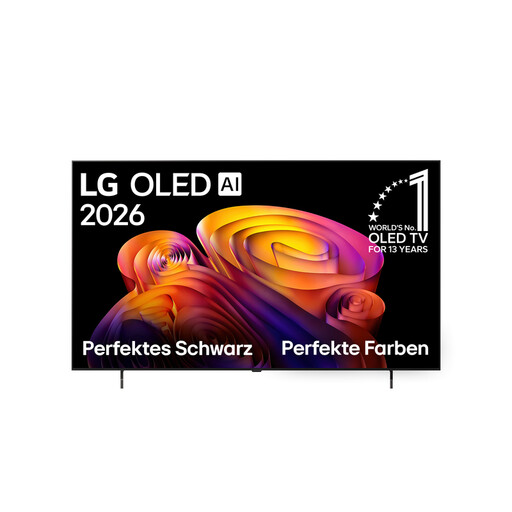
LG OLED65B68LA, 65-inch OLED 4K Smart TV
As an OLED model, this TV is worth considering for a wide seating arrangement. Compare how the picture looks from the side seats.
65-inch, 4K, Dolby Vision and Dolby Atmos; model: OLED65B68LA.
Joybuy
 No image available
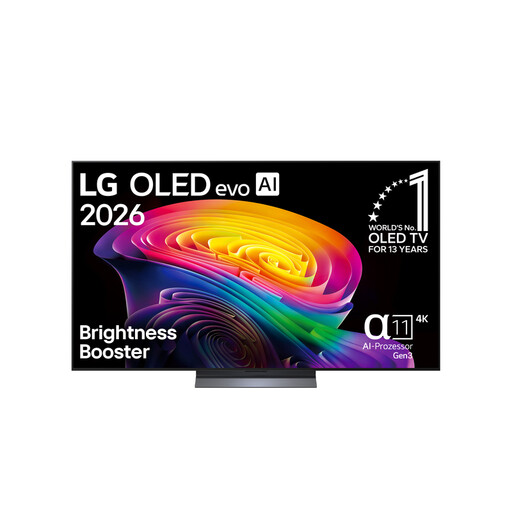
LG OLED65C67LA, 65-inch OLED evo 4K TV
As an OLED model, this TV could be a good choice for side seating. Check the viewing angle of the specific set.
65-inch, 4K, 120 Hz, Dolby Vision and Dolby Atmos; model: OLED65C67LA.
A wall mount must be purchased separately; the specified VESA size is 300 × 200 mm.
Joybuy
Frequently asked questions
Is a USB port enough to play my family videos?
No. Check a sample file and the storage device against the specifications for the exact model. Sony lists supported file systems and playback codecs for the K-55XR8M2; even support for a particular format doesn’t guarantee that every file will play.
Where should I position the TV for several side seats?
Position the TV facing the seating area as closely as possible, then assess the picture from the seat furthest to the side. Independent viewing angle tests look at changes when viewing the screen horizontally; also check whether windows or lights are reflected on the screen.
What should I bear in mind when displaying photos for a long time on an OLED TV?
Avoid leaving still images on screen for longer than necessary. LG describes the possibility of image retention during extended static display and mentions protective features; this should not be taken to mean that all risk is eliminated.


