People testing collisions in motion
If you repeatedly watch fast-moving scenes, you can follow the preview on one screen and keep your editor or log open on the other. You can configure multiple displays in Windows (Microsoft Support).


For fast-moving collision sequences that you follow visually, a QHD monitor with a higher refresh rate is an obvious choice. For fine geometry and lots of code, a 4K model may be better suited to your testing work. What matters is whether your computer can drive both displays at your chosen resolutions and frame rates, and whether the layout suits your testing workflow. A high refresh rate does not prove that a simulation is accurate or that your testing software is suitable.
If you repeatedly watch fast-moving scenes, you can follow the preview on one screen and keep your editor or log open on the other. You can configure multiple displays in Windows (Microsoft Support).
If you check geometry or rendering while keeping code or diagnostic data open alongside it, resolution and readable text scaling both matter. Microsoft Support notes that text may look blurry at a resolution lower than the native one.
If you’re adding a screen to your existing set-up, check the connection type, desk space and position of the second device against your current arrangement. EIZO describes a multi-monitor USB-C function for the FlexScan EV2490, which requires a compatible signal path.
When choosing a monitor for collision testing, consider whether you mainly need to follow movement, check detail and text, connect a second screen, or make the most of your space while keeping running costs in mind.
| What matters | What should you look for? | Who is this most important to? |
|---|---|---|
| Moving sequences | Check the refresh rate and resolution of the specific model, then confirm which display mode is actually available through the connection you plan to use. | If I want to follow fast-moving collision scenes visually, motion handling matters to me. Around 36% of consumers put it first. |
| Detail and text | Check the native resolution, screen size and readable text scaling together in your own development environment. | If I need to assess small geometries and code side by side, a clear, readable detailed view matters to me. Around 29% of consumers prioritise detail and screen space for text. |
| Connecting a second screen | Check the connections on your computer and monitor, along with the cable or any possible daisy-chain set-up. Then configure the display settings to suit your layout. | If I’m adding a second screen, I want to be sure my computer and connection set-up will support the layout I have in mind. Around 21% of consumers put connecting a second screen first. |
| Space and running costs | Check the space available and adjustment options for both devices; compare the energy label and product data sheets for the specific models. | If space is limited at my desk or I’m keeping running costs in mind, dimensions and energy use are key for me. Around 14% of consumers prioritise space and manageable running costs. |
The refresh rate describes a display feature of the monitor, not the quality of the collision calculations.
Choose a refresh rate that suits the visual preview you need, and check the collision results separately using the relevant data or tests in your application.
The monitor’s features alone don’t determine which video signals your computer can output.
Check your computer, cables and both signal paths before buying. Depending on your system, you may need an additional compatible connection or adapter.
The ASUS and BenQ 4K models described here are specified at 60 Hz. Text scaling also affects how you can arrange code and previews in everyday use.
Compare what you’ll use each display for and check whether text is easy for you to read at the native resolution.
The S2725DSM is a QHD option for displaying movement. Dell lists this model as 27 inches, 2560 × 1440 and 144 Hz.
The UltraGear 27GP850P-B is another QHD option for previewing moving sequences.
The ProArt PA279CRV combines a 27-inch 4K display with several video connections, making it worth considering for detailed checks.
The RD320UA is a larger 4K option for extensive code and diagnostic views.
The FlexScan EV2490 is a compact second monitor with features for multi-monitor workstations.
This selection from Joybuy includes QHD monitors for a two-screen set-up, with a range of refresh rates and connection options.
 No image available
Can be used as a QHD display for visually monitoring moving scenes.
2560 × 1440; 144 Hz; height-adjustable stand; DisplayPort and HDMI.
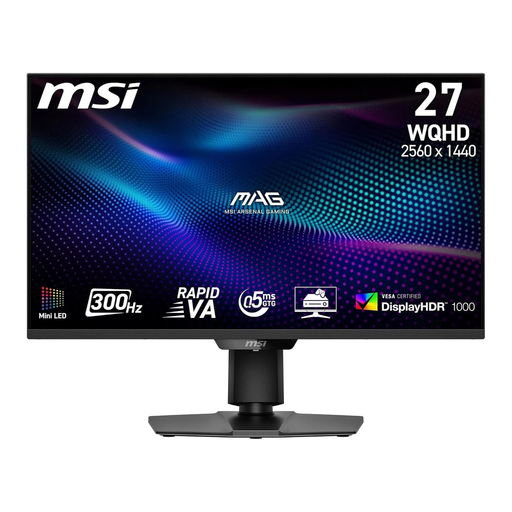 No image available
Its stated WQHD resolution and refresh rate may be useful for displaying movement on one screen.
2560 × 1440; 300 Hz; HDMI 2.1 and DisplayPort 1.4a; height-adjustable stand.
 No image available
Can be used as a QHD display in a two-screen set-up. Check the refresh rate your computer can output through the connection you plan to use.
2560 × 1440; 240 Hz, 275 Hz in overclocking mode; HDMI 2.0 and DisplayPort 1.4; height-adjustable stand.
 No image available
The QHD resolution can be used for a development view on one of your two screens.
2560 × 1440; 200 Hz, 210 Hz in overclocking mode; height-adjustable stand.
 No image available
Its connection features may suit a multi-monitor workstation. Check compatibility with your computer and the signal path you plan to use.
2560 × 1440; 100 Hz; USB-C with 98 W Power Delivery; daisy-chaining and KVM.
No, choose them according to what you’ll use each display for. In Windows, you can configure detected screens individually and arrange them to match their actual positions. Check that your computer can output the combination you want.
In Windows display settings, arrange the numbered screens to match their actual positions on your desk. Use the ‘Identify’ function to tell them apart, then test how the mouse pointer moves between them.
No, the Hz figure describes a feature of the monitor’s display. You’ll need to use the appropriate test procedure to check whether your application calculates and records collisions correctly.
Compare the EU energy label and product data sheets for the specific models. For a meaningful cost comparison, you’ll also need to factor in how long you use them.
For eligible online purchases from a trader, you generally have a 14-day right to cancel from the date of delivery; statutory exceptions and any return costs should also be taken into account (Your Europe, European Union). Monitors covered by the rules must also carry the EU energy label. ASR A6 applies to screen work within its relevant scope, not automatically to every home desk.