If you’re checking posters for a specific print process, prioritise a primary monitor with suitable colour management and a reliable calibration process; your second screen can be used for tools and references. For layout details or a straightforward laptop setup, resolution, legible scaling, ports and desk space matter more. A large quoted colour gamut alone doesn’t guarantee a match with the final print.
Who is a two-monitor setup suitable for?
Posters for print
If you’re checking posters for a specific print workflow, you’ll need a suitably configured primary screen. Adobe explains the CMYK process printing used for posters, while PRAD recommends choosing a monitor to suit your particular workflow.
Detail-focused designers
If you’re checking type, edges and image details, you can keep tools or references on your second screen. Make sure your design software remains legible at your chosen scaling setting.
Designers using a laptop
If you want to connect two displays to a laptop, important things to consider include compatible video ports, charging power if needed, and the space available. Also check that your specific computer supports both displays.
What to look for when choosing
First decide whether your primary monitor needs to help you assess print colours or mainly show layout details. Then check the resolution, signal path and space available for both displays.
| What you need |
What to check before buying |
Who it matters most to |
| Colours for poster printing |
Colour modes and calibration method for the exact model; printer requirements and the profile or proofing workflow. |
If I’m assessing colours for a specific print process, I need a suitably configured primary monitor. Around 33% of consumers put print colours first. |
| Type and image details |
Screen size and native resolution; how legible your design software is at the scaling setting you plan to use. |
If I’m checking fine type and edges, I want to be able to read the workspace clearly at my chosen scaling setting. Detail checking is the main priority for around 25% of consumers. |
| Connecting two screens |
The computer’s video outputs and display support; signal path, ports and required charging power. |
If I want to connect my laptop to both displays, the computer must actually support the intended signal path. Around 25% of consumers prioritise ports. |
| Space for both displays |
Width and depth with the stands fitted; height adjustment, swivel and, if needed, the mounting points on the specific model. |
If I want two displays on my desk, I need to know in advance how much room they’ll take up, including their stands. Around 17% of consumers pay particular attention to positioning. |
Common buying misconceptions
-
Assuming Adobe RGB coverage guarantees suitable poster colours
A quoted colour gamut alone doesn’t tell you whether the screen can accurately show the conditions of the final print.
Start with the printer’s output requirements, then consider the monitor, calibration and file output as parts of the same workflow.
Depending on your workflow, you may also need measurement equipment and time for setup and proofing.
-
Assuming USB-C on a monitor means a two-display setup will work
The connection also depends on which video signals your computer can output and how many displays it can drive.
Before buying, check the ports and display support of every device involved.
You may need a compatible cable or dock for the signal path you plan to use.
-
Ordering two monitors without measuring your desk space
The width of the monitors and their stands will determine whether your chosen arrangement will actually fit on your desk.
Measure the available space and compare it with the dimensions of both monitors, including their stands.
If the stands don’t suit your layout, you may need a suitable mount.
Brands to consider
EIZO
ColorEdge models such as the CG2700X are worth considering for workflows with defined colour modes and hardware calibration.
- EIZO lists a built-in calibration sensor, 4K resolution and an Adobe RGB mode for the CG2700X.
- These model-specific claims don’t replace checking the print conditions or using a suitable profile and proof.
ASUS
The ProArt PA279CRV is a 27-inch 4K option for detail work, with multiple colour modes and laptop connectivity.
- ASUS lists 99% Adobe RGB coverage and USB-C with up to 96 W for this model.
- In PRAD’s test, brightness on the PA279CRV could only be set to 80 cd/m² in sRGB mode; bear this in mind when choosing this mode.
BenQ
The Creative Pro PD2732U is designed for digital and print work, while the PhotoVue SW272U is geared more towards colour checking.
- BenQ lists Adobe RGB and Thunderbolt 4 with 90 W for the PD2732U; PRAD describes hardware calibration and connectivity on the tested SW272U.
- The PD2732U specifications and the SW272U test results relate to different models and can’t be applied interchangeably.
Dell
The UltraSharp U2725QE is a 27-inch 4K hub monitor for a workspace where laptop connectivity and screen space matter.
- Dell specifies 4K resolution, a Thunderbolt hub and an adjustable stand for this model.
- These features don’t prove that, without checking your workflow, the monitor is equivalent to a ColorEdge primary monitor configured for poster printing.
Monitors for two-screen poster design
This selection includes monitors for detailed poster layouts and a range of connectivity and positioning needs when working with a second screen.
 No image available
MSI MAG 274UPDFDE E16M 27-inch UHD Mini-LED monitor
Worth considering as a primary display for detailed poster layouts; check that everything remains legible at your chosen scaling setting.
The product name specifies Rapid IPS, with 160 Hz at UHD and 320 Hz at FHD.
Joybuy
 No image available
MSI PRO MP273UPDE E6 27-inch 4K UHD monitor
A suitable option for checking fine layout details alongside a second screen; factor in legibility at your planned scaling setting when choosing.
The product name specifies IPS, 60 Hz and HDR Ready.
Joybuy
 No image available
INNOCN CB27U1 27-inch 4K UHD monitor
For poster layouts that call for detailed work on the primary display alongside a second screen; check the connection path for your specific computer.
The product name specifies 3840 × 2160 pixels, IPS, 120 Hz, HDR500, FreeSync, USB-C with 90 W, plus PIP and PBP.
Joybuy
 No image available
KTC M27P6 27-inch 4K Mini-LED monitor
Worth considering for a setup with a laptop connection and a second display; check that your computer and monitor support the signal path you plan to use.
The product name specifies 160 Hz at 4K or 320 Hz at FHD, USB-C with 65 W, KVM and a height-adjustable stand.
Joybuy
 No image available
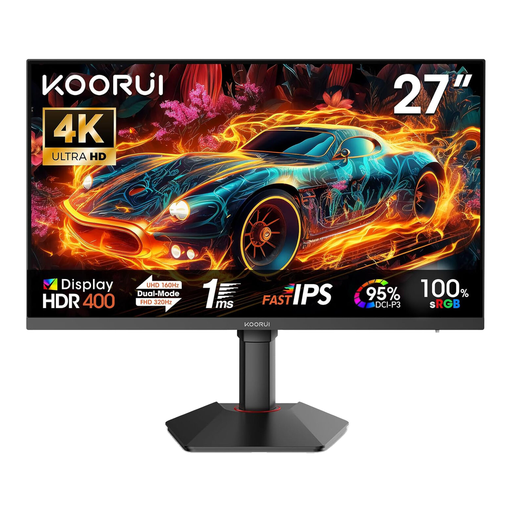
KOORUI G2741L 27-inch 4K UHD monitor
An option for layout work with a second screen; check the stand’s positioning and the ports available for your setup.
The product name specifies Fast IPS, 160 Hz at 4K or 320 Hz at FHD, HDR 400, 1 ms, two HDMI 2.1 ports and DP 1.4.
Joybuy
Frequently asked questions
Do both screens need to show identical colours?
No, not necessarily, if you’re assessing colours on just one configured primary monitor and using the second for tools. If you want both screens to serve as colour references, check their individual settings and your colour management workflow; matching model names alone aren’t enough.
How do I set up two monitors in Windows?
Connect both using supported signal paths, identify the displays in Windows Display settings, then arrange them to match their actual positions. Microsoft Support recommends setting their layout in Display settings; first check that your specific computer or dock supports both displays.
Are PC monitors subject to energy labelling requirements in Germany?
Yes. The European Commission includes computer monitors within the scope of EU energy labelling rules for electronic displays. Compare the energy information for the specific model on its EU energy label.
Can I return a monitor bought online?
For online consumer purchases in Germany, you generally have a 14-day right to withdraw from the purchase after receiving the goods. Check the terms of your specific purchase; statutory rights for faulty goods and a voluntary manufacturer’s warranty are separate matters.


